Homebrew BAGPlug (SCDS2 Entry)

  • Thread starter Thread starter BassAceGold
  • Start date Start date
  • Views Views 149,332
  • Replies Replies 584
  • Likes Likes 4
@Aguilera_87 gracias por el trabajo, y sobre todo por hacerlo tan rápido.

@VatoLoco: Awesome icons/covers like you always do
yaynds.gif
 
Updated to release 2 - 6:
-added ability to create a list of hidden folders using "hiddenfolders.txt" in the /_bagui/ folder. One folder is listed per line with no ending '/'. eg. to hide the "_bagui" folder -> /_bagui
-fixed issue with back paging through a directory and icons not loading properly
-fixed issue where DSGAME would display a blank name when using internal nds file names
-can now set the favorites menu to auto show on boot
-can now set an audio file to play on boot (press select on an audio file)

The first post has also been updated with download links for all the NDS covers thanks to Aguilera_87.
 
Greetings BassAceGold, first of all thanks for developing such a cool menu. The sad thing is that on the 3DS the bottom of both screens look really bad, as if the bottom of the menu is overlapping with itself. The menu is completely functional and loads everything A-OK, but I really don't know how to get rid of that graphical glitch. I changed the skin to see if that would fix it but it remained the same. I don't know if it's fixable or not, but I think is something you should know. Thanks again for the program and good luck in the bounty!
 
Wow!!!, another update in less than one week.
You are a beast programmer BAG. GOOD WORK!!!
grog.gif

You make my DSTwo the best card. I also like very much iMenu and I think is good to have some good programs to choose from.
 
I must admit, first i was sceptic about this but now i love it. It's great to have multiple options within the arg files and the new hiddenfolders.txt works even with subfolders.
But can we have a hiddenfiles.txt too? I made me an ini.arg to load dscovered, but i don't want any ini to be displayed. like the ones in the root or the coverart.ini. And i can think about some more files to be hidden.

As for ARG support, maybe someone with technical knowledge and better english then myself can ask aktive developers to implement this. Like having DSx86 loading *.bat via arg or ikuReader (which i think already has moonshell extlink support).

Anyway it's nice even without arg support to browse any files and be able to load the fitting plugin. I made some arg files, maybe i'll upload them later if someone want me to.

I updated the LEDS2 Skin which now has matching Orange Windows and some more Icons.
http://filetrip.net/f24627-%5BBagPlug%5D-LEDS2-1-01.html
 
luisrodl said:
Greetings BassAceGold, first of all thanks for developing such a cool menu. The sad thing is that on the 3DS the bottom of both screens look really bad, as if the bottom of the menu is overlapping with itself. The menu is completely functional and loads everything A-OK, but I really don't know how to get rid of that graphical glitch. I changed the skin to see if that would fix it but it remained the same. I don't know if it's fixable or not, but I think is something you should know. Thanks again for the program and good luck in the bounty!

I do not have a 3DS so I am not able to test, however you can take a screenshot of the menu with L and R buttons pressed and I may be able to see what is wrong. Maybe if I make it in the top 3 of the bounty (for DSTwo) I'll put what ever winnings towards a 3DS.

Boriar said:
Wow!!!, another update in less than one week.
You are a beast programmer BAG. GOOD WORK!!!
grog.gif

You make my DSTwo the best card. I also like very much iMenu and I think is good to have some good programs to choose from.

The updates aren't really much work or effort. The base of the menu took a good few months to get everything in place which was designed to be expanded on. It also helps that I'm using a flexible library (*cough*libBAG*cough*). So due to the flexible code base it really only takes a few minutes to half an hour to add new content and even less time to fix simple bugs. This of course doesn't take into account the testing time.

QUOTE(2-bias @ Mar 28 2011, 11:41 PM)
I must admit, first i was sceptic about this but now i love it. It's great to have multiple options within the arg files and the new hiddenfolders.txt works even with subfolders.
But can we have a hiddenfiles.txt too? I made me an ini.arg to load dscovered, but i don't want any ini to be displayed. like the ones in the root or the coverart.ini. And i can think about some more files to be hidden.

As for ARG support, maybe someone with technical knowledge and better english then myself can ask aktive developers to implement this. Like having DSx86 loading *.bat via arg or ikuReader (which i think already has moonshell extlink support).

Anyway it's nice even without arg support to browse any files and be able to load the fitting plugin. I made some arg files, maybe i'll upload them later if someone want me to.

I updated the LEDS2 Skin which now has matching Orange Windows and some more Icons.
http://filetrip.net/f24627-%5BBagPlug%5D-LEDS2-1-01.html

hiddenfiles.txt can easily be added and maybe a hiddentypes.txt will be added to hide file types which have .arg files globally.
 
With all this hide stuff, whats with the Show all files Option, if i check it it is unchecked next time and i don't see the point in this option.

I have uploaded a ARG Pack
All files must be in _dstwoplug or the path must be changed.
Also included is a hiddenfolder.txt with some unnecessary folders.

avi = movie.plg
bmp, jpg, png = ireader.plg, moonshell2.nds, dsorganize.nds
dpg = moonshell2.nds
epub, fb2 = ikureader.nds
gb, gbc = lameboy.nds
gba = ndsgba.plg
gen, smd = jenesisds.nds
gg, sms = dsmasterplus.nds
ini = dsorganize.nds
mp3, ogg, wav = INTERNAL, movie.plg, moonshell2.nds, dsorganize.nds
nds = INTERNAL
nes = nesds.nds
pdf = ireader.plg
sfc, smc = catsfc.plg, bagsfc.plg
txt = dsorganize.nds, ikureader.nds
zip = catsfc.plg, bagsfc.plg

Download (filetrip)
 
First, I just want to say WOW, this menu has really impressed me, Good Work!

I have only a few problems:

Pokemon Black & White (USA) don't run right away, it boots to the DSTWO Menu.

GBA, and Gameboy Color Games also don't run right away, they just boot the their respected emulators.


I will end on a good note..... You can add covers for all the NES, SNES, Gameboy and GBA games....along with NDS. Thanks for this!!! Now all we need is a GBA and GBC cover pack!
 
nathancnc said:
GBA, and Gameboy Color Games also don't run right away, they just boot the their respected emulators.


I will end on a good note..... You can add covers for all the NES, SNES, Gameboy and GBA games....along with NDS. Thanks for this!!! Now all we need is a GBA and GBC cover pack!
the only emulators that support arg shortcut loading are CATSFC, BAGSFC, and nesDS.
you must be using args for GBA and GB/C to load the emulator by choosing *.gb/*.gbc/*.gba but since the emulator itself doesn't support the shortcut, it doesn't do anything once it's loaded.
i think it would be better to just add your GBA and GBC emulators (their respective *.nds files) to your favorites by browsing to them and pressing select>favorite.

oh yeah, and bass, have you noticed the format for displaying internal nds names is kinda screwy?
i mean, it shows all three lines as a single string. just wondering if it's possible to fix this.

example:
Game Title
Game Subtitle
Publisher


would be the correct format, but what is displayed is

Game TitleGame SubtitlePublisher

and this leads to text being cut off since the string is too long, even though it wraps.

 
nathancnc said:
GBA, and Gameboy Color Games also don't run right away, they just boot the their respected emulators.
This is normal..... Unfortunately, certain Homebrew don't accept the ARG() commands (Lameboy is one of them) & because of that it can only load in the Emulator & not autoload the game

The only way to get those to work is IF the original developers alter the emulator with the necessary code to accept ARG(). Since some emulators haven't been updated for a while - I'll guess that will never happen
 
nathancnc said:
First, I just want to say WOW, this menu has really impressed me, Good Work!

I have only a few problems:

Pokemon Black & White (USA) don't run right away, it boots to the DSTWO Menu.

GBA, and Gameboy Color Games also don't run right away, they just boot the their respected emulators.


I will end on a good note..... You can add covers for all the NES, SNES, Gameboy and GBA games....along with NDS. Thanks for this!!! Now all we need is a GBA and GBC cover pack!

Any roms that have issues are a problem with the DSTwo firmware and not BAGplug. Once the DSTwo menu is loaded, it is completely up to it to load whatever. You can try using different rom settings in the DSTwo menu to see if it will boot properly the next time you run it - like using patch mode or clean mode


Shabutie78 said:
QUOTE(nathancnc @ Mar 29 2011, 06:07 AM) GBA, and Gameboy Color Games also don't run right away, they just boot the their respected emulators.


I will end on a good note..... You can add covers for all the NES, SNES, Gameboy and GBA games....along with NDS. Thanks for this!!! Now all we need is a GBA and GBC cover pack!
the only emulators that support arg shortcut loading are CATSFC, BAGSFC, and nesDS.
you must be using args for GBA and GB/C to load the emulator by choosing *.gb/*.gbc/*.gba but since the emulator itself doesn't support the shortcut, it doesn't do anything once it's loaded.
i think it would be better to just add your GBA and GBC emulators (their respective *.nds files) to your favorites by browsing to them and pressing select>favorite.

oh yeah, and bass, have you noticed the format for displaying internal nds names is kinda screwy?
i mean, it shows all three lines as a single string. just wondering if it's possible to fix this.

example:
Game Title
Game Subtitle
Publisher


would be the correct format, but what is displayed is

Game TitleGame SubtitlePublisher

and this leads to text being cut off since the string is too long, even though it wraps.

It was intentional to put everything on one line, but I suppose I can fix it up.
 
Double Posting
ohnoes.png


buuut new release is out!

Release 2 - 7:
-added extlink support
-improved internal DS name displaying
-removed the show all files option in settings
-removed hide folders setting in favor of using hiddenfolders.txt
-fixed a memory leak in the favorites menu
-tweaked favorites menu loading
-added hiddenfiles.txt support
-fixed an error in extensions handling in the browser

With extlink support, you can now load files in other programs such as IkuReader. All you need to do is create the appropriate .arg file for the format. eg. For loading .epub files with iku reader
epub.arg
QUOTE said:
Iku Reader:
"/_dstwoplug/iku.nds"//file path
[$PRGMPATH$,$FILEPATH$]//arguments are separated by commas
;
the extlink.dat will automatically be created for all files launched with external programs.

Also, not really important, but one of my DSTwo's has died today. RIP DSTwo
ohnoes.png
 
Wow, i must say
yay.gif


BAGPlug has already got most of the features i wanted from an alternate menu for the dstwo, i mean if people started doing some skin for this
then this could be better then iMenu.
 
That bites about yer DStwo, BassAce, but im glad you have a backup =)

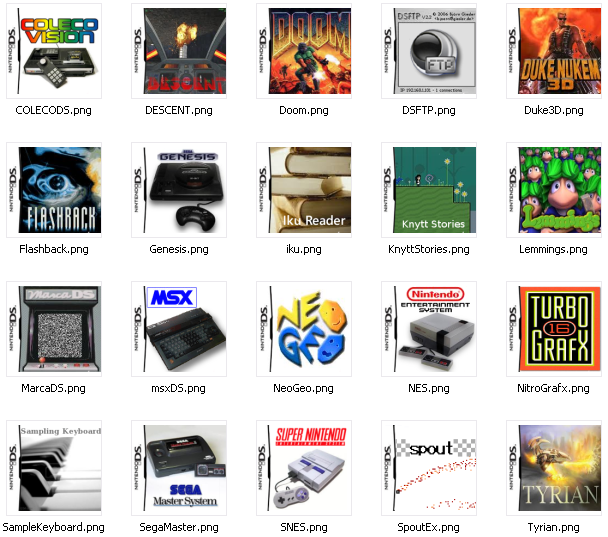
Okely dokely, I dun churned out a hefty 71 homebrew box-art pics. Theres plenty more homebrews out there so I'll be sure to be making more =P

2011-03-29Preview.png


Edit: I merged the BAGPlug boxart to my VatoPack, as it'll be mucho easier to manage=P
download.gif
Download
 
Last edited by VatoLoco,
Congratulations, BagPlug is now my default boot option
yay.gif

Just one little thing i want to mention for now, can you remove the am/pm when 24h clock is aktiv?

ps: sorry about your DSTwo, i wish you good luck with the homebrew bounty.

Edit:
Is it possible to add own stuff to the sidebar? I mean its kinda empty and i would prefer a DSTwo Plugin Menu or iMenu Icon there instead of the favorites
 
I seem to be having a couple issues.

1: I can't seem to get the cover art to work.
2: I must be doing something wrong with the arg thing for the NES files. I have this for my nex.arg

nesDS:
"nesDS.nds"//file path
[$PRGMPATH$,$FILEPATH$]//arguments are separated by commas
;
/nesDS.nds,/nes roms

basically a minor edit to what was in the distro based on where my nes roms are. However when I try to launch a rom from the menu the ds freezes then when I reboot the next time it launches straight to the NesDS menue. Rebooting again takes it to the normal bag interface.

Never mind. Managed to fix problem 2. Now I'm trying to get the Super Nintendo stuff working
 

Site & Scene News

Popular threads in this forum