

miniCDi - Philips CD-i emulator

  • Thread starter Thread starter niuus
  • Start date Start date
  • Views Views 428
  • Replies Replies 8
  • Likes Likes 9

niuus

Well-Known Member
Member
Joined
Mar 4, 2016
Messages
2,260
Reaction score
3,240
Trophies
2
XP
5,357
Country
Japan
miniCDi
by CatmanFan
https://github.com/CatmanFan/miniCDi
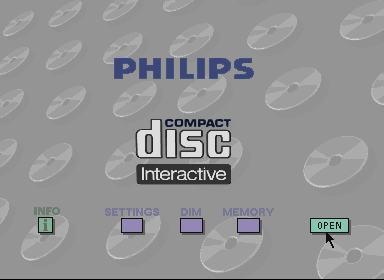
capture_220b.png


An experimental multiplatform Philips CD-i emulator written in C++17, for Gamecube / Wii / Wii U / 3DS / Windows.

Features:
  • Mono-I board (CDI 200, CDI 220/20) fully supported, can run commercial game discs and homebrew
  • Mono-II and Mono-IV boards are partially supported, can run player shell but disc emulation is not available.
  • Emulation of the fluorescent tube display (FTD) on the player's front-facing panel
  • Partial audio support (soundmap playback via CPU is not 100%, but can read audio sectors from disc fine)
  • Experimental controller emulation
    • This is still not sorted out due to the nature of the CD-i pointing device being an absolute and not relative (i.e. tablet-style) type. This works fine for the player shell but translates to wanky controls on actual CD-i games.
  • And most importantly: confirmed to run on Windows, macOS (courtesy of yeah-its-gloria), (v)Wii, Wii U (WUHB) and 3DS. May not run up to fullspeed on all builds.

Controller support:
  • Gamecube controller. (GCN build only)
  • Wiimote.
  • Wii Classic Controller.
  • Wii U Pro Controller.

Notes for miniCDi:
  • App folder: root://apps/miniCDI/
  • BIOS folder: root://miniCDi/rom
  • Games folder: root://miniCDi/discs
The following boards and chips have been implemented. CD-i Fan has more information regarding hardware at cdichips repository.
  • Mono-I: SCC68070, MCD212, CDIC, SLAVE
  • Mono-II: SCC68070, MCD212, DRVDSP (stub), SLAVE
  • Mono-III, Mono-IV, Robocon: SCC68070, MCD212, CIAP (stub), IKAT
Only the Mono-I driver is capable of playing CD-i discs, since the DRVDSP and CIAP in later boards are not fully emulated. Certain software may softlock due to constant D-Pad movement polling by SLAVE (e.g. Zelda: Wand of Gamelon or CDi_BadApple).
 
I cannot wait to try this. If you told me two years ago we'd have Saturn, Dreamcast, DS, 3D0 and Cdi emulation on Wii in 2026 I would have never believed it. What else can realistically be done???

One other thought, will this function as a WFL plugin?

Here is an overclock forwarder for this.
 
Last edited by P0intnCl1ckIt,
I cannot wait to try this. If you told me two years ago we'd have Saturn, Dreamcast, DS, 3D0 and Cdi emulation on Wii in 2026 I would have never believed it. What else can realistically be done???

One other thought, will this function as a WFL plugin?

Here is an overclock forwarder for this.
Definitely a surprising year. AI really changed the game for the possibilities on the Wii. When 3DO also advances, it will be nuts. Atari Jaguar at this point could be a reality, and I wouldn't be shocked if someone added core 32X emulation to GenesisPlus GX out of the blue.
 
Another platform is always welcome; AI is a huge help. They could use the same approach to improve DOSBox or, who knows, PureDos.
 
miniCDi
by CatmanFan
https://github.com/CatmanFan/miniCDi

capture_220b.png


An experimental multiplatform Philips CD-i emulator written in C++17, for Gamecube / Wii / Wii U / 3DS / Windows.

Features:
  • Mono-I board (CDI 200, CDI 220/20) fully supported, can run commercial game discs and homebrew
  • Mono-II and Mono-IV boards are partially supported, can run player shell but disc emulation is not available.
  • Emulation of the fluorescent tube display (FTD) on the player's front-facing panel
  • Partial audio support (soundmap playback via CPU is not 100%, but can read audio sectors from disc fine)
  • Experimental controller emulation
    • This is still not sorted out due to the nature of the CD-i pointing device being an absolute and not relative (i.e. tablet-style) type. This works fine for the player shell but translates to wanky controls on actual CD-i games.
  • And most importantly: confirmed to run on Windows, macOS (courtesy of yeah-its-gloria), (v)Wii, Wii U (WUHB) and 3DS. May not run up to fullspeed on all builds.

Controller support:
  • Gamecube controller. (GCN build only)
  • Wiimote.
  • Wii Classic Controller.
  • Wii U Pro Controller.

Notes for miniCDi:
  • App folder: root://apps/miniCDI/
  • BIOS folder: root://miniCDi/rom
  • Games folder: root://miniCDi/discs
The following boards and chips have been implemented. CD-i Fan has more information regarding hardware at cdichips repository.
  • Mono-I: SCC68070, MCD212, CDIC, SLAVE
  • Mono-II: SCC68070, MCD212, DRVDSP (stub), SLAVE
  • Mono-III, Mono-IV, Robocon: SCC68070, MCD212, CIAP (stub), IKAT
Only the Mono-I driver is capable of playing CD-i discs, since the DRVDSP and CIAP in later boards are not fully emulated. Certain software may softlock due to constant D-Pad movement polling by SLAVE (e.g. Zelda: Wand of Gamelon or CDi_BadApple).
Yeah!! Now we can play the worst Zelda game ever as original intended!! As his te A.I. want us to play it 😝🤣😝😀
 
Another platform is always welcome; AI is a huge help. They could use the same approach to improve DOSBox or, who knows, PureDos.
I thought about DOSBox Wii too some days ago, yes. It had a last release that improved speed by a nice margin.

Yeah!! Now we can play the worst Zelda game ever as original intended!! As his te A.I. want us to play it 😝🤣😝😀
That is what all true warriors strive for!!
 
I'm having trouble with this one with both the Wii (via overclock forwarder) and Wii U versions. The Wii version has black bars running up and down the screen that mostly obscure the bios menu, which it loads directly to without a disc selection screen.

As far as I am aware the bios is correct (have 200 and 220 in the rom folder). The Wii U version says no discs are found whether those are placed in Wiiu/apps/minicdi/discs on the sd or usb. Anyone had luck with either yet?
 
I'm having trouble with this one with both the Wii (via overclock forwarder) and Wii U versions. The Wii version has black bars running up and down the screen that mostly obscure the bios menu, which it loads directly to without a disc selection screen.

As far as I am aware the bios is correct (have 200 and 220 in the rom folder). The Wii U version says no discs are found whether those are placed in Wiiu/apps/minicdi/discs on the sd or usb. Anyone had luck with either yet?
I couldn't even get it run anything. Not even the BIOS screen worked, so not sure if I'm missing a file (I already have cdi200 and cdi220b.rom in the proper folder)

Games are in CUE+BIN, which is what I used to rip them many years ago. Usage documentation is scarce so I don't know if it needs any other format.

Have you tried editing the folder path inside the ini? The page says one thing about the paths, but then the default is another.

P.S. there's already two remastered PC ports of the Zelda CD-i series if you weren't aware.
In my case, I got them when they released. Makes the games actually playable and decent enough. :rofl:
 
Last edited by niuus,

Site & Scene News

Popular threads in this forum


