

Tongari Boushi to Mahou no Machi - How to Restore DLC Shops and Items
About:
After a long and difficult process, I was able to recover some of the limited-time downloadable content (DLC) for this game.
Examples of DLC for this game can be found here : https://www.konami.com/games/tongari-boushi-machi/comm/shop.html
I’m happy to share this content with everyone.
Since applying DLC to this game requires a few special steps, I have created this tutorial.
Please note that I’m not fluent in English, so I apologize for any mistakes.
If you choose to follow the tutorial, please make sure to back up your save data and store it in a safe place before proceeding!
I have also created a list of all the DLC content that has been successfully restored so far.
Some content has not yet been recovered, so you may see certain items marked as “not owned” in the list.
If you happen to have any of the missing content, I would be very grateful if you could share it!
All DLC for this game is stored in the Extra Data on the 3DS.
You can check which content you have by backing up the Extra Data from your 3DS using JSKM.
Tutorial:
1. Install JKSM on your 3DS.

2. Open JKSM and create the following two backups.
①Titles → Tongariboshi To Maho no Machi → Save Data → New → TongariSaveBk
②Titles → Tongariboshi To Maho no Machi → Extra Data → New → TongariExtBk
3. Transfer both ① and ② to your PC.
① is stored at JKSV\Saves\Tongariboshi To Maho no Machi\TongariSaveBk on your 3DS SD card.

② is stored at JKSV\ExtData\Tongariboshi To Maho no Machi\TongariExtBk on your 3DS SD card.
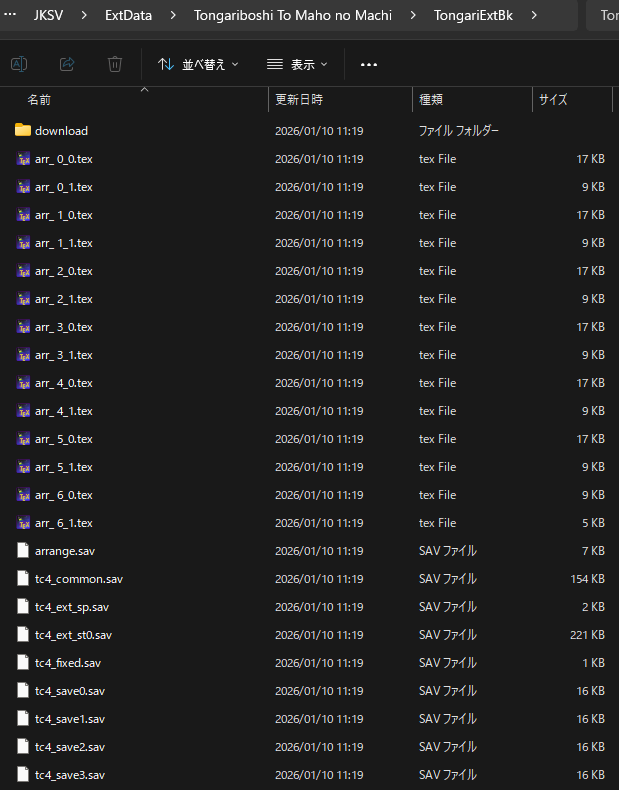
4. Make copies of both ① and ② and store them in a safe place.
5. Download the file
6. Refer Tongariboshi To Maho no Machi - DLC items and shops_2026-01-10\JKSV\ExtData\Tongariboshi To Maho no Machi\DLC items and shops as ③.
7. Copy the
8. Open
9. To add DLC shops, modify the data starting from address 0x00026388, as shown in the diagram below.
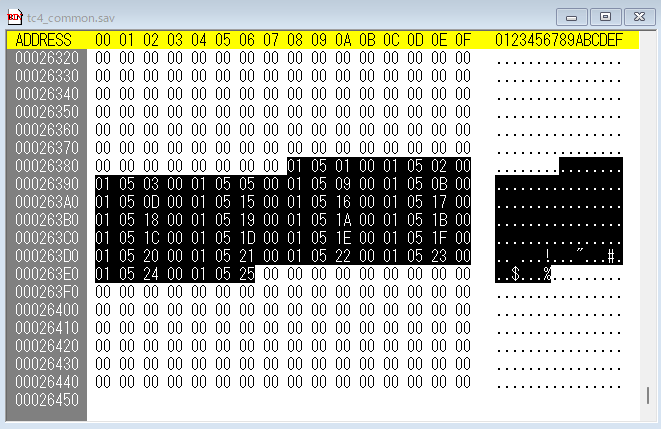
Each shop entry consists of 4 bytes.
The 3rd byte represents the DLC shop ID (matching the number in ③).
For example:
01 05 20 00 → the 3rd byte 20 corresponds to "dlshop_32.tarc" (クリスマスハウス(12がつおみせ))

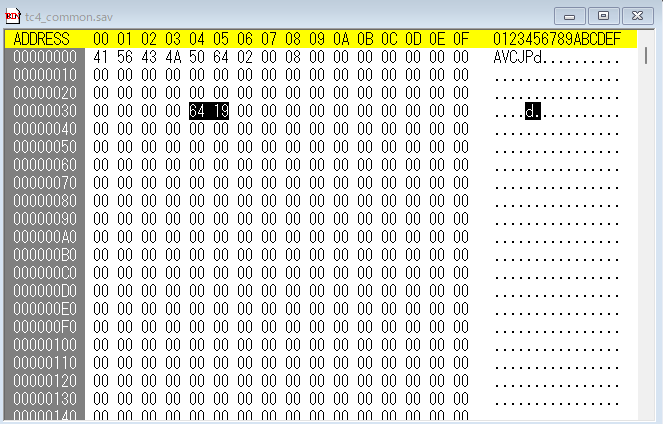
10. To add DLC items, modify the data starting from address 0x00000034, using the DLC item ID (matching the number in ③).
For example:
64 19 → corresponds to "dlitem_6500.tarc" (かさねフリルキャミ)

11. Save the modified
12. Copy ① and ② to your 3DS SD card, then restore both using JKSM.
13. Launch the game and verify the following.
The DLC shops appear in the shopping mall.
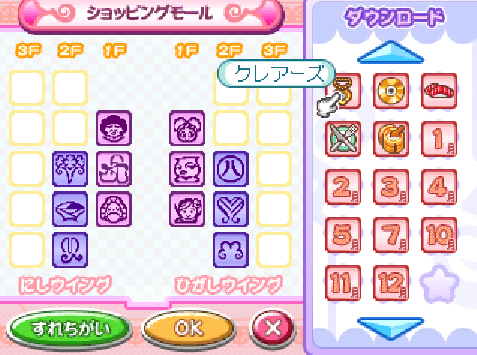
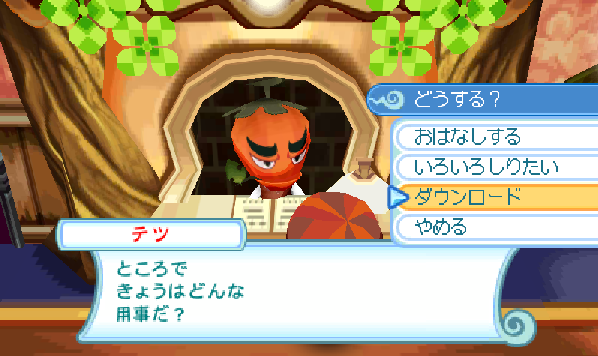
You can obtain the DLC items from the "ダウンロード" option after speaking to テツ.
After a long and difficult process, I was able to recover some of the limited-time downloadable content (DLC) for this game.
Examples of DLC for this game can be found here : https://www.konami.com/games/tongari-boushi-machi/comm/shop.html
I’m happy to share this content with everyone.
Since applying DLC to this game requires a few special steps, I have created this tutorial.
Please note that I’m not fluent in English, so I apologize for any mistakes.
If you choose to follow the tutorial, please make sure to back up your save data and store it in a safe place before proceeding!
I have also created a list of all the DLC content that has been successfully restored so far.
Some content has not yet been recovered, so you may see certain items marked as “not owned” in the list.
If you happen to have any of the missing content, I would be very grateful if you could share it!
All DLC for this game is stored in the Extra Data on the 3DS.
You can check which content you have by backing up the Extra Data from your 3DS using JSKM.
Tutorial:
1. Install JKSM on your 3DS.
2. Open JKSM and create the following two backups.
①Titles → Tongariboshi To Maho no Machi → Save Data → New → TongariSaveBk
②Titles → Tongariboshi To Maho no Machi → Extra Data → New → TongariExtBk
3. Transfer both ① and ② to your PC.
① is stored at JKSV\Saves\Tongariboshi To Maho no Machi\TongariSaveBk on your 3DS SD card.
② is stored at JKSV\ExtData\Tongariboshi To Maho no Machi\TongariExtBk on your 3DS SD card.
4. Make copies of both ① and ② and store them in a safe place.
5. Download the file
Tongariboshi To Maho no Machi - DLC items and shops_2026-01-10.zip that I posted here, and extract it on your PC.6. Refer Tongariboshi To Maho no Machi - DLC items and shops_2026-01-10\JKSV\ExtData\Tongariboshi To Maho no Machi\DLC items and shops as ③.
7. Copy the
download folder and the tc4_ext_sp.sav file inside ③, and overwrite them in ②.8. Open
tc4_common.sav, found inside ①, using a hex editor.9. To add DLC shops, modify the data starting from address 0x00026388, as shown in the diagram below.
Each shop entry consists of 4 bytes.
The 3rd byte represents the DLC shop ID (matching the number in ③).
For example:
01 05 20 00 → the 3rd byte 20 corresponds to "dlshop_32.tarc" (クリスマスハウス(12がつおみせ))
10. To add DLC items, modify the data starting from address 0x00000034, using the DLC item ID (matching the number in ③).
For example:
64 19 → corresponds to "dlitem_6500.tarc" (かさねフリルキャミ)
11. Save the modified
tc4_common.sav file.12. Copy ① and ② to your 3DS SD card, then restore both using JKSM.
13. Launch the game and verify the following.
The DLC shops appear in the shopping mall.
You can obtain the DLC items from the "ダウンロード" option after speaking to テツ.


