Copying from my folder to the nand directory works, but I can't play all the games. The Megadrive doesn't display 4 pages, but at least a few can be played
Das Problem ist nach wie vor das ich bei keinem der Installationen bisher den AT Ordner angezeigt bekomme.. egal was ich mache, er ist einfach nicht da, nur immer die telefonähnlichen prdner
Problem Description: I encountered difficulties flashing the custom firmware on my console.
Tools Used: I tried two different tools to flash the firmware: one that came with the custom firmware, and a newer one. However, only the newer tool worked.
Error Messages:
During the flashing process, an error occurred indicating that the parameters were not present.
The error message "U-boot is missing, stop running" appeared repeatedly.
Disappearance of user.img File: During the flashing process, the user.img file may disappear or not be processed properly. This could indicate issues with the flash tool, file structures, or settings.
Faulty Flash Folder Names: It has been observed that the folder structure for flashing may not be properly named or organized, especially concerning the output folders for different flash tools.
Post automatically merged:
Problem Description: I encountered difficulties flashing the custom firmware on my console.
Tools Used: I tried two different tools to flash the firmware: one that came with the custom firmware, and a newer one. However, only the newer tool worked.
Error Messages:
During the flashing process, an error occurred indicating that the parameters were not present.
The error message "U-boot is missing, stop running" appeared repeatedly.
Disappearance of user.img File: During the flashing process, the user.img file may disappear or not be processed properly. This could indicate issues with the flash tool, file structures, or settings.
Faulty Flash Folder Names: It has been observed that the folder structure for flashing may not be properly named or organized, especially concerning the output folders for different flash tools.
I only know of one publically available custom firmware for the 2017 version of the console and that is Senpai.
Otherwise there are only update and recovery fimrwares here
All uploads restored: 10/25/2022 Flashback 2017 HD System Update
This is an official Update to the original system firmware and not a full backup or restore.
Same backup and recovery tool but the process is a little different.
Connect to the console with the tool and then click on the Upgrade Firmware tab.
1. Load the img
2. Upgrade the Flashback 2017 HD firmware. https://i.postimg.cc/FFYWkDf4/Update4.jpg
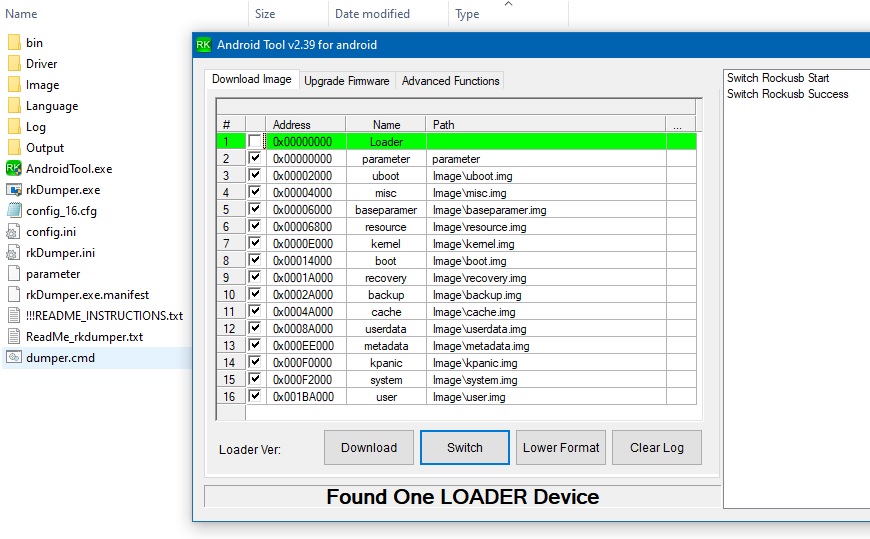
Put the console into Loader Mode and run the dumper.cmd (Might have to rt.click and RunAs Administrator)
Backup will be stored in the "Output" directory.
The unchecked Loader highlighted in green is not needed. https://postimg.cc/0K0nLtbP
Make sure there are no spaces in the directory paths or the dumper won't run.
This is an example of the output: https://postimg.cc/Cz1ZnvwH
The example above shows a 2GB console: Partition "user" (0x00246000)
The easiest way to determine if you have a 2GB or 4GB console is to back it up first and then read the dumper output.
Download LINKS Repaired: 10/18/2022
Backup-Recovery tool and Stock Firmware:
adb_driver - If ADB is already working then do not install this.
Backup of System partition games: Genesis Flashback HD 2017 Megadrive Flashback HD 2017
Notes:
1. Connect to the console using ADB and read the Instructions.
2. This firmware will convert an OBB console to a Non-OBB console. This makes it easier to add games.
3. The difference between Genesis and Megadrive firmware is the artwork for the games and the console gui.
4. If you've completely lost your firmware, the console wont boot and don't know what GB version console you have then Try the firmware reset button and its OK to use your best guess because it will not damage the console.
Its ok PM me for help.
The backup/recovery tool only works from folders without spaces.
As for those apk updates, those are rubbish.
About the image update, its been ages now but your comment regarding better sound is interesting.
I'm not sure if this is something that has been torn apart yet or not... the cobwebs are thick.
There is a high quality open source firmware replacement by WD_GASTER2 here: Generations Dashboard 4.0
The built in Firmware Reset button.
And Thank you! @astuermer
You've pointed out one of the most over looked features of the 2017 ATGames Sega Genesis console.
The built-in firmware reset button.
Press and hold to reset the firmware or put the system into Loader mode.
Its hard to brick the rock.
Problem Description: I encountered difficulties flashing the custom firmware on my console.
Tools Used: I tried two different tools to flash the firmware: one that came with the custom firmware, and a newer one. However, only the newer tool worked.
Error Messages:
During the flashing process, an error occurred indicating that the parameters were not present.
The error message "U-boot is missing, stop running" appeared repeatedly.
Disappearance of user.img File: During the flashing process, the user.img file may disappear or not be processed properly. This could indicate issues with the flash tool, file structures, or settings.
Faulty Flash Folder Names: It has been observed that the folder structure for flashing may not be properly named or organized, especially concerning the output folders for different flash tools.
Post automatically merged:
Problem Description: I encountered difficulties flashing the custom firmware on my console.
Tools Used: I tried two different tools to flash the firmware: one that came with the custom firmware, and a newer one. However, only the newer tool worked.
Error Messages:
During the flashing process, an error occurred indicating that the parameters were not present.
The error message "U-boot is missing, stop running" appeared repeatedly.
Disappearance of user.img File: During the flashing process, the user.img file may disappear or not be processed properly. This could indicate issues with the flash tool, file structures, or settings.
Faulty Flash Folder Names: It has been observed that the folder structure for flashing may not be properly named or organized, especially concerning the output folders for different flash tools.
"I actually meant the CFW by: WD_GASTER2, which was linked on page 43, but has since been removed."
"Maybe I should have placed this post somewhere else?"
"I'm pretty sure that there was a CFW linked for download on page 43. However, this link no longer works because the content is no longer available. I had already downloaded this zip file with the MOD content and the text files also indicate that it is a CFW. I could be mistaken though. Anyway, I'm now trying this one from Senpai. By the way, I couldn't install the first CFW properly, but at least I was able to restore the backup..."
You are in the right place if you want to recover your system to the default AtGames firmware.
Download a US or EU recovery package of your choice, swtich to Loader mode and download the firmware to the machine.
If you need the old Senpai image I have that as well.
I was able to install the CFW from Senpai. Furthermore, I was also able to copy some games. My problem now is that when I use a controller (no matter which one) and press A in the game, I get into the RetroArch menu.
I did try to map the buttons differently. But the A button always stays mapped the same, and in the game, when I press this button, I go back to the main menu. This is bad... does anyone have any ideas?
I was able to install the CFW from Senpai. Furthermore, I was also able to copy some games. My problem now is that when I use a controller (no matter which one) and press A in the game, I get into the RetroArch menu.
I did try to map the buttons differently. But the A button always stays mapped the same, and in the game, when I press this button, I go back to the main menu. This is bad... does anyone have any ideas?
I was able to install the CFW from Senpai. Furthermore, I was also able to copy some games. My problem now is that when I use a controller (no matter which one) and press A in the game, I get into the RetroArch menu.
I did try to map the buttons differently. But the A button always stays mapped the same, and in the game, when I press this button, I go back to the main menu. This is bad... does anyone have any ideas?
There is no support for senpai here.
I host the firmware that's all.
I do remember finding a way, but that was a very long time ago. Hints towards your answer may even be buried in this thread.
Please contact the author.
If you find methods to accomplish your goals the please start a new page with your questions and discoveries.
Thank you,
I have a problem with my Mega Drive Flashback 2017 edition EU. I added some games like 40, everything works fine. I added them on "Bonus" section and just deleted the old games inside.
My problem is when I start to put artwork with them and restart the console, I navigate into the "Bonus" section and when reaching the third page (I got like 4 lil dots on the footer), the console kinda bug and put me to the "Favorites" games, impossible to go to the third page.
I just did some tests and when I add all the artworks once, that mad this bug. After trying to put gradually, I've noticed that work but I have to remove 1 or 2 artwork, otherwise the bug start again.
Do you have any solution at this guys ?
Other thing : Yestarday I just tried the Toy Story ROM and worked fine, then I deleted the ROM. Today, wanted to reinstall the SAME ROM and didn't work, ROM return a blackscreen. How even is that possible ?
I have a problem with my Mega Drive Flashback 2017 edition EU. I added some games like 40, everything works fine. I added them on "Bonus" section and just deleted the old games inside.
My problem is when I start to put artwork with them and restart the console, I navigate into the "Bonus" section and when reaching the third page (I got like 4 lil dots on the footer), the console kinda bug and put me to the "Favorites" games, impossible to go to the third page.
I just did some tests and when I add all the artworks once, that mad this bug. After trying to put gradually, I've noticed that work but I have to remove 1 or 2 artwork, otherwise the bug start again.
I did see your message.
But I was helping a friend with a stange hdmi sound issue.
I've never had to reinstall a video driver to fix a sound problem.
Anyway, the Bonus section is limited to the total ROMS that can be listed.
I think you've hit the limit. Its been while now since using mine and its hard to remember.
With that said I know that there are limitations in all of the sections except Sega Games.
I recommend keeping most of the Roms in Sega Games section whenever possible.
Other thing : Yestarday I just tried the Toy Story ROM and worked fine, then I deleted the ROM. Today, wanted to reinstall the SAME ROM and didn't work, ROM return a blackscreen. How even is that possible ?
Check your work.
If its good then try renaming the rom, change the game list to reflect the change and then try again.
Internal Memory corruption is common.
Once its currupted the only way to fix it is to reformat the volume.
To avoid this, I recommend installing the USB mod for an external USB drive.
You'll have to try searching this thread for mine and others work on how to do that.
There is more than one method but all of them require the same thing, a switch, micro usb adapter and USB drive.
And, we know the devs knew this could be a problem, so the system can recover from this corruption automatically using a separate OBB database or User partition backup. To be clear there are two types of 2017 consoles. OBB and User partition. Most people like yourself have an internal backup of the User partition that can be restored using the built in internal reset button. However that does not always work and that is why I've maintained the backup/restore and official update images. Just installing the official update alone often repairs internal memory without the need to entirely recover the firmware.
Amazing ! This worked for me. I moved all my games on Sega Games and cleaned a bit the section by deleting some games. Now I just tried to put 2 games on the Bonus section : Toy Story and Zombies Ate My Neighbors. When I navigate into the console menu, everything seems OK but when I go to the Bonus section, then problem appears again, console freeze like 2 sec and back to the Favorites games like I restarted the console..
I've done some tests with the artwork, here is the results :
- I removed the 2 artwork from Toy Story and Zombies, they appears again in Bonus section but like I said before, can't run those ROM, maybe broken or what idk..
I removed those 2 games on Bonus section and restart the console, now when I go far than the 4th dot on the Sega section, appears the same bug as the previous post. Think if I remove all the artwork will work again and back to the initial problem...
- I removed all the artwork and put in again gradually (I got 40 games). When I put all the 40 artwork, it start to bug like the first post. Now if I remove 2 artworks on random game ON THE LAST PAGE OF SEGA GAMES SECTION ONLY, that work.. But when I add those 2 missing, then the bug start again. Doesn't matter which game is, when you remove 2 others artwork and add the 2 others (STILL ON THE LAST PAGE), then works fine but if you add the 4 artworks, start to bug again..
- I've put 2 games on the bonus section and all my others games on Sega section.
When I remove the 2 artworks from the 2 games on bonus section, that bug appears again on SEGA SECTION (like the first post > I can't go more thant the 4th dot on sega section). But when I add the 2 artworks again on the 2 games on bonus section, than the sega section is repared and work again but cannot go into the bonus section (same bug appears with the bonus section now, going to the favorites one after a 2 sec freeze).
So as I understood, always 2 artworks break the whole thing. Noticed that worked when I moved all my games from bonus section to sega. But when I added the 2 roms on the bonus section to test, bug appears again..
- I've tried to remove 2 others artwork in the middle of the list to the sega section and put back the 2 last games artwork, BUG.
I've put back the 2 artworks on the middle of the list and remove 2 from the last page, WORK AGAIN.
(yeah I didn't said that but is always the last sega section page causing the bug in all situation. When is bug like that, all I had to do was removing all the artworks, put them all again -2...)
The actual situation is :
I got no games on Bonus section, now the problem appears not with 2 but 3 artworks at the last page of the SEGA section. Tried to add some ROMS without artwork, work properly. So if I don't use any arwork, I have NOT AT ALL problem.. Only artworks broke the whole thing. Is there any solution ? Firmware to help me please ?
The actual situation is :
I got no games on Bonus section, now the problem appears not with 2 but 3 artworks at the last page of the SEGA section. Tried to add some ROMS without artwork, work properly. So if I don't use any arwork, I have NOT AT ALL problem.. Only artworks broke the whole thing. Is there any solution ? Firmware to help me please ?
Make sure the artwork is the correct size and make sure there are no errors or duplicate entries in the all-games.ini.
There are no real problems with the Bonus or Sega sections.
In my use, The Bonus menu has always been limited and the Sega Section has over a hundred games.
Again I highly recommend using a DTG and USB drive for external game storage and leave the internal memory alone.
To start over flashing the firmware will format the internal memory.
Finally ready to flash the new firmware of an ATGAMES Sega Megadrive Flashback HD console, I hesitate for the following reasons:
- Should I first update the 2017 firmware titled "update-sega-usa-g2-2017-11-15-163241", and then proceed with a second flash using the 2019 file titled "sega_update_20190226_EU"?
- Or should I just flash the file titled "sega_update_20190226_EU" for the European console, the 2017 firmware titled "update-sega-usa-g2-2017-11-15-16324" being reserved for American consoles?
Thank you in advance for your clarifications and details.
As I try to upgrade the firmware, i choose "sega_update.img" from the "sega_update_20190226_EU" extracted files.
But it says :
"Loading firmware failed!"
The same with the "sega_upadte.img" from the "sega_update_20190226_EU_pico" and "sega_update_20190226_US" extracted files !
As I upgrade the firmware when i choose "update-sega-usa-g2-2017-11-15-163241.img", the firmware is well loaded, but i can't upgrade because this message appears :
Atgames released a new update for the Genesis Flashback HD 2018 last week (v20190226).
The issue with PAL games seems fixed (I've only tested Sonic 2 for Master System and Sonic CD) and the games are running even better in my opinion. The...
Atgames released a new update for the Genesis Flashback HD 2018 last week (v20190226).
The issue with PAL games seems fixed (I've only tested Sonic 2 for Master System and Sonic CD) and the games are running even better in my opinion. The...
The package with the 1st Custom ROM/Firmware for Mega Drive Flashback is ready !
It contains 3 folders:
1 - the 1st one provide a way to fully backup your console NAND to have a working recovery solution if something goes wrong.
2 - the 2nd one is a pre-cooked firmware with RetroArch integrated; it can be flashed as-is if your console NAND configuration is the same as the one provided
(read the included .txt for more information)
3 - the 3rd one is a folder where you can play with ADB and the console; you can find some batch scripts and some shell script to see how the console works.
The console is based on Android 4.4.4; my unit has 4GB NAND but I saw some other units with 2GB only so be careful when flashing (read the included .txt files) !
The console is probably compatible with external USB flash drives but I need to test it (I miss the correct USB mini to USB female adapter).
It took me almost 2 weeks to achieve that result and it is nothing more than some "script-kiddie" stuff, feel free to modify and use it as you prefere.
The readme files are best readable with Metapad (wrap test option ON).
I will probably not have the time to answer questions but I wrote quite exaustive readmes inside the package to explain each step better. if you have doubts write them here but do not get angry if I will not answer
This is the only firmware for our console that I could find online. RetroArch with pre-configured cores works great, plus you still have the option to return to the original stock UI and play the built-in games.
Warning: Make sure to install the drivers from the first folder before flashing. Also, once flashed, you must delete the 'Game' folder from the console's internal storage and create a new one to upload your ROMs.
This is the only firmware for our console that I could find online. RetroArch with pre-configured cores works great, plus you still have the option to return to the original stock UI and play the built-in games.
Warning: Make sure to install the drivers from the first folder before flashing. Also, once flashed, you must delete the 'Game' folder from the console's internal storage and create a new one to upload your ROMs.
Its very cool.
It was uploaded 3 years ago and never published here.
Curious to see it run.
So...
There are at least two other private CFW's.
One from myself that I will try to publish.
Its been a very long time.
But I have the files.
It uses the standalone FinalBurnAlpha emulator and anothers.
A custom core that supports scripting and automatic controller remapping.
And one from Rafael that is a proper RetroArch port.
A solid port with great core support.
Controllers work 100% of the time.
And one that combines Both.
All launch from the dashboard using a hack from Rafael.
However,
Rafaels CFW will never see the light of day because he was hired by ATGames to do some work on spinner controlls way back then.
Sony made a shocking announcement today, revealing that the company plans to move away from physical game releases in the future. Citing claims of how the industry is...
After much speculation, a lot of which being caused by dbrand's unceremonious reveal of their Companion Cube casing, the Steam Machine is finally available to order...
Nintendo's expected Summer showcase is here, offering up plenty of new announcements and exciting reveals. Let's see what they have in store in the latest Nintendo...
What once seemed like a far off dream, and after many, many community restarts throughout the years, the elusive Mother 1 / EarthBound Beginnings Remake, which is a...
Since being decompiled Super Mario 64 has seen a considerable amount of interest. We've had multiple PC ports, but the efforts beyond that are really astounding. It's...
Remember when you could get an Xbox Series S for $300? Those were the days. Microsoft has today announced the latest in their console price hikes, seeing their...
Happy June 15th! Well, this one was close enough. Atmosphere has been updated to add support for the latest Nintendo Switch firmware, 22.5.0. This means all of you...
The delays may be behind us, but the news isn't all good for Grand Theft Auto VI. Rockstar have today announced that pre-orders for the game will go live tomorrow, on...
Following an investigation over misleading commercial practices, today Nintendo has been imposed a fine of 35 million euros related to the controller malfunctions...
After much speculation and rumour, the fabled Nintendo Direct is upon us. Set to go live tomorrow, the 9th of June, at 3pm in the UK, it'll feature 50 minutes of...
Sony made a shocking announcement today, revealing that the company plans to move away from physical game releases in the future. Citing claims of how the industry is...
After much speculation, a lot of which being caused by dbrand's unceremonious reveal of their Companion Cube casing, the Steam Machine is finally available to order...
Remember when you could get an Xbox Series S for $300? Those were the days. Microsoft has today announced the latest in their console price hikes, seeing their...
The delays may be behind us, but the news isn't all good for Grand Theft Auto VI. Rockstar have today announced that pre-orders for the game will go live tomorrow, on...
Nintendo's expected Summer showcase is here, offering up plenty of new announcements and exciting reveals. Let's see what they have in store in the latest Nintendo...
After much speculation and rumour, the fabled Nintendo Direct is upon us. Set to go live tomorrow, the 9th of June, at 3pm in the UK, it'll feature 50 minutes of...
Following an investigation over misleading commercial practices, today Nintendo has been imposed a fine of 35 million euros related to the controller malfunctions...
The end has come for the PlayStation 3 and the PlayStation Vita. After supporting the PSN Store on the PS3 and PS Vita since 2006 and 2011 respectively, Sony has...
Since being decompiled Super Mario 64 has seen a considerable amount of interest. We've had multiple PC ports, but the efforts beyond that are really astounding. It's...
What once seemed like a far off dream, and after many, many community restarts throughout the years, the elusive Mother 1 / EarthBound Beginnings Remake, which is a...