


Wassup. I'm pretty new to modding-
So I recently decided to mod my 3DS, and I got everything working just fine
I was having fun with just the 3DS and DSIware I installed but decided to try installing DS ROMS, so I started my adventure with TWLMenu++ and nds-bootstrap
I was able to get a few of my ROMS working, specifcally the smaller ones. Games I got working: The Bomberman DS games, Mario party DS, The Amazing Spiderman, Inuyasha Secret of the Divine Jewel...
Everytime I attempted to run a bigger ROM, like Lego Harry Potter or Legend Of Zelda Phantom Hourglass, I keep getting a "an error has occured"
A .sav file is created and everything, nds-bootstrap just can't run the game.
I also tried NDS forwarder but that gave me an error when installing those titles as well... for some reason though, I was able to install the 3 Bleach DS titles, but got the same NDS bootstrap error when opening them...
============
Using:
OLD 3DS
Running Luma3DS
Installed TWM++ and NDS forwarder using Universal Updater app, manually tried fixing nds-bootstrap using files from GitHub release, including the newest hotfix (thought that would fix things, it didn't)
Using 32 GB SD card, FAT32. Brand is ONN from walmart (doing some research, I wonder if that's the issue... don't have another SD at the moment tho...)
And yes, all the ROM's that are failing work.
============
I do wonder though if for some reason, the issue has to do with the fact I installed previous DSiWare through GODMODE9 instead of using TWM++, although I don't see how that's an issue...
Idk tho
please help!!!
here's some images

NDS bootstrap error
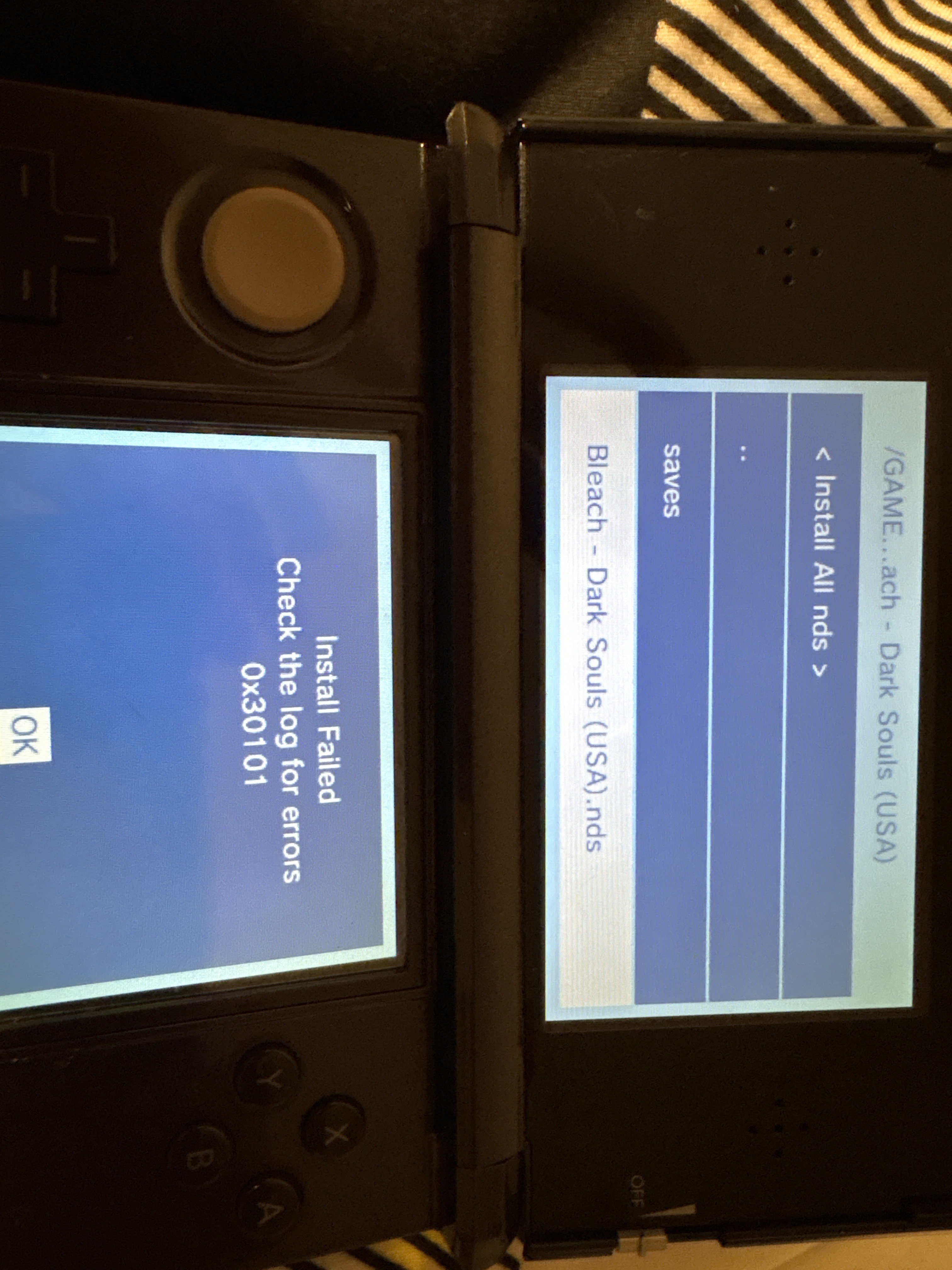
NDS forwarder error
Thank you if you can help
So I recently decided to mod my 3DS, and I got everything working just fine
I was having fun with just the 3DS and DSIware I installed but decided to try installing DS ROMS, so I started my adventure with TWLMenu++ and nds-bootstrap
I was able to get a few of my ROMS working, specifcally the smaller ones. Games I got working: The Bomberman DS games, Mario party DS, The Amazing Spiderman, Inuyasha Secret of the Divine Jewel...
Everytime I attempted to run a bigger ROM, like Lego Harry Potter or Legend Of Zelda Phantom Hourglass, I keep getting a "an error has occured"
A .sav file is created and everything, nds-bootstrap just can't run the game.
I also tried NDS forwarder but that gave me an error when installing those titles as well... for some reason though, I was able to install the 3 Bleach DS titles, but got the same NDS bootstrap error when opening them...
============
Using:
OLD 3DS
Running Luma3DS
Installed TWM++ and NDS forwarder using Universal Updater app, manually tried fixing nds-bootstrap using files from GitHub release, including the newest hotfix (thought that would fix things, it didn't)
Using 32 GB SD card, FAT32. Brand is ONN from walmart (doing some research, I wonder if that's the issue... don't have another SD at the moment tho...)
And yes, all the ROM's that are failing work.
============
I do wonder though if for some reason, the issue has to do with the fact I installed previous DSiWare through GODMODE9 instead of using TWM++, although I don't see how that's an issue...
Idk tho
please help!!!
here's some images
NDS bootstrap error
NDS forwarder error
Thank you if you can help

 ik it probably had to do with the sd card after some research but i didnt know the solution


