How to Flash GBA Games on ChisFlash v1.2

  • Thread starter Thread starter luis889sv
  • Start date Start date
  • Views Views 4,418
  • Replies Replies 32
  • Likes Likes 1

luis889sv

New Member
Newbie
Joined
Sep 3, 2025
Messages
3
Reaction score
1
Trophies
0
Age
33
XP
17
Country
El Salvador
Hi everyone,

I recently bought a ChisFlash v1.2 cartridge with rumble support, and it came preloaded with Goodboy Galaxy, which works perfectly. The rumble feature is working fine, and the game boots with no issues.

However, when I tried to flash a different game, like Pokémon Pinball GBA, I couldn't get it to work.
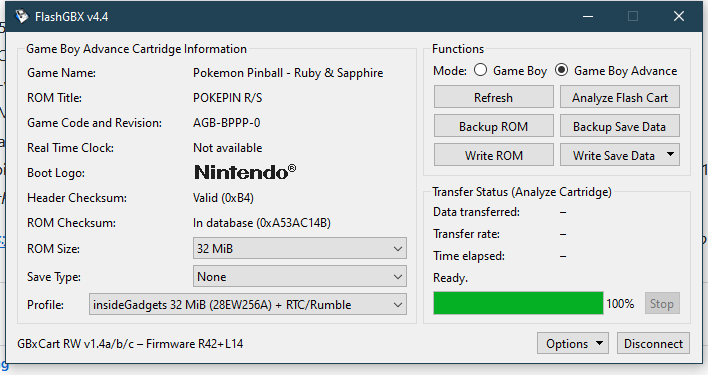
Does anyone know the correct configuration for flashing with GBxCart RW using FlashGBX?
1000084557.png
1000084551.jpg
1000084552.jpg
 
  • Like
Reactions: zfreeman
There's a known good configuration in the main thread a few posts down, have you tried using those settings?

What happens when you select "Analyze Flash Cart" in the UI?
 
There's a known good configuration in the main thread a few posts down, have you tried using those settings?

What happens when you select "Analyze Flash Cart" in the UI?
I'll try to find the thread you mentioned. As for the "Analyze Flash Cart" option, it's the same one shown in the image above.

ROM Size:32 MiB

Save Type:None

Profile:insideGadgets 32 MiB (28EW256A) + RTC/Rumble
 
I have not yet, was looking for a trusted source to avoid building my own.
ok, I have purchased from this seller before, I will post the images and results of the purchase when it arrives, it has landed in Australia already.
Post automatically merged:

1757460305743.png

this is when loading the cartridge in FlashGBX
1757460280836.png

after clicking Analyze

1757460510614.png

after writing the same rom.
1757460551529.png

running SRAM test

1757460807303.jpeg

game is working perfectly


1757460833435.jpeg
1757460843269.jpeg

Post automatically merged:

the game does not have rumble enabled, you need to patch it with https://www.romhacking.net/hacks/6256/ also to get rumble working

works perfectly after that


if your cartridge is still reporting no save, try force the save type to 1Mbit unlicensed SRAM then write a 1Mbit save to it (a pokemon save) then run a test on that
 
Last edited by Hunter,
  • Like
Reactions: Nephiel
hi friends.. I have one chisflash ver 1.02, I tried to flash pokemon ruby, but when I try to save it says that the save is corrupted.

am I doing something wrong?

this is my flasher:
1759190376581.png
 
the game needs to be patched with a custom patcher, not gbata for 1M Flash to 1M SRAM

https://github.com/bbsan2k/Flash1M_Repro_SRAM_Patcher

also note the RTC(timer) will not work on this cartridge
oh, nice! I tried with gbata but didn't worked, I will try with this one tonight and update the results

thanks!
Post automatically merged:

the game needs to be patched with a custom patcher, not gbata for 1M Flash to 1M SRAM

https://github.com/bbsan2k/Flash1M_Repro_SRAM_Patcher

also note the RTC(timer) will not work on this cartridge
didn't worked, my card is the same as your print

the game boy logo appears, after that white screen, but on pc emulator the rom is ok after the patch

the save type, is unlicensed 1m sram 128kib corret for pokemon ruby?
 
Last edited by tunex,
just an update, I tried this site:
https://gbarompatcher.com/

the game boots, and when I do save, it freezes and there's two leds, one orange and one red blinking, but nothing happens

any hint please?

I just tested it using my system,

Code:
dgc@dgc5900x:~/Downloads/ruby$ ./Flash1M_Repro_SRAM_Patcher Pokemon\ -\ Ruby\ Version\ \(USA\,\ Europe\)\ \(Rev\ 2\).gba
Applying patches for FLASH1M_V103
Success! Wrote output_Pokemon - Ruby Version (USA, Europe) (Rev 2).gba

then I wrote the output_Pokemon - Ruby Version (USA, Europe) (Rev 2).gba file to my cartridge and it worked.


so on windows, drag the original rom on to the Flash1M_Repro_SRAM_Patcher.exe file and it will create a patched file that you write.

if you know how to use CLI check it for errors.
 
I just tested it using my system,

Code:
dgc@dgc5900x:~/Downloads/ruby$ ./Flash1M_Repro_SRAM_Patcher Pokemon\ -\ Ruby\ Version\ \(USA\,\ Europe\)\ \(Rev\ 2\).gba
Applying patches for FLASH1M_V103
Success! Wrote output_Pokemon - Ruby Version (USA, Europe) (Rev 2).gba

then I wrote the output_Pokemon - Ruby Version (USA, Europe) (Rev 2).gba file to my cartridge and it worked.


so on windows, drag the original rom on to the Flash1M_Repro_SRAM_Patcher.exe file and it will create a patched file that you write.

if you know how to use CLI check it for errors.
I need to set something in flashgbx? save type? profile?
 

Site & Scene News

Popular threads in this forum