

I might be the first person to document encountering a "dev mode brick" in retail mode. After the recent collateral-damage exploit was announced, I took my console offline. This precaution has been effective for dumping backups of my games and sideloading homebrew games and emulators. However, I later discovered that my console is experiencing this "dev mode brick" issue while in retail mode.
As a result, I can't use Adv File Explorer, Durango FTP, or emulators to browse my drives. The only workaround I've found involves remotely typing commands through a netcat-connected terminal window, where I must run various shell scripts and manually input lengthy commands to copy, paste, or delete files and folders.
At the moment, I'm effectively stuck. As far as I know, performing any kind of reset will result in losing my license for the Game Script entry point. If anyone comes up with a solution, please let me know.
I also wanted to add that, based on my limited research, there is no definitive evidence that this issue is solely caused by a rogue Xbox update. My theory is that while an Xbox update might trigger the problem, it's more likely that some previous homebrew applications may have corrupted files or altered permissions beforehand. I recall reading that altering file permissions on Windows 10/11 Game Pass folders could risk being locked out of the drive entirely due to protection measures implemented by Microsoft. The same policies might apply to Xbox as well.
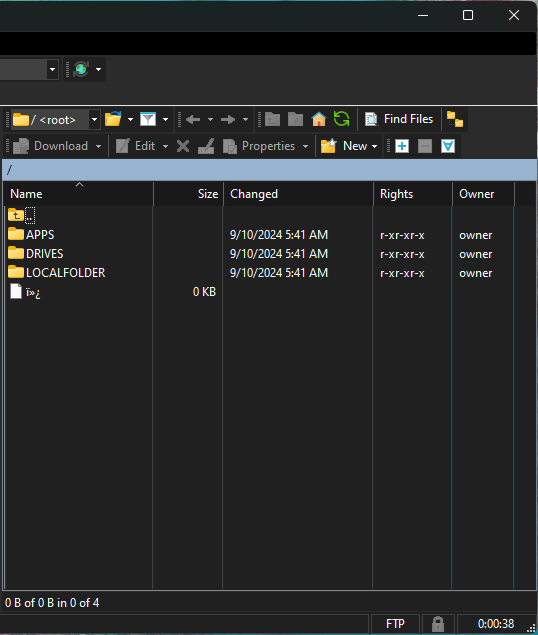
I've noticed garbled characters appearing in every folder on every drive. This issue might be breaking code that normally allows files and folders to be displayed. Additionally, there are remnants of old homebrew folders in <root>/APPS/ that I previously uninstalled. These folders also show as empty, but with those strange garbled characters.

As a result, I can't use Adv File Explorer, Durango FTP, or emulators to browse my drives. The only workaround I've found involves remotely typing commands through a netcat-connected terminal window, where I must run various shell scripts and manually input lengthy commands to copy, paste, or delete files and folders.
At the moment, I'm effectively stuck. As far as I know, performing any kind of reset will result in losing my license for the Game Script entry point. If anyone comes up with a solution, please let me know.
Post automatically merged:
I also wanted to add that, based on my limited research, there is no definitive evidence that this issue is solely caused by a rogue Xbox update. My theory is that while an Xbox update might trigger the problem, it's more likely that some previous homebrew applications may have corrupted files or altered permissions beforehand. I recall reading that altering file permissions on Windows 10/11 Game Pass folders could risk being locked out of the drive entirely due to protection measures implemented by Microsoft. The same policies might apply to Xbox as well.
I've noticed garbled characters appearing in every folder on every drive. This issue might be breaking code that normally allows files and folders to be displayed. Additionally, there are remnants of old homebrew folders in <root>/APPS/ that I previously uninstalled. These folders also show as empty, but with those strange garbled characters.
Code:

Last edited by simbin,