
RP2040-NS Chip on Switch V1 Help!

  • Thread starter Thread starter mediavieja
  • Start date Start date
  • Views Views 10,374
  • Replies Replies 10
  • Likes Likes 1

mediavieja

Well-Known Member
Member
Joined
Oct 28, 2010
Messages
147
Reaction score
17
Trophies
1
XP
394
Country
Venezuela
I got my chip from aliexpress, this one to be exact Aliexpress Switch V1 i did the flex soldering for V1 on the cpu, installed the nand, boot up the console but it boots straight to normal firmware, also the led on the hip doesnt turn on, i have already soldered and desoldered the flex cable 3 times with the same results, i dont know what else to do, am i missing something?

Heres a photo of the chip, which is suppose to be the HWFLY?
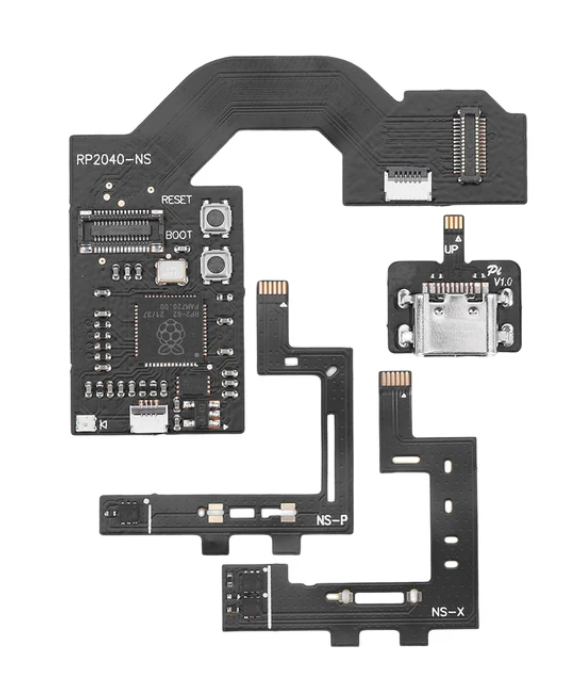
Chip.png

Post automatically merged:

Ok so aparently these chips are shipped without firmware so i connected the chip to my computer, flashed it with the latest picofly firm and now it shows no sd card rasperry logo on my switch.

i was using rcm before installing the chip i asumed that everything was gonna work out just fine but aparently not because when i connect the sd card module with the console still opened, it only shows a black screen and doesnt boot, imma dig a bit more and see what else i have to do now
 
Last edited by mediavieja,
  • Like
Reactions: Magnetic87
In my opinion, install a picofly in an unpatched erista is a waste of time and money...
Never understood why people on an
unpatched V1 want to install chips 🤔,
when RCM works flawlessly, furthermore, if you don’t have the skills and right tools, you end up with a bricked/dead switch 🙄
 
Could have went with a trinket M0 if they really want a modchip, some people doesn't like the idea of connecting a dongle or computer just to load a payload.
My dongle fits in the case I use for
Travelling, but I understand that some people don’t want to bother with a dongle.

I build my first dongle with a trinket, but never wanted to install internally now I use RCM loader (actually two in case one fails) and never had any issues.

I do agree that when you can’t bypass hardmods, well no other solution, but I’ve always been for fan of “soft mods “.
 
Last edited by Maupiti,
Is the payload.bin in the root of your SD?


In my opinion, install a picofly in an unpatched erista is a waste of time and money...
Aparently the issue was that Picofly doesnt load Atmosphere directly, i had to use Hekate as my main payloader and then load Atmosphere from there, as soon as i replaced the payload.bin for the hekate one, everything worked.
Post automatically merged:

Never understood why people on an
unpatched V1 want to install chips 🤔,
when RCM works flawlessly, furthermore, if you don’t have the skills and right tools, you end up with a bricked/dead switch 🙄
Well, im a fan of softmods as well but i was tired of using the dongle, plus i have the tools and skills to install it hehe, everything is working perfect now B-)
 
  • Like
Reactions: Maupiti
Never understood why people on an
unpatched V1 want to install chips 🤔,
when RCM works flawlessly, furthermore, if you don’t have the skills and right tools, you end up with a bricked/dead switch 🙄
RCM doesnt work on all V1s
 
Hi, which firmware did you install to that?

github Ansem-SoD/Picofly

This?
If you have an rp2040 based chip, then yes, 2.73 from ansems github. There is another github source with a 2.75 version that is newer but the docs are limited and I dont know what is changed about it.
 
I got my chip from aliexpress, this one to be exact Aliexpress Switch V1 i did the flex soldering for V1 on the cpu, installed the nand, boot up the console but it boots straight to normal firmware, also the led on the hip doesnt turn on, i have already soldered and desoldered the flex cable 3 times with the same results, i dont know what else to do, am i missing something?

Heres a photo of the chip, which is suppose to be the HWFLY?

View attachment 401099
Post automatically merged:

Ok so aparently these chips are shipped without firmware so i connected the chip to my computer, flashed it with the latest picofly firm and now it shows no sd card rasperry logo on my switch.

i was using rcm before installing the chip i asumed that everything was gonna work out just fine but aparently not because when i connect the sd card module with the console still opened, it only shows a black screen and doesnt boot, imma dig a bit more and see what else i have to do now

How did you get this flashed? I have tried following the instructions but it refuses to flash.

  • I attached it via USB
  • Window pops up
  • LED does not turn on
  • I drag and drop fw_2.73.uf2 to it
  • Nothing happens

I also tried holding down the boot or reset button while connecting it to USB, but this has the same result as above. I have 4 of these chips and all show the same behavior.

/edit: Never mind, solved:

Update again: Seems the .uf2 was corrupt.... Though I did re-download it earlier, I did so again and now it worked.... Sorry for the confusion guys.... And thanks for your help.
 
Last edited by Schweino,

Site & Scene News

Popular threads in this forum