Avatool - Homebrew Tool to Change Avatars

This is a quick tool I threw together in my free time the last two days to make changing avatars to custom ones easier for myself. It works by terminating the account service on your Switch which will lead to a crash. While I have had 0 problems testing it, it does write to system save data, which some might consider risky. Also, guaranteed ban online. You've been warned.

Avatars are 256x256 JPG files. Place them in the folder sdmc:/avatar/. Avatool will only see files with the extension '.jpg'
Once on the main selection screen:
  • L and R change the targeted avatar image
  • Up and Down control the file menu
  • A will overwrite the target with the selected source image
If the write was successful, you will see the target image change. Reboot and it should show on the home menu and profile screens.

Keep in mind this isn't supposed to be anything fancy.
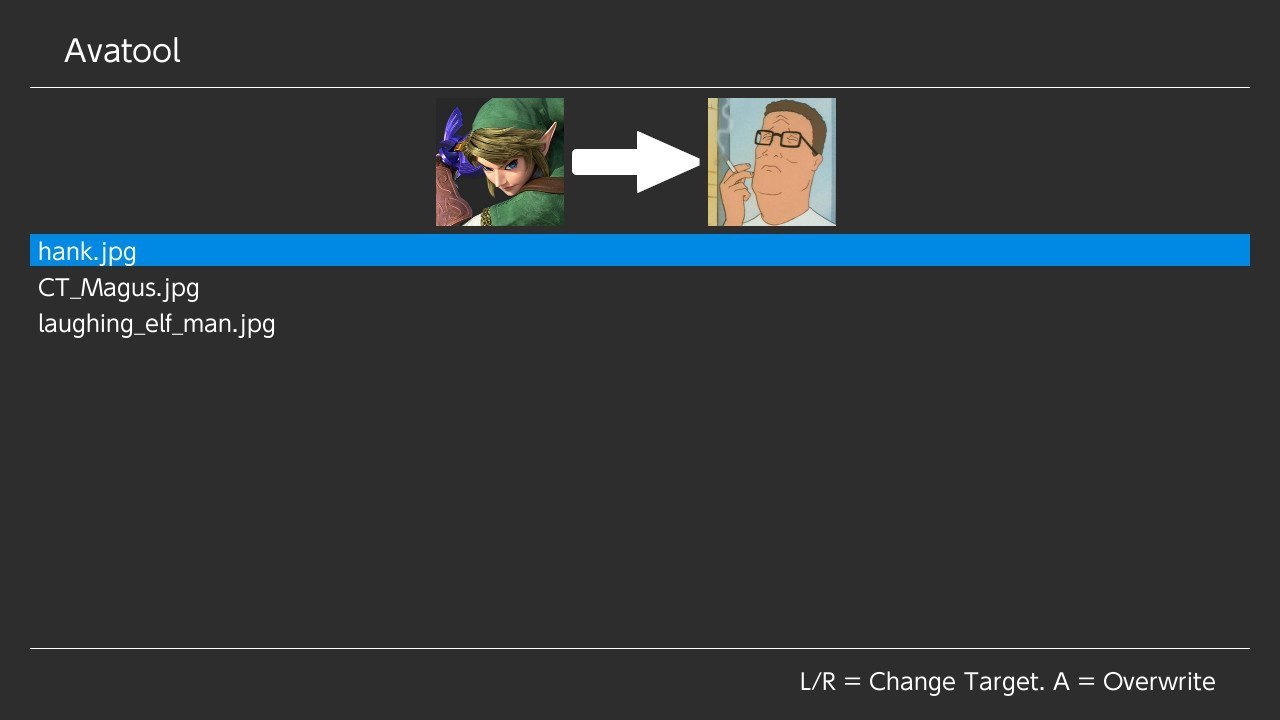
avatool.jpg

https://github.com/J-D-K/Avatool/releases
 
Last edited by JK_,
Does this change the avatar online and get you banned? Or just locally on the system.

--------------------- MERGED ---------------------------
If you want to be safe don't do it. It overwrites them on your switch but there's a chance they could get uploaded to Nintendo. I don't really know for sure.
 
Does this stil work as of September 2021? My switch has been banned since 2019 for piracy, Im assuming changing your profile picture is just worthy of a console ban and not an account one, right?
 
Does this stil work as of September 2021? My switch has been banned since 2019 for piracy, Im assuming changing your profile picture is just worthy of a console ban and not an account one, right?
If your system is already banned and you can't access anything from Nintendo, you'll be fine. It won't even be able to connect for them to find out.
Try it out and let us know.
Try not bumping old threads with useless posts and let us know how that goes.
 
  • Like
Reactions: hippy dave
JK_ awesome app man! Thank you!


For those wondering…

I just confirmed Avatool is working on FW 13.1.0 (Atmosphere 1.2.2) as well as FW 11.0.0 (SXOS 3.1.0).

Just used the version in the HB App Store (1.0.2).

Found a ton of 256x256 avatar images here:

https://avatars.alphacoders.com/by_resolution/256


The trick is to make sure your jpg Is formatted correctly.

Here is the best online converter I found that just works:

https://convertio.co/

I’m attaching a jpg thats confirmed to work on both of my setups above.

Place your properly sized and formatted jpg in sd:/avatar, open up Avatool, select your image, press (A) button, and then press (Home) button. You’ll likely crash when you hit Home but but simply press (Power) button to reboot and you should be good to go!
 

Attachments

  • kitty.jpg
    kitty.jpg
    20.9 KB · Views: 212
  • Like
Reactions: Tsukiru
This is a quick tool I threw together in my free time the last two days to make changing avatars to custom ones easier for myself. It works by terminating the account service on your Switch which will lead to a crash. While I have had 0 problems testing it, it does write to system save data, which some might consider risky. Also, guaranteed ban online. You've been warned.

Avatars are 256x256 JPG files. Place them in the folder sdmc:/avatar/. Avatool will only see files with the extension '.jpg'
Once on the main selection screen:
  • L and R change the targeted avatar image
  • Up and Down control the file menu
  • A will overwrite the target with the selected source image
If the write was successful, you will see the target image change. Reboot and it should show on the home menu and profile screens.

Keep in mind this isn't supposed to be anything fancy.


https://github.com/J-D-K/Avatool/releases

isn't there an alternative towards this??? q-q that doesn't go in the system save data at all? i really wanna use it for i can finally use my pfp that i did here on my switch to enjoy it.
 
isn't there an alternative towards this??? q-q that doesn't go in the system save data at all? i really wanna use it for i can finally use my pfp that i did here on my switch to enjoy it.
No alternative, I'm afraid. In theory I guess it could maybe be possible to mitm the accounts service to replace user profile image on-the-fly without having to directly replace the picture in system save data, but this would require writing some new homebrew that no-one's done yet (and would that even evade Nintendo's scrutiny?)
 
JK_ awesome app man! Thank you!


For those wondering…

I just confirmed Avatool is working on FW 13.1.0 (Atmosphere 1.2.2) as well as FW 11.0.0 (SXOS 3.1.0).

Just used the version in the HB App Store (1.0.2).

Found a ton of 256x256 avatar images here:

https://avatars.alphacoders.com/by_resolution/256


The trick is to make sure your jpg Is formatted correctly.

Here is the best online converter I found that just works:

https://convertio.co/

I’m attaching a jpg thats confirmed to work on both of my setups above.

Place your properly sized and formatted jpg in sd:/avatar, open up Avatool, select your image, press (A) button, and then press (Home) button. You’ll likely crash when you hit Home but but simply press (Power) button to reboot and you should be good to go!
Hi @binkinator , which is the "correct" format? what oddities must to comply the file? thanks.
 
Hi @binkinator , which is the "correct" format? what oddities must to comply the file? thanks.

Unfortunately I didn’t keep a log of what didn’t work…just hammered on things until it did!

The kitty.jpg attachment I left above works perfectly so you can try to get it as close to that as possible.

Here’s the info I know works:

B0BA0997-888E-4A1D-9D3E-BCC7D8480D01.jpeg
 
Unfortunately I didn’t keep a log of what didn’t work…just hammered on things until it did!

The kitty.jpg attachment I left above works perfectly so you can try to get it as close to that as possible.

Here’s the info I know works:

View attachment 304916
what my mind pictured with "keep hammering":
200.gif


he he he.
 
Best I can do fellas:

1649189368166.png


…and with only a bit of luck. it will just work!


edit:

I just did another one (attached) just to be sure.

1) Grab any 256x256 image you find here: https://avatars.alphacoders.com/by_resolution/256
2) Drop your file (in any format) here https://convertio.co/ and convert it to .jpg
3) Download the jpg into your /avatar/ directory on your switch.
4) Run the avatool homebrew
 

Attachments

  • abstract.jpg
    abstract.jpg
    25.2 KB · Views: 150
Last edited by binkinator,
Unticking both "progressive" and "generate thumbnail" in Gimp seems to generate what I want. Here's the output of the avatars I'm currently using:

Code:
ava-barioth-256.jpg:       JPEG image data, JFIF standard 1.01, resolution (DPI), density 300x300, segment length 16, baseline, precision 8, 256x256, components 3
ava-lycanroc-256.jpg:      JPEG image data, JFIF standard 1.01, resolution (DPI), density 72x72, segment length 16, baseline, precision 8, 256x256, components 3
ava-plesioth-256.jpg:      JPEG image data, JFIF standard 1.01, resolution (DPI), density 72x72, segment length 16, baseline, precision 8, 256x256, components 3

One of the sample images is attached.
 

Attachments

  • ava-plesioth.256.jpg
    ava-plesioth.256.jpg
    25.2 KB · Views: 126
  • Like
Reactions: binkinator
Golfleaf does it without crashing, though it does require a restart for things to fully take effect. If that might be preferable behavior? I bet this could be implemented here too (could prompt the user for a restart after changing profile picture, just like theme installer.)
 
  • Wow
Reactions: VeniaSilente
Golfleaf does it without crashing, though it does require a restart for things to fully take effect. If that might be preferable behavior? I bet this could be implemented here too (could prompt the user for a restart after changing profile picture, just like theme installer.)

I had to hunt for it. Figured out you just browse the SD card and find your /avatars directory and when you click on the jpg it offers you the swap. Learned something today, thanks!

image.jpg
 
  • Like
Reactions: Takokeshi
Attached is a hacky build for Avatool for FW 16.0.0 for testing.

Simply unzip the file below and place the .nro file in your /switch directory to try it out. :-)


Sadly, I’m told, this does not work. We will have to wait.
 
Last edited by binkinator,
  • Like
Reactions: hippy dave
Attached is a hacky build for Avatool for FW 16.0.0 for testing.

Simply unzip the file below and place the .nro file in your /switch directory to try it out. :-)


Sadly, I’m told, this does not work. We will have to wait.
Hey I used this version on my file based atmosphere emunad, with 16.0.0 firmware and it works, (it does crash the console while doing it but my profile image was still changed, after restarting the console) I don't remember where I got it, because i did a full format of my old sxos emunand, and I downloaded so many things to bring back my console to live again, so I didn't keep track, but here it is, oh and i used this guide to make a working jpg file:
Best I can do fellas:

View attachment 304933


…and with only a bit of luck. it will just work!


edit:

I just did another one (attached) just to be sure.

1) Grab any 256x256 image you find here: https://avatars.alphacoders.com/by_resolution/256
2) Drop your file (in any format) here https://convertio.co/ and convert it to .jpg
3) Download the jpg into your /avatar/ directory on your switch.
4) Run the avatool homebrew
 

Attachments

Site & Scene News

Popular threads in this forum