Hacking Waninkoko's Backup Loader FAQ

  • Thread starter Thread starter Praetor192
  • Start date Start date
  • Views Views 302,953
  • Replies Replies 1,053
talicme said:
SpongeFreak52 said:
talicme said:
NTSC 3.2 Wii
HDTV with Component Cables
Imgburn Set to Auto Speed
Maxell DVD-R from Wal-Mart

When I play an original copy of a game it looks fine, but when I play one of these backups (any that I have made) they look ok but are more grainy and a little pixelated. Anyone else seeing this?
Remember that this loader cannot be expected to be perfect in it's pre-beta phase. It could be because of the slow read speed, but I can't say for sure.

Yea, I know it's still in beta. But I just wanted to bring it up in case someone else notices it, they would know that they aren't alone.
Ah, good call then. =]

I think I should probably try to compile my own glitch/error database on this topic...
 
Midnightzak said:
Prisoner said:
I still don't get one thing....
but the patcher, the backup-creator.exe ......does it block updates or not??
If a game (like Wario Land) has a newer update, but I don't want to install it....do I have to brickblock the iso before patching, or the patcher blocks the update in the iso???

Not sure if it patches it or not, but there are many people that are using BrickBlock anyway. So I'd say if you want to be sure then run BrickBlock before you put it through the BackupCreator. To my knowledge the BrickBlock doesn't really take that long anyway...
My opinion, I've not read it anywhere and I'm not sure but...
What bricks the Wii are updates from the wrong region right? But this updates are run in the Disk Channel, and Backup Loader 'skips' (or better it, it doesn't even use) the Disk Channel, meaning that no updates will be launched, meaning the Wii will not get bricked. Once again, I'm not really sure about this
wink.gif
 
noobwarrior7 said:
Midnightzak said:
Luigi728 said:
I think I understand everything here!
I'm new here, but defenitely not a noob^^
The only thing I want to know now is:
What's the recommended burn speed?
I read here things about 2x 3x 4x 8x
Wich one is the best?

Slower burns are always better(WRONG) (Really?), however I have successfully burned StarWars TFU at 8x. So its pretty much up to you...


nope, burn it at the highest (or 2nd highest) your media is rated, assuming your drive supports it.
dvd burning is not the same as high speed cd burning.
I'm not sure about that... 8x is acceptable but anything over that and the Wii will fail to read it (I only tried it once, but it didn't work).
I guess it's really up to you, but in my opinion 4x is the best speed to burn the backups
 
Let me get this straight... I have A PAL Game but my NTSC Wii/TV only outputs NTSC. Will Component cables from gamestop solve this or are my games stuck in black/white forever? My TV is a SDTV and 480i. Please clear this for me!
 
Zeek03 said:
Let me get this straight... I have A PAL Game but my NTSC Wii/TV only outputs NTSC. Will Component cables from gamestop solve this or are my games stuck in black/white forever? My TV is a SDTV and 480i. Please clear this for me!

Yea the component cables will fix it.
 
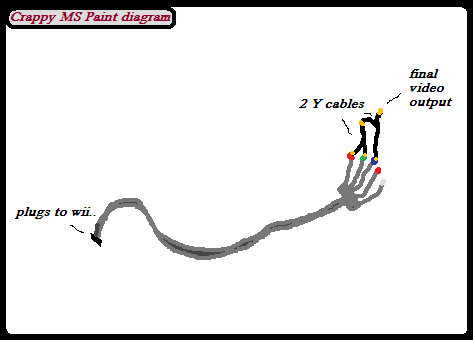
ok i just ordered a component cable but i have a standard TV with no HD inputs...but i have an idea but not sure if it'll work.
i drew up a crappy diagram..
diagram.png


so what do you guys think? i think it might work but some feedback would be nice..
 
Guys got a question i burned Star wars NTSC and it worked fine but i tried to burn indiana jones, super sluggers and lego batman it goes through the loading screen but then i get a green screen any idea on what should i do
 
Cooler89 said:
Guys got a question i burned Star wars NTSC and it worked fine but i tried to burn indiana jones, super sluggers and lego batman it goes through the loading screen but then i get a green screen any idea on what should i do

I just burned lego batman NTSC and it is working perfectly. I used a scrubbed ISO, not sure if that would make a diff.

What speed did you burn it at? I used Nero at 2.4x.
 
would like to note I used cheap Tesco discs and burned at 8x.

Games worked as well as can be expected, but worked all the same.
 
supersonic88 said:
ok i just ordered a component cable but i have a standard TV with no HD inputs...but i have an idea but not sure if it'll work.
i drew up a crappy diagram..
diagram.png


so what do you guys think? i think it might work but some feedback would be nice..


I was thinking about this myself. If the Wii outputs RGB then it seems like it would work. However, if it outputs YPbPr then it won't because of the digital sync needed. There would have to be some sort of transcoder used between the Wii and TV. I've been searching, but I'm not sure which one the Wii uses.
 
SympathyX said:
would like to note I used cheap Tesco discs and burned at 8x.

Games worked as well as can be expected, but worked all the same.

Yh same here mate, cant fault good old tescos lol
 
talicme said:
supersonic88 said:
ok i just ordered a component cable but i have a standard TV with no HD inputs...but i have an idea but not sure if it'll work.
i drew up a crappy diagram..
diagram.png


so what do you guys think? i think it might work but some feedback would be nice..


I was thinking about this myself. If the Wii outputs RGB then it seems like it would work. However, if it outputs YPbPr then it won't because of the digital sync needed. There would have to be some sort of transcoder used between the Wii and TV. I've been searching, but I'm not sure which one the Wii uses.

cool let me know what you come up with
 
"COMPAT LIST NOT MAINTAINED- a Wiki with a more in-depth backup list has been established, but since they stole my work and DID NOT CREDIT ME, I will not link to it."

methods such as that info cannot be copywritten, you have been contacted anyway since you expressly guaranteed you would give "permission." also, enforcing copyright on a method to circumvent copyright is plenty illogical, hope you will come to your senses, or down off your high horse, or just generally turn 11 years old. and you SHOULD copy my modifications of your info, since yours is not as reliable for the general public consumption.

list maintained here
http://maschell.de/mediawiki-1.6.10/index.php/Main_Page
 
telefunkin said:
Cooler89 said:
Guys got a question i burned Star wars NTSC and it worked fine but i tried to burn indiana jones, super sluggers and lego batman it goes through the loading screen but then i get a green screen any idea on what should i do

I just burned lego batman NTSC and it is working perfectly. I used a scrubbed ISO, not sure if that would make a diff.

What speed did you burn it at? I used Nero at 2.4x.

i burned at 4x and all the games i get is freaken green screen so i dont know what to do
 
Guys got a question i burned Star wars NTSC and it worked fine but i tried to burn indiana jones, super sluggers and lego batman it goes through the loading screen but then i get a green screen any idea on what should i do i burned at 4x what should i do
 
talicme said:
supersonic88 said:
ok i just ordered a component cable but i have a standard TV with no HD inputs...but i have an idea but not sure if it'll work.
i drew up a crappy diagram..
diagram.png


so what do you guys think? i think it might work but some feedback would be nice..


I was thinking about this myself. If the Wii outputs RGB then it seems like it would work. However, if it outputs YPbPr then it won't because of the digital sync needed. There would have to be some sort of transcoder used between the Wii and TV. I've been searching, but I'm not sure which one the Wii uses.

sorry guys, i tried this a few days ago and to no avail. It seems once the component cables are plugged in the wii detects it and outputs YPbPr. I would be especially happy if someone got it to work as I have an older TV with only AV input
frown.gif
;
also i've tried the PAL games on my NTSC wii and no go for color either.

and a big thanx to WANINKOKO for getting this ball rolling in the first place, if i could apologize for all the Jerks out there flaming you for helping us all out, i would:)
 
noobwarrior7 said:
"COMPAT LIST NOT MAINTAINED- a Wiki with a more in-depth backup list has been established, but since they stole my work and DID NOT CREDIT ME, I will not link to it."

methods such as that info cannot be copywritten, you have been contacted anyway since you expressly guaranteed you would give "permission." also, enforcing copyright on a method to circumvent copyright is plenty illogical, hope you will come to your senses, or down off your high horse, or just generally turn 11 years old. and you SHOULD copy my modifications of your info, since yours is not as reliable for the general public consumption.

list maintained here
http://maschell.de/mediawiki-1.6.10/index.php/Main_Page
Methods can be copywritten, in some circumstances as derived from personal opinion on an issue... can a video game guide be copyrighted? Yup. I guaranteed nothing, I just said if you would like to discuss my consent I can be emailed. Some people don't break copyright laws either; in Canada backups made for personal use are completely legal. Is a computer illegal because it facilitates copyright infringement? No. I would have been fine with you using my info, but the fact that you did not credit me for my work is what pissed me off. Get off your own fucking high horse. My info is plenty usable for anyone who has an IQ over 80. If you can't figure something out, you can google it or look at this thread, but you don't even need to. Your attitude is starting to aggravate me.
 

Site & Scene News

Popular threads in this forum