


It might not be anything new, and it's certainly not groundbreaking or anything, maybe it was even intentional and already well known... but I've 'discovered' seemingly anything can be given a cover in VBA GX, it doesn't care for the file type, if it's a directory, or anything.
You would think there would be a condition for whether the file contains a valid extension(.gb, .gba, .gbc rom files) but the fact there isn't actually allows us some great freedom. It’s fairly likely this applies to some other emulator apps too. Another reason I doubt I’m the first to notice or say anything, but just in case.
Anyways, you can give a cover to even your directories, like "roms", and for me, within "roms" I have them sorted: "Game Boy", "Game Boy Color", "Game Boy Advance"
Simply naming a cover "Game Boy", we can give a cover to my "roms/Game Boy" directory.
Attached is a gif example, and a google drive link only to the covers seen in the gif, some WIP bits too.
All images are public domain/free use, and I've included compressed .zip and .7zip copies for easier 'bulk' download.
Note: sizes are 224x224, and a background should be given to 'transparent' images to hide/overlay the default background, which is the faintly colored/slightly opaque indigo GBA.
https://drive.google.com/drive/folders/1cyK5qf8lt39JEdGnDU9cnuKezGitQFnx
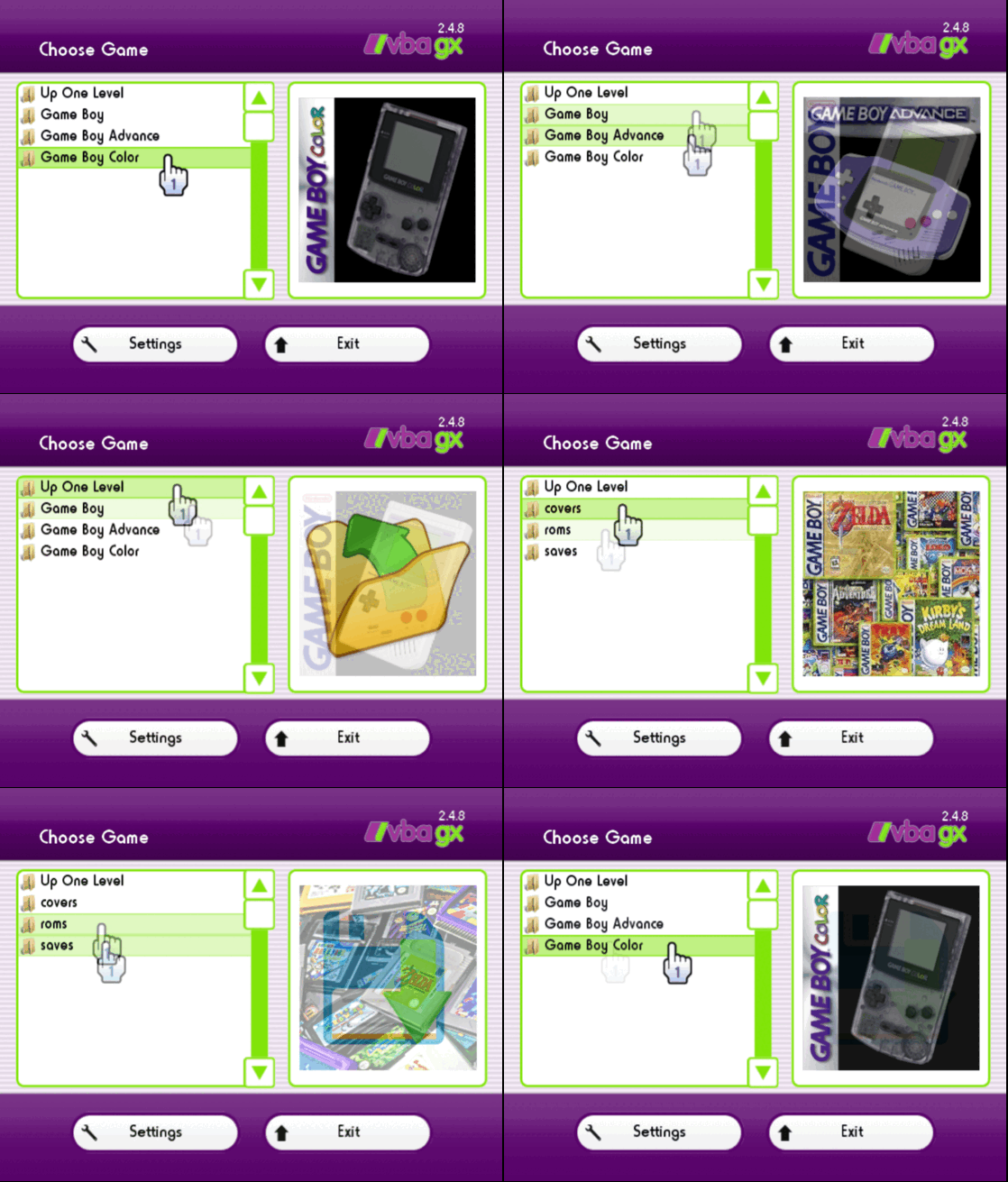
You would think there would be a condition for whether the file contains a valid extension(.gb, .gba, .gbc rom files) but the fact there isn't actually allows us some great freedom. It’s fairly likely this applies to some other emulator apps too. Another reason I doubt I’m the first to notice or say anything, but just in case.
Anyways, you can give a cover to even your directories, like "roms", and for me, within "roms" I have them sorted: "Game Boy", "Game Boy Color", "Game Boy Advance"
Simply naming a cover "Game Boy", we can give a cover to my "roms/Game Boy" directory.
Attached is a gif example, and a google drive link only to the covers seen in the gif, some WIP bits too.
All images are public domain/free use, and I've included compressed .zip and .7zip copies for easier 'bulk' download.
Note: sizes are 224x224, and a background should be given to 'transparent' images to hide/overlay the default background, which is the faintly colored/slightly opaque indigo GBA.
https://drive.google.com/drive/folders/1cyK5qf8lt39JEdGnDU9cnuKezGitQFnx
Last edited by Subnetic,


