ROM Hack [Tutorial][SaveDatafiler/Ninjhax] Pokémon Shuffle: SaveEdit

  • Thread starter Thread starter Asia81
  • Start date Start date
  • Views Views 98,222
  • Replies Replies 355
  • Likes Likes 11
Disregard my last post. I got savedata and the exploit to work. I wasn't aware we got free items as part of it too so that's an extra bonus. :)
 
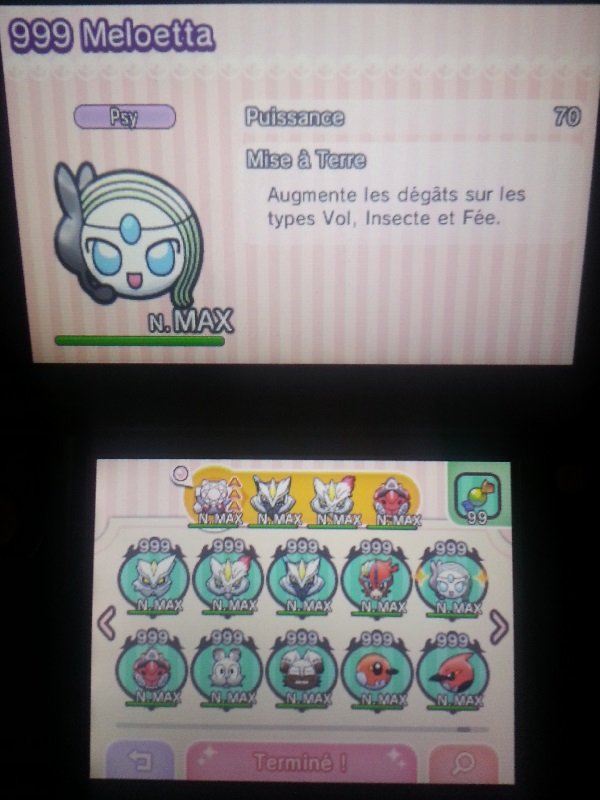
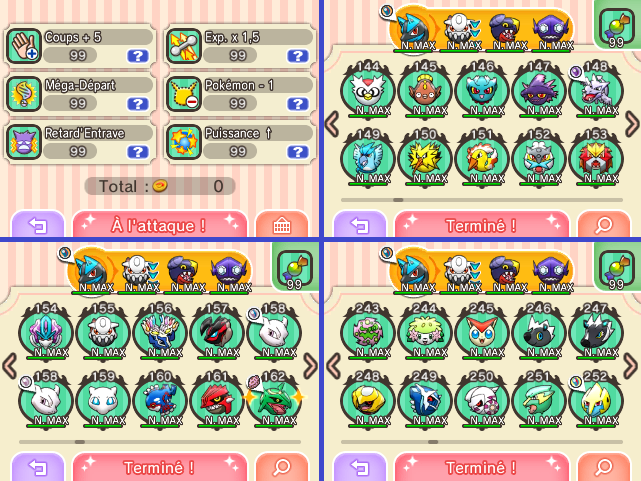
1441226112-20150902-223204.jpg
 
Updated:
- 99999 Coins + 150 Diamonds (No Overflow)
- 99x Items (No Overflow)
- 99 Hearts (No Overflow)
- 99 Mega Speedups (No Overflow)
- Caught All Pokemon (Table 1, 2 & 3)
- All Pokemon Level 10
- All Megas Unlocked

Thanks to [Anonymous] (someone on 4Chan ?) for the best new Python Script.
 
  • Like
Reactions: Madridi
For those who've got savedata corrupted recently using save_manager homebrew, to fix corrupted savedata you have to have your old savedata backup (or savedata from your friend, other sources etc...)

1. Try to make savedata corrupted by messing with hex values. Import to Shuffle then play the game and reformat save game when asked.
2. Backup the empty savedata to the game using save_manager
3. Using hex editor select and copy Offset 0 to 46 from the empty savedata backup, paste exactly the same offsets to your old savedata backup.
4. Import edited savedata to the game using save_manager
5. Profit

Tested and worked.

View attachment 24390

Thank you very much, this narrowed the search so much that I found the secure value at 0x2c-0x33:

oie_H6Y65d6jHvCs.png


Only the underlined bytes should be changed. If anyone with a corrupted save tries please report back.

I've also attached a modified script from the correct one that only puts max diamonds, max stocked lives and max coins.
 

Attachments

Last edited by suloku,
Yes, but I don't know how to delete the patch that I've done before :)
AND THAT'S NOT APPEARS ON THE FIRST POST. I CAN READ IT T_________T
 
Last edited by DaniOrtega,
People who have problem with the Python script - you guys most likely have both Python 3.4 and Python 2.7 installed, and 3.4 is the default one. To change it you have to force it to run it through 2.7. Copy the script and the save file to the folder where 2.7 is installed. Then open a command prompt there (easiest way - in the folder, hold shift and right-click an empty space in it, then click "Open a command prompt here" (or something like that, non-english Windows here)) and put in Python.exe name-of-the-script.py name-of-the-save.bin
 
People who have problem with the Python script - you guys most likely have both Python 3.4 and Python 2.7 installed, and 3.4 is the default one. To change it you have to force it to run it through 2.7. Copy the script and the save file to the folder where 2.7 is installed. Then open a command prompt there (easiest way - in the folder, hold shift and right-click an empty space in it, then click "Open a command prompt here" (or something like that, non-english Windows here)) and put in Python.exe name-of-the-script.py name-of-the-save.bin

I have both 2.7 and 3.4 installed, and it's working nice. But yeah, i guess the 2.7 is the main for me

--------------------- MERGED ---------------------------

Yes, but I don't know how to delete the patch that I've done before :)
AND THAT'S NOT APPEARS ON THE FIRST POST. I CAN READ IT T_________T

But WTF, what are you trying to do oO? I don't understand...
 
I have both 2.7 and 3.4 installed, and it's working nice. But yeah, i guess the 2.7 is the main for me

--------------------- MERGED ---------------------------


But WTF, what are you trying to do oO? I don't understand...

Let me explain you...

I know how to apply the script to the Shuffle's savedata.bin. I did it two days ago and it works (full coins, 150 jewels, 99 items...). What I want to know is HOW TO REAPPLY, because I've done it a lot of times and it doesn't work (in-game, all is the same that before apply the script again). The new script, obviously, doesnt work xD
 
those unrelease mega effect are wrong for sure.....
Let me explain you...

I know how to apply the script to the Shuffle's savedata.bin. I did it two days ago and it works (full coins, 150 jewels, 99 items...). What I want to know is HOW TO REAPPLY, because I've done it a lot of times and it doesn't work (in-game, all is the same that before apply the script again). The new script, obviously, doesnt work xD

I have a functional save editor and have done a lot of save research...that script's writing the correct values (I tested it, even), which is why I linked to it here.

And Asia81's screenshots suggest it worked for him, too.
 

Site & Scene News

Popular threads in this forum