Homebrew The Wii U Homebrew Request Thread

  • Thread starter Thread starter GalladeGuy
  • Start date Start date
  • Views Views 220,425
  • Replies Replies 1,127
  • Likes Likes 9
Homebrew to modify game files (translation) automatically. I can't access some folders to replace files with the original language of the game with the translated one.
I know I can use SDCafiine, but replacing is better.
 
Last edited by fmhugo,
I think that FCEU looks horrendous (at least on my TV)
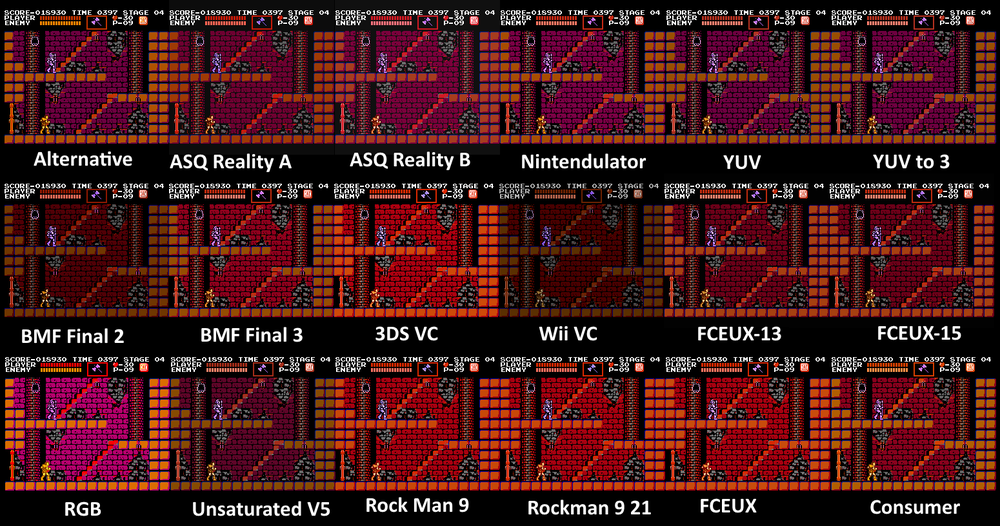
It could be the color options maybe? Not 100% on this, but I noticed nes emulators seem to all have options for colors. Something no other console emulator has. Not sure why though, I even noticed some youtube videos of people with oddly colored visuals in their games. (Purple sky instead of blue in super mario bros, Various shades of blue on mega man.) I always wonder why so many color options exist only for nintendo. Because I haven't seen a real one since not owning one, is hard to compare. So I usually assume the NES games on switch or other official products nintendo sells or various compilations to be right colors.

This website I found that documents emulators also has a chart of known color pallets for emulators. It all crazy to think this isn't simplified by now. :blink:

1000px-5NUrm6U-1-.png
 
It could be the color options maybe? Not 100% on this, but I noticed nes emulators seem to all have options for colors. Something no other console emulator has. Not sure why though, I even noticed some youtube videos of people with oddly colored visuals in their games. (Purple sky instead of blue in super mario bros, Various shades of blue on mega man.) I always wonder why so many color options exist only for nintendo. Because I haven't seen a real one since not owning one, is hard to compare. So I usually assume the NES games on switch or other official products nintendo sells or various compilations to be right colors.

This website I found that documents emulators also has a chart of known color pallets for emulators. It all crazy to think this isn't simplified by now. :blink:

1000px-5NUrm6U-1-.png
It's not the pallet options, that is actually fine. But more so that FCEU looks softer compared to the raw and sharp pixels I get when using RetroArch. And the emulator just looks like the Wii U NES VC without the dark filter to me.
 
It's not the pallet options, that is actually fine. But more so that FCEU looks softer compared to the raw and sharp pixels I get when using RetroArch. And the emulator just looks like the Wii U NES VC without the dark filter to me.
Well, since the fceux is being emulated using wii mode which is 480P compared to retroarch using higher resolution in wii u mode, that makes a lot of sense. Lol :P

And I guess I'm the only crazy person using the Blargg NTSC composite filter on my nes emulators. :ninja:
 
  • Like
Reactions: GABO1423
Well, since the fceux is being emulated using wii mode which is 480P compared to retroarch using higher resolution in wii u mode, that makes a lot of sense. Lol :P

And I guess I'm the only crazy person using the Blargg NTSC composite filter on my nes emulators. :ninja:
The poor quality does have a charm that just screams nostalgia, so I might actually do that when I'm in the mood.
 
The poor quality does have a charm that just screams nostalgia, so I might actually do that when I'm in the mood.
Well, we all can wish we was back in the basement with old tube tv, mono speaker with the clicky tv dial and RF cable with antenna. Is more about stuff looking right. :P

Clean and crispy pixels are nice when things look good. It show how well the sprites was done by the artist. But not every sprite game looks right with the sharp blocky Jagged pixels. Always have to remember, that the developers knew we didn't have the same monitors they used to make these games. So they used the poor quality for greater good, magic tricks. :creep:

Kinda same that new compilations officially endorsed by the same people who made these games don't have such features to make them look accurate. But I guess all people care about now is the "Perfect pixel picture" 4:3 or 8:7 aspect ratio and clear uniform pixels that don't shimmer or change shape. :ninja:
SplendidSneakyKitty-size_restricted.gif
 
  • Like
Reactions: GABO1423
Well, we all can wish we was back in the basement with old tube tv, mono speaker with the clicky tv dial and RF cable with antenna. Is more about stuff looking right. :P

Clean and crispy pixels are nice when things look good. It show how well the sprites was done by the artist. But not every sprite game looks right with the sharp blocky Jagged pixels. Always have to remember, that the developers knew we didn't have the same monitors they used to make these games. So they used the poor quality for greater good, magic tricks. :creep:

Kinda same that new compilations officially endorsed by the same people who made these games don't have such features to make them look accurate. But I guess all people care about now is the "Perfect pixel picture" 4:3 or 8:7 aspect ratio and clear uniform pixels that don't shimmer or change shape. :ninja:
SplendidSneakyKitty-size_restricted.gif
My main preference is to have sharp pictures that can be as big as possible without stretching the image. But I can get down with the look of composite video since it's what I grew up with. Nostalgia can be a powerful thing.
 
A more efficient way of dumping digital wii games from the wii u would be rather nice. I've been trying to use FTPiiU Everywhere and I've had zero luck with that.
 
A more efficient way of dumping digital wii games from the wii u would be rather nice. I've been trying to use FTPiiU Everywhere and I've had zero luck with that.

there's an app to read the wii u hdd on pc. you need the seeprom and otp.bin. I can't recall the name of it though. it's fairly new, and I think it was made by @GaryOderNichts .

--------------------- MERGED ---------------------------

found it: https://gbatemp.net/threads/dumpsteru-wii-u-harddrive-dumper.568513/
 
  • Like
Reactions: GABO1423
ddd is not really recommended anymore. It's slow and might not dump everything (meta folder requires additional work and some libraries might not be loaded in memory.) You should use Dumpling or DumpsterU if you want to dump installed games on your Wii U.
I couldn't find any other programs when I googled it lol. DDD is still better than using FTPiiU Everywhere though like the op is doing :rofl2:
 
  • Like
Reactions: GABO1423

Site & Scene News

Popular threads in this forum