The Switch Flashcart Thread (Mig Switch etc.)

  • Thread starter Thread starter TheStonedModder
  • Start date Start date
  • Views Views 777,726
  • Replies Replies 2,812
  • Likes Likes 25
The MIG is just really picky with what SD cards it likes. I know sanddisk works but it’s also not a 1tb I heard those are more hit or miss

That being said avoid the MiG branded SD cards those are almost certainly fake low quality sd cards and if they work it won’t be for long
Appreciate the reply. I had a feeling it was just being picky, so I suppose I'll just return these two cards I got and get some lower capacity ones and carry multiple around. Not a big deal, just obviously less-than-ideal. I guess I'm not quite as bummed that I missed out on the prime day 1.5TB SanDisk for $84.

Out of curiosity, what perspective do you have about the ones MIG sells being fake or low quality?
 
bummed that I missed out on the prime day 1.5TB SanDisk for $84.
You shouldn't be... Using a card of this size would be a mistake!

For example, in my testing I used a 512GB microSD.
That card held well over 50+ games, awesome right? DEAD WRONG!

If I wanted to play Zelda (or any game starting with the letter Z) TotK, I had to insert and eject the MIG over 50 times.
That kind of excessive insertion/removal WILL destroy the contact pins of the Switch port faster.

For me/my recommendation would be 128GB.
These cards hold a more reasonable 10~15 games (depending on size) and on average cost 15~20$ (you could get 4 for 80$).
Also, if you have one of these handy microSD supporting Switch game cases...
s-l1200.jpg


You'll simply store a few different microSD cards (splitting up the alphabet into manageable chunks)...
Eject the MIG once, replace the SD card and reinsert it ONCE! ;)
 
Last edited by jassin000,
  • Like
Reactions: retnuh730
Hello, I recently received MigSwitch v2 and a SanDisk 512GB Extreme microSDXC 190 MB/s Clase A2 UHS-I Class 10 U3 V30.

How should I format the microsd?
Because I used it with stocked format and some games worked and other games didn't like NieR Automata. I formated the microsd with Rufus using exfat and cluster size of 32kb and the games that didn't work, now work the ones I have tested so far.

Which is the optimal cluster size I should use for migswitch?
 
Hello, I recently received MigSwitch v2 and a SanDisk 512GB Extreme microSDXC 190 MB/s Clase A2 UHS-I Class 10 U3 V30.

How should I format the microsd?
Because I used it with stocked format and some games worked and other games didn't like NieR Automata. I formated the microsd with Rufus using exfat and cluster size of 32kb and the games that didn't work, now work the ones I have tested so far.

Which is the optimal cluster size I should use for migswitch?
Default settings should be fine. If your game isn’t working it’s likely a bad dump or file.

Maybe someone else had a different experience tho but I didnt really notice a difference with the file systems
 
How should I format the microsd?
ExFAT using "normal" (default) Windows formatting options.

FAT32 is only used/recommended for the SD card inside a hacked/modified Switch itself (not the MIG).

Screenshot 2024-08-06 110802.png


Screenshot 2024-08-06 111009.png


Wow disappointed, IDK who that "guy" is, but he sounds like a real douchbag. :rofl2:
You should probable get a moderator involved, maybe they could ban his account.
 
Last edited by jassin000,
  • Haha
Reactions: impeeza
First off, thanks so much for the writeup on what to do with this @TheStonedModder. I just received my v2 and it was literally just a cart in a padded envelope with no instructions. I ordered from the official Mig Switch store way back when. I thought, well GBATemp probably has some information and I found this thread.

Now that Mig whatever have have had their issues with domain names and websites, it looks like the "Mig Flash" site is now just a store with no FAQ or Downloads or anything. So thanks for providing all that information and download files.

What I am unclear on now is what exactly is needed to play a backup game? I have plenty of backed up games in XCI format, but I don't have these additional .bin files I see in the screenshot you provided. How exactly can I get these files without the Mig Dumper? I also thought I saw you mention somewhere in this thread that you really only need a card ID set, card UID, cert, and initial data for one of your cartridges and you can use those same files for all of the other dumps you want to play (the Switch I'm using is already banned so playing online isn't an option for me anyway). Can you clarify further on these .bin files?

Additionally, is there a way to actually update a game? The only way I would think is by an NSP file but it looks to me that an XCI is required.
 
You shouldn't be... Using a card of this size would be a mistake!

For example, in my testing I used a 512GB microSD.
That card held well over 50+ games, awesome right? DEAD WRONG!

If I wanted to play Zelda (or any game starting with the letter Z) TotK, I had to insert and eject the MIG over 50 times.
That kind of excessive insertion/removal WILL destroy the contact pins of the Switch port faster.

For me/my recommendation would be 128GB.
These cards hold a more reasonable 10~15 games (depending on size) and on average cost 15~20$ (you could get 4 for 80$).
Also, if you have one of these handy microSD supporting Switch game cases...
s-l1200.jpg


You'll simply store a few different microSD cards (splitting up the alphabet into manageable chunks)...
Eject the MIG once, replace the SD card and reinsert it ONCE! ;)
Remember you can sort the FAT in any order using a software like DriveSort ( http://www.anerty.net/software/file/DriveSort/ )
Post automatically merged:

ExFAT using "normal" (default) Windows formatting options.

FAT32 is only used/recommended for the SD card inside a hacked/modified Switch itself (not the MIG).

View attachment 451398

View attachment 451399

Wow disappointed, IDK who that "guy" is, but he sounds like a real douchbag. :rofl2:
You should probable get a moderator involved, maybe they could ban his account.
Just a little bit, but not a full douchbag, just a crank old dude!
 
Remember you can sort the FAT in any order using a software like DriveSort
When you've got 50+ images on a single SD card... The order isn't the issue.
just a crank old dude!
You are wise beyond your years. :bow:
Post automatically merged:

What I am unclear on now is what exactly is needed to play a backup game?
For Online Use: A complete 5 file dump without trimming, zero deviation/exception (example on left).

For a Console Already Ban: 3 file dump without unique cart IDs trimmed or not (example on right).

trim-example-png.449702


For me, the only "grey" area concerns the insertion of an incomplete dump into a retail console even if done offline.
These values (ie unique cart IDs) ARE recorded, and being retail YOU (yes I understand a few official Nintendo system repair carts have leaked out over the years, and yes these could fully erase the NAND of any retail console, I know of one person who has one, yet they have REFUSED to ever dump it to the community) cannot remove offending values from system NAND.

At ANY future point when connecting to the network Nintendo COULD request this unique data, and if found to be fraudulent issue bans accordingly... :huh:

<soapbox>If you have access to an official repair cart, please take the necessary steps to ensure its properly (complete 5 files without trimming) dumped. WHATEVER these steps might include, its importance to the scene justifies ANY means taken!
</soapbox>

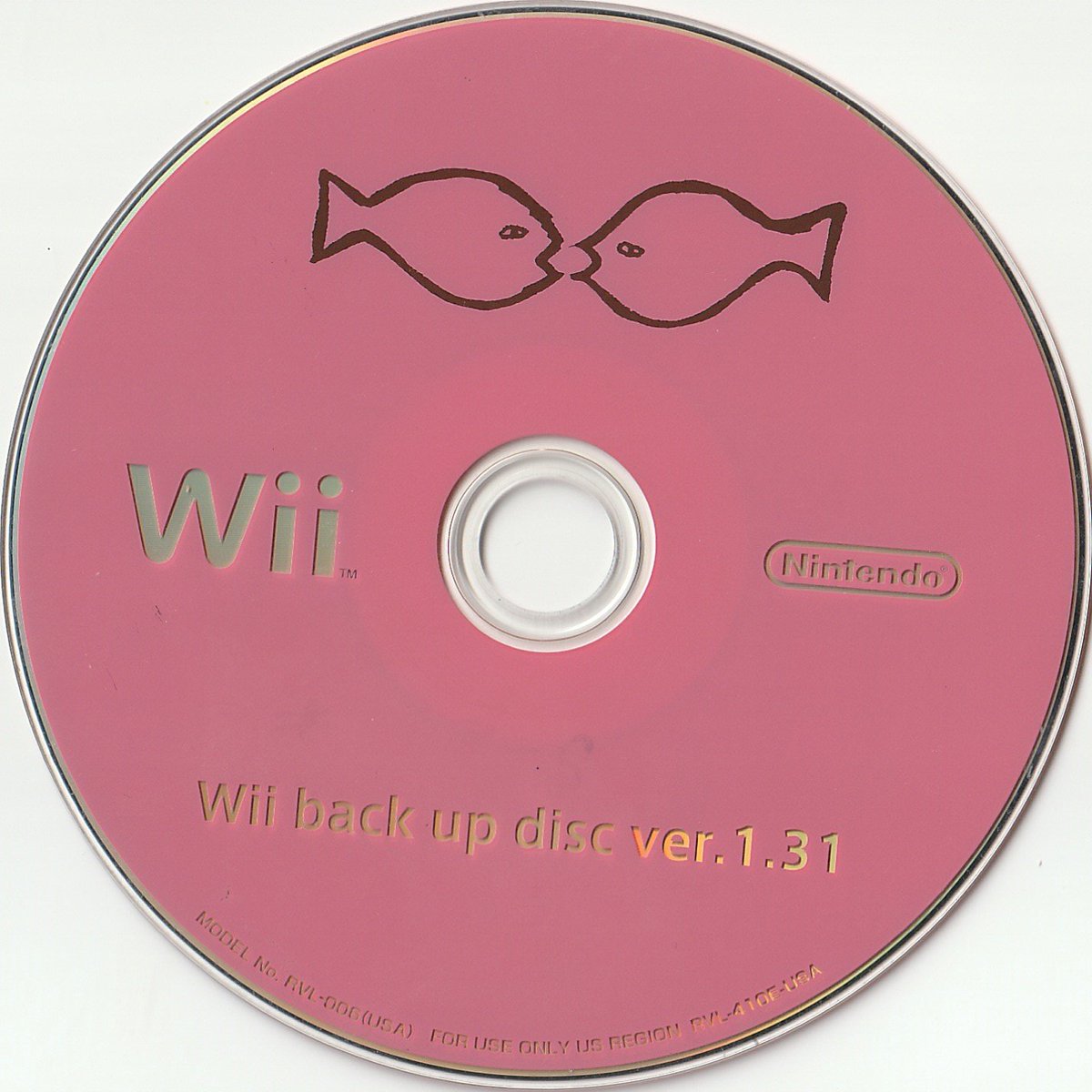
Example of an official Nintendo Wii system repair disc (because I have zero images of the Switch equivalent) most commonly referred to as the "pink fish" disc.

EoiCQPzUwAAKLIy.jpg
 
Last edited by jassin000,
  • Haha
Reactions: impeeza
When you've got 50+ images on a single SD card... The order isn't the issue.
Completely right, but if you insist on have lots and lots of games, you always can have your «favorite» ones at first of fat table, so when you delete the lock file always you select the first one.
 
  • Like
Reactions: jassin000
if US are just running a big hoax, I'm not sure what their endgame goal might be. Like, with the no pre-orders, and the whole sending the custom test hardware (sans software) to randomly selected "testers", then by now they're already in the hole cost wise. Like outside of "haha you all were fooled" at great cost to themselves, I just don't get it. Like, as shady as they're getting with this, it's starting to look more and more like they're pulling a prank on *themselves*
 
if US are just running a big hoax, I'm not sure what their endgame goal might be. Like, with the no pre-orders, and the whole sending the custom test hardware (sans software) to randomly selected "testers", then by now they're already in the hole cost wise. Like outside of "haha you all were fooled" at great cost to themselves, I just don't get it. Like, as shady as they're getting with this, it's starting to look more and more like they're pulling a prank on *themselves*
Imagine if it's MigSwitch or whatever they're called now that made that group and just make fools of themselves to get more sales of Migs?
 
Imagine if it's MigSwitch or whatever they're called now that made that group and just make fools of themselves to get more sales of Migs?
This would be galaxy brain, but US arguably has a better product with support for open source firmware and the wireless receiver (which could allegedly be used to switch games with an app or something). If it was some marketing ploy, I don't think they would make their "competitor" better in any way.
 
This would be galaxy brain, but US arguably has a better product with support for open source firmware and the wireless receiver (which could allegedly be used to switch games with an app or something). If it was some marketing ploy, I don't think they would make their "competitor" better in any way.
I know, just being silly
 
  • Haha
Reactions: impeeza

Site & Scene News

Popular threads in this forum