SysDVR - Stream gameplay directly to a pc

SysDVR
Stream/record gameplay to a PC via USB or network.
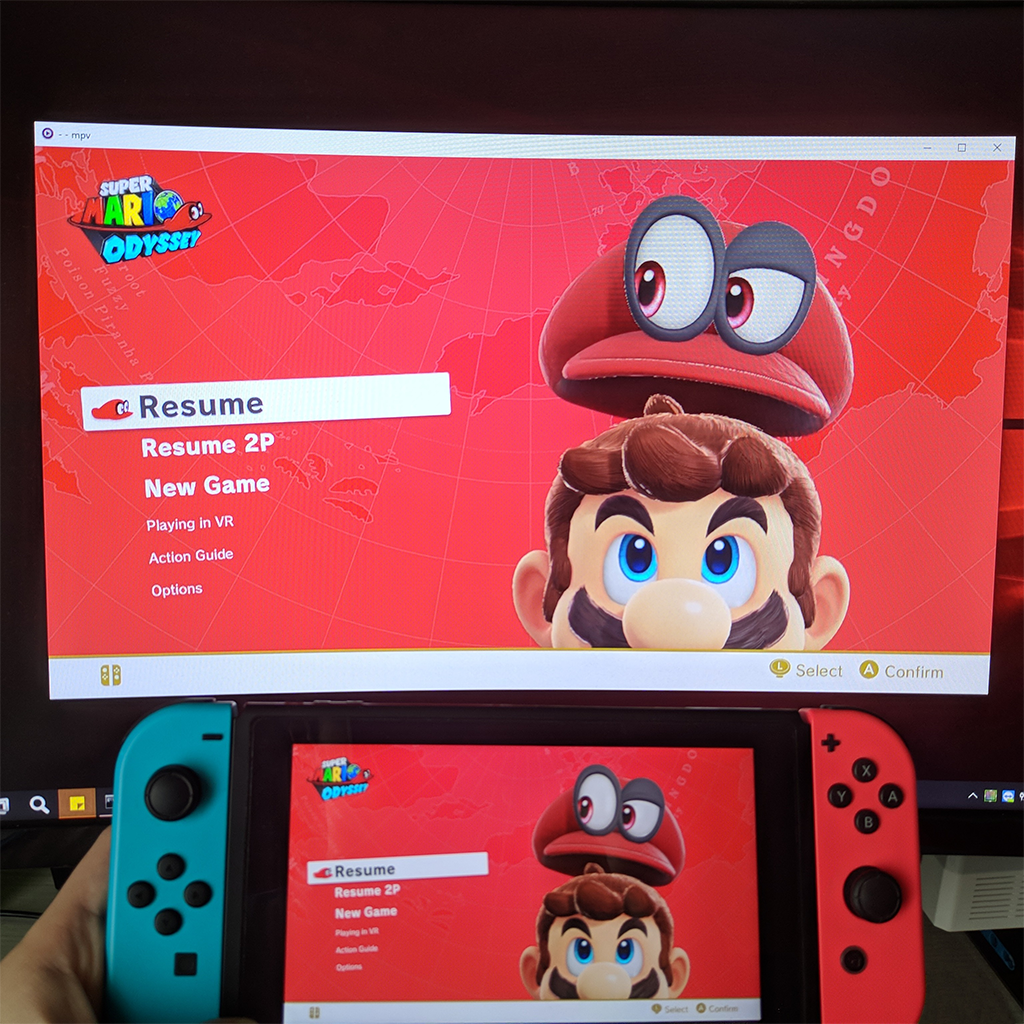
upload_2019-10-21_9-21-20.png

Update: Version 5.0 has been released with low latency streaming, be sure to check it out on github.

This is an experimental sysmodule that allows capturing the running game output on a pc.
As this uses switch's built-in game recording feature it has the same limitations: 720p@30fps and only works on the games that enable it, but by sending the video to another device there's no time limit to the recording.

There are two modes: USB and Network, both work fine but USB is slightly better, at least compared to wifi, didn't try with a LAN adapter.
Players like mpv or vlc can play the stream directly so you can use any screen recording applications but it's also possible to write the stream directly to a file.
To use the USB version you need the UsbStream program you'll find on the github page, it's built using .NET 5 and works on both windows and linux, haven't tried mac but in theory it should work too.

You can see it in action in the two teasers i posted while working on it:

As you can see it's not meant for remote play, but it can work as a basic capture card, audio output is uncompressed so it can be useful for ripping OSTs .

Download and wall of text guide on github: https://github.com/exelix11/SysDVR/
To get notified of updates you can follow this thread or join my new discord server (i also have a twitter account where occasionally post development updates).

Please make sure to read the full readme before reporting issues as it explains the most common problems you may encounter.
 
Last edited by exelix11,
This only for switch?

I would like to do this with my PS3 wireless, but this Is helpful.
¯\_(ツ)_/¯
 
I also noticed that nxmtp, tinfoil, and goldleaf all do not work any longer. My assumption would be the sysmodule is not compatible and would need to be manually removed before using any of those homebrew applications again. Using nxshell to remove the sysmodule(placing it in another location temporarily) and then rebooting might fix this. Afterwards, I would guess replacing the file to its correct location again and rebooting would re-enable SysDVR thus disabling nxmtp, goldleaf, and tinfoil.
To my knowledge, this sysmodule gives the switch console a whole new ID allowing it to work solely with SysDVR so it would not overwrite the old drivers when using zadig.
I'm hoping this is a temporary issue until the application is further developed. Also lets cross our fingers that this will become a bit more user friendly and be enabled system wide at some point.
Btw huge shoutout to the dev for making this for us all!
This is one of the hottest homebrew features we all have dreamed of
 
  • Like
Reactions: Chrisssj2
I also noticed that nxmtp, tinfoil, and goldleaf all do not work any longer. My assumption would be the sysmodule is not compatible and would need to be manually removed before using any of those homebrew applications again. Using nxshell to remove the sysmodule(placing it in another location temporarily) and then rebooting might fix this. Afterwards, I would guess replacing the file to its correct location again and rebooting would re-enable SysDVR thus disabling nxmtp, goldleaf, and tinfoil.
To my knowledge, this sysmodule gives the switch console a whole new ID allowing it to work solely with SysDVR so it would not overwrite the old drivers when using zadig.
I'm hoping this is a temporary issue until the application is further developed. Also lets cross our fingers that this will become a bit more user friendly and be enabled system wide at some point.
Btw huge shoutout to the dev for making this for us all!
This is one of the hottest homebrew features we all have dreamed of


This is what happened to me. So I delete the SysDVR and everything worked again. I hope they can solve this issue.
 
Since I put this on my CFW nxmtp, tinfoil and goldleaf stop working...why?
As explained in the readme, the usb port is busy with SysDVR and they can't access it. Next version which is coming very soon will have a configuration homebrew to temprairly stop it to launch other apps that require it.
 
As explained in the readme, the usb port is busy with SysDVR and they can't access it. Next version which is coming very soon will have a configuration homebrew to temprairly stop it to launch other apps that require it.


Ok, thanks man :D
 
Just released version 2.0 with a fix for the 10 minutes crash as well as support for running alongside other homebrews that require USB access.
Also includes UsbStreamGUI, a graphical launcher for UsbStream as many people seem to struggle with command line applications.


So I just put the version 1 working. What files do I have to replace? I don't want to screw this xD
 
Sweet, fixed all the problems it was having! Awesome work!

--------------------- MERGED ---------------------------

I get a bit of screen tearing but it works!
 
SysDVR
Stream/record gameplay to a PC via USB or network.
View attachment 183541

Update: Version 2.0 has been released to address most of the issues reported here, be sure to check it out on github.

This is an experimental sysmodule that allows capturing the running game output on a pc.
As this uses switch's built-in game recording feature it has the same limitations: 720p@30fps and only works on the games that enable it, but by sending the video to another device there's no time limit to the recording.

There are two modes: USB and Network, both work fine but USB is slightly better, at least compared to wifi, didn't try with a LAN adapter.
Players like mpv or vlc can play the stream directly so you can use any screen recording applications but it's also possible to write the stream directly to a file, in that case video format is raw h264 data, you can convert it to mp4 with ffmpeg and audio is a stream of uncompressed 16-bit little-endian stereo samples at 48kHz, you can play it with audacity.
To use the USB version you need the UsbStream program you'll find on the github page, it's built using .NET core 3 and works on both windows and linux, haven't tried mac but in theory it should work too.

You can see it in action in the two teasers i posted while working on it:

As you can see it's not meant for remote play, but it can work as a basic capture card, audio output is uncompressed so it can be useful for ripping OSTs .

Download and wall of text guide on github: https://github.com/exelix11/SysDVR/

Please make sure to read the full readme before reporting issues as it explains the most common problems you may encounter.


oh my freaking jeez noodles you are blessed child -i did not even know you made this q u q. i am grateful, and am hoping it works on the laptop i got.
 
I recorded 11 minutes of Slay the spire and it works! It gave me a .264 video file and a RAW audio file. I already converted the video file to MP4, just need to combine it with the raw file. Gonna try a more taxing game to see if there is a difference. Thank you for this! I was atually waiting for someone to do it :)
 
SysDVR
Stream/record gameplay to a PC via USB or network.
View attachment 183541

Update: Version 2.0 has been released to address most of the issues reported here, be sure to check it out on github.

This is an experimental sysmodule that allows capturing the running game output on a pc.
As this uses switch's built-in game recording feature it has the same limitations: 720p@30fps and only works on the games that enable it, but by sending the video to another device there's no time limit to the recording.

There are two modes: USB and Network, both work fine but USB is slightly better, at least compared to wifi, didn't try with a LAN adapter.
Players like mpv or vlc can play the stream directly so you can use any screen recording applications but it's also possible to write the stream directly to a file, in that case video format is raw h264 data, you can convert it to mp4 with ffmpeg and audio is a stream of uncompressed 16-bit little-endian stereo samples at 48kHz, you can play it with audacity.
To use the USB version you need the UsbStream program you'll find on the github page, it's built using .NET core 3 and works on both windows and linux, haven't tried mac but in theory it should work too.

You can see it in action in the two teasers i posted while working on it:

As you can see it's not meant for remote play, but it can work as a basic capture card, audio output is uncompressed so it can be useful for ripping OSTs .

Download and wall of text guide on github: https://github.com/exelix11/SysDVR/

Please make sure to read the full readme before reporting issues as it explains the most common problems you may encounter.


Edited: I may need help on how to install this properly because i followed the only tutorial about this emulator and i failed to get it working ; -;"
 
Do you think this could work running alongside with sys-ftpd? It seems to freeze loading it with SysDVR.

As mentioned previously on this thread, no. sys-ftpd uses too much memory.

Edited: I may need help on how to install this properly because i followed the only tutorial about this emulator and i failed to get it working ; -;"

This isn't an emulator.
 
im using the ubs stream now. the gui, in the readme, usb stream mpv default no cache, how to enable caching, delay is okay compared to screen tear due to lag

also if using save to file how to merge the video and audio to an mp4 file?
 
im using the ubs stream now. the gui, in the readme, usb stream mpv default no cache, how to enable caching, delay is okay compared to screen tear due to lag

also if using save to file how to merge the video and audio to an mp4 file?
When streaming directly to mpv there's no cache. To use mpv's built-in cache mechanism use UsbStream "Relay via network" option, then connect via mpv using
Code:
mpv tcp://localhost:6666 --no-correct-pts --fps=30
. But this sounds like your USB wire is not very good, try with a different port or connecting it directly to your pc is you use an HUB, also disabling audio could improve video performances.
 
When streaming directly to mpv there's no cache. To use mpv's built-in cache mechanism use UsbStream "Relay via network" option, then connect via mpv using
Code:
mpv tcp://localhost:6666 --no-correct-pts --fps=30
. But this sounds like your USB wire is not very good, try with a different port or connecting it directly to your pc is you use an HUB, also disabling audio could improve video performances.
When using the gui version of usbstream 2.0 if you select to connect over network(tcp) it will begin by opening a cmd prompt and then endlessly say "waiting for client to connect on 6666". I have successfully gotten the usb mode to work with ease, I switched to network in the config homebrew app and it says streaming over network, however the pc never connects and endlessly reads the message above. Am I missing something? Is tcp mode just broken with UsbStreamGUI 2.0? Tried this on 3 different routers as well.
 
When using the gui version of usbstream 2.0 if you select to connect over network(tcp) it will begin by opening a cmd prompt and then endlessly say "waiting for client to connect on 6666". I have successfully gotten the usb mode to work with ease, I switched to network in the config homebrew app and it says streaming over network, however the pc never connects and endlessly reads the message above. Am I missing something? Is tcp mode just broken with UsbStreamGUI 2.0? Tried this on 3 different routers as well.


Did you entered the Switch's IP address?
 
  • Like
Reactions: Ka_Ninja

Site & Scene News

Popular threads in this forum