SysDVR - Stream gameplay directly to a pc

SysDVR
Stream/record gameplay to a PC via USB or network.
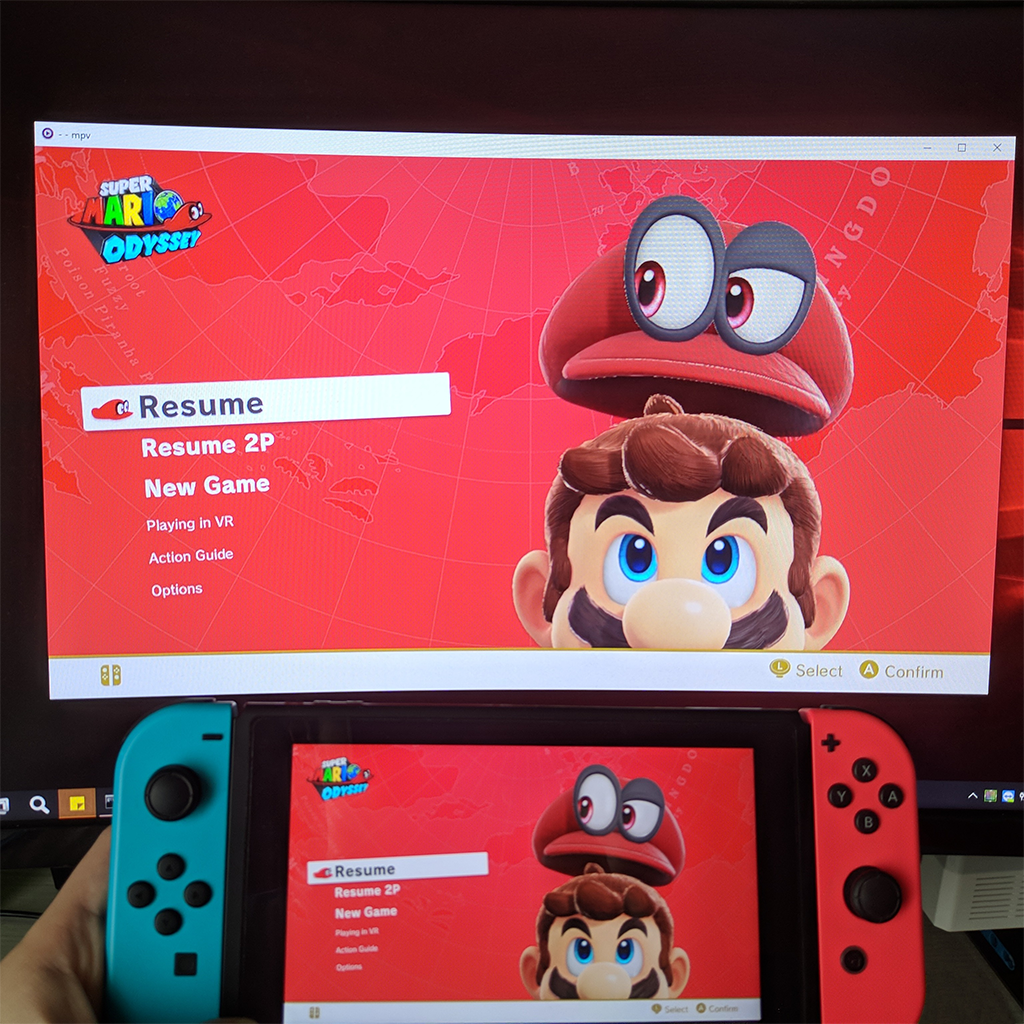
upload_2019-10-21_9-21-20.png

Update: Version 5.0 has been released with low latency streaming, be sure to check it out on github.

This is an experimental sysmodule that allows capturing the running game output on a pc.
As this uses switch's built-in game recording feature it has the same limitations: 720p@30fps and only works on the games that enable it, but by sending the video to another device there's no time limit to the recording.

There are two modes: USB and Network, both work fine but USB is slightly better, at least compared to wifi, didn't try with a LAN adapter.
Players like mpv or vlc can play the stream directly so you can use any screen recording applications but it's also possible to write the stream directly to a file.
To use the USB version you need the UsbStream program you'll find on the github page, it's built using .NET 5 and works on both windows and linux, haven't tried mac but in theory it should work too.

You can see it in action in the two teasers i posted while working on it:

As you can see it's not meant for remote play, but it can work as a basic capture card, audio output is uncompressed so it can be useful for ripping OSTs .

Download and wall of text guide on github: https://github.com/exelix11/SysDVR/
To get notified of updates you can follow this thread or join my new discord server (i also have a twitter account where occasionally post development updates).

Please make sure to read the full readme before reporting issues as it explains the most common problems you may encounter.
 
Last edited by exelix11,
If the version matches v1.2.6.0 then it should be set up fine, for some reason sometimes it shows a different name, try rebooting the switch and it should work.

Still the same, it gives different errors each time and sometimes it actually shows the game streaming for a second then exits
 
which arg command did you use? I dont see any mention of it in the readme
A run.bat with "UsbStream video mpv C:\Users\[youruser]\Desktop\Stream\mpv\mpv.com audio mpv C:\Users\[youruser]\Desktop\Stream\mpv\mpv.com" inside
that's just my path
 
A run.bat with "UsbStream video mpv C:\Users\[youruser]\Desktop\Stream\mpv\mpv.com audio mpv C:\Users\[youruser]\Desktop\Stream\mpv\mpv.com" inside
that's just my path
even after putting it in with my exact path usbstream just closes
 
how to use network stream? the mpv.exe close when i put the bat file (mpv.exe tcp://%my switch ip%:6666 --no-correct-pts --fps=30) also the command promp mpv autoclose upon opening thus cant be used, im using sx os and put the titles on sxos folder/titles
 
I'm not sure, did you specify 30fps in ffmpeg ? the h264 format doesn't include timing info so the converter may have just assumed something like 25fps.

Nope, doesn't feel like this is working. I just tried it out, and as the .264 file is already slowed down, converting it and changing the framerates does not change anything, it just outputs a slowed down file with a higher framerate :/ I don't really know what to do here, kinda stuck
 
SysDVR
Stream/record gameplay to a PC via USB or network.
View attachment 183541

This is an experimental sysmodule that allows capturing the running game output on a pc.
As this uses switch's built-in game recording feature it has the same limitations: 720p@30fps and only works on the games that enable it, but by sending the video to another device there's no time limit to the recording.

There are two modes: USB and Network, both work fine but USB is slightly better, at least compared to wifi, didn't try with a LAN adapter.
Players like mpv or vlc can play the stream directly so you can use any screen recording applications but it's also possible to write the stream directly to a file, in that case video format is raw h264 data, you can convert it to mp4 with ffmpeg and audio is a stream of uncompressed 16-bit little-endian stereo samples at 48kHz, you can play it with audacity.
To use the USB version you need the UsbStream program you'll find on the github page, it's built using .NET core 3 and works on both windows and linux, haven't tried mac but in theory it should work too.

You can see it in action in the two teasers i posted while working on it:

As you can see it's not meant for remote play, but it can work as a basic capture card, audio output is uncompressed so it can be useful for ripping OSTs .

Download and wall of text guide on github: https://github.com/exelix11/SysDVR/
Please make sure to read the full readme before reporting issues as it explains the most common problems you may encounter.
y a a a s
 
Was playing as normal then this happened

Fatal error. System.AccessViolationException: Attempted to read or write protected memory. This is often an indication that other memory is corrupt.
Fatal error. Internal CLR error. (0x80131506)
at System.Enum.GetEnumInfo(System.RuntimeType, Boolean) at LibUsbDotNet.NativeMethods.BulkTransfer(LibUsbDotNet.DeviceHandle, Byte, Byte*, Int32, Int32 ByRef, UInt32)

at LibUsbDotNet.NativeMethods.UnrefDevice(IntPtr)
at LibUsbDotNet.NativeMethods.BulkTransfer(LibUsbDotNet.DeviceHandle, Byte, Byte*, Int32, Int32 ByRef, UInt32)
at LibUsbDotNet.NativeMethods.UnrefDevice(IntPtr)
at LibUsbDotNet.LibUsb.UsbEndpointBase.Transfer(IntPtr, Int32, Int32, Int32, Int32 ByRef)
at LibUsbDotNet.Device.ReleaseHandle()
at LibUsbDotNet.LibUsb.UsbEndpointBase.Transfer(System.Object, Int32, Int32, Int32, Int32 ByRef)
at System.Runtime.InteropServices.SafeHandle.InternalRelease(Boolean)
at UsbStream.UsbDevStream.Read(Byte[], Int32, Int32)
at System.Runtime.InteropServices.SafeHandle.Dispose(Boolean)
at System.IO.Stream.Read(System.Span`1<Byte>)
at System.Runtime.InteropServices.SafeHandle.Finalize()
at UsbStream.Program.<StreamLoop>g__ReadToSharedArray|14_1(<>c__DisplayClass14_0 ByRef)
at UsbStream.Program.StreamLoop(IOutTarget, UsbStream.UsbDevStream, StreamKind)
at UsbStream.Program+<>c__DisplayClass16_0.<Main>b__2()
at System.Threading.ThreadHelper.ThreadStart_Context(System.Object)
at System.Threading.ExecutionContext.RunInternal(System.Threading.ExecutionContext, System.Threading.ContextCallback, System.Object)
at System.Threading.ThreadHelper.ThreadStart()
 
Oh nice.
A new way to capture footage in handheld mode, wonderful.
Hopefully this could be used for homebrew too eventually if not already.
 
That's great, thanks!..

BTW how to run wifi streaming in Windows version of mpv.exe?..
It's just "Drop files or URLs to play here" string, but I cannot put
Code:
tcp://<my switch ip address>:6666 --no-correct-pts --fps=3

View attachment 183546

Solved, thanks, one must create .bat file with mpv.exe tcp://%ip-address%:6666 --no-correct-pts --fps=30
it works for you?
 
Is it possible a port to other consoles? Like 3ds and wiiu. I know that 3ds have some apps to to stream the video(like KitKat),but most of times,it isn't fast
 

Site & Scene News

Popular threads in this forum