Switch - Permanently power cooling fan

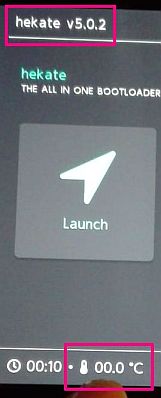
If you have a hardware issue with temperature indicator and the fan will not spin.
You can permanently power the cooling fan. The NSW dosn't check faulty fan speed.

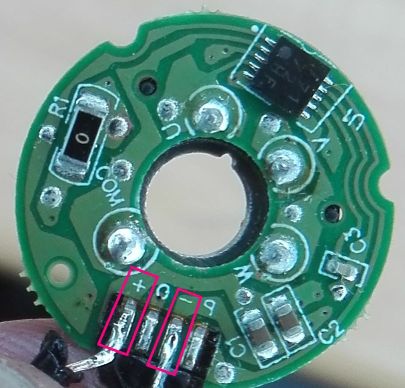
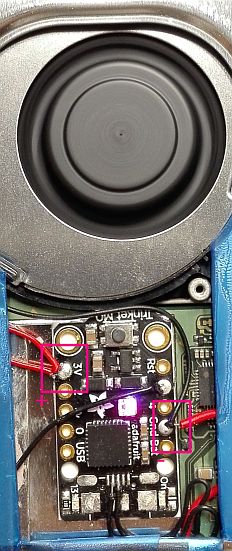
You can use V3.3 from Nand point, it will give enough power for trinket & fan, too.
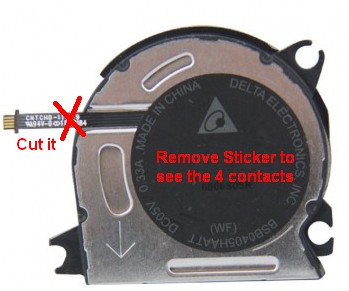
51K0ml.jpg


51KQK2.jpg


51K5M2.jpg


51K7Jf.jpg


Warning Note: Dosn't connect the flat cable from the fan back to the mainboard. Cut it away!
Remember also: Permanently power fan will drain your accu but better as to dispose NSW.
 
Hey, can anyone help me. I am using Reverse NX in handheld and using docked speeds. But the fan is following handheld profile and it goes all out at 100%. How do I set docked fan profile in handheld so that it doesn't go all out trying to maintain handheld temperature limits?
 
Hello, I've been trying to increase the fan speeds with no luck. I have made a "system_settings.ini" file and put the lines in the file and placed it in the atmosphere directory. I have also rebooted to and from hekate or do I have to do a full reboot for this to take effect? Also, I'm running Atmosphere 0.12.0 on firmware 10.0.3
 
Does have a way to create a sys module to works with SXOS ?
By the way, Really thanks... That is something that I've waiting for a time.
My PS3/X360 got some problems about the temperature, almost lost these two if was not the Cooler Fan Mod Software...
Again, Thanks a Lot.
This is cool but there's no need to take risk.

add this to atmosphere/system-settings.ini to enable max fan speed.

str!"[[-1000000, 40000, 255, 255]
-1000000, 40000 these are temperature 40000 = 40C
255 is the speed, 0-255

Code:
; Unlock fan speed (dock speeds)
[tc]
tskin_rate_table_handheld = str!"[[-1000000, 40000, 255, 255], [36000, 43000, 51, 51], [43000, 48000, 51, 102], [48000, 53000, 102, 153], [53000, 58000, 153, 255], [48000, 58000, 153, 255]]"
 
Does this work on the latest firmware / atmosphere [FW 9.1 / atmos 0.10.2]? I wan't to max out the fan speed at 50 or 60 percent speed, but changing the values doesn't seem to work.

Hello, I've been trying to increase the fan speeds with no luck. I have made a "system_settings.ini" file and put the lines in the file and placed it in the atmosphere directory. I have also rebooted to and from hekate or do I have to do a full reboot for this to take effect? Also, I'm running Atmosphere 0.12.0 on firmware 10.0.3

For those that asked it took me a bit to figure this out but it does work with latest firmware just put the system_settings.ini file in atmosphere/config folder
 
Hello, I've been trying to increase the fan speeds with no luck. I have made a "system_settings.ini" file and put the lines in the file and placed it in the atmosphere directory. I have also rebooted to and from hekate or do I have to do a full reboot for this to take effect? Also, I'm running Atmosphere 0.12.0 on firmware 10.0.3

Did you manage to increase the speed of the fans?
 

Site & Scene News

Popular threads in this forum