


For short:
why some .3ds games in the SD card of Stargate flashcard don’t have a corresponding .sav file?
detailed:
I have a New Nintendo 3DS XL(USA region) that I prefer not to homebrew, and a Stargate flashcard(which doesn’t require homebrew to use encrypted .3ds roms to emulate a real 3ds cartridge) with a 32 GB SD card. I have played several games with this flashcard like Mario Kart 7 and Mario Party- Star Rush. Recently I found the 32 GB SD card is too small to hold more games that I want to play, so I planed to replace it with a new 64 GB SD card. I tried to copy every single file in the 32 GB card to the 64 GB card, then I inserted the new 64 GB card into the Stargate flashcard and started testing on my 3ds. Weirdly, I found some games’ save data was lost and reset, while others are carried over without any problem. So I looked more carefully into what files are in the root path of the 32 GB SD card, and found something very strange. I should have created my save file for every single game that I have here in the SD card, but only some of the [game name].3ds files have a corresponding [game name].sav file that looks like its save data file. And I found out that it’s exactly those games that don’t have .sav file that lost its save data when ran on the new 64 GB SD card. However, if I insert the old 32 GB SD card back into the Stargate flashcard and run those games on my 3ds, those games still have their save data there. So where is the save data of those games stored? How should I swap to a bigger SD card while maintaining the save data that I played?
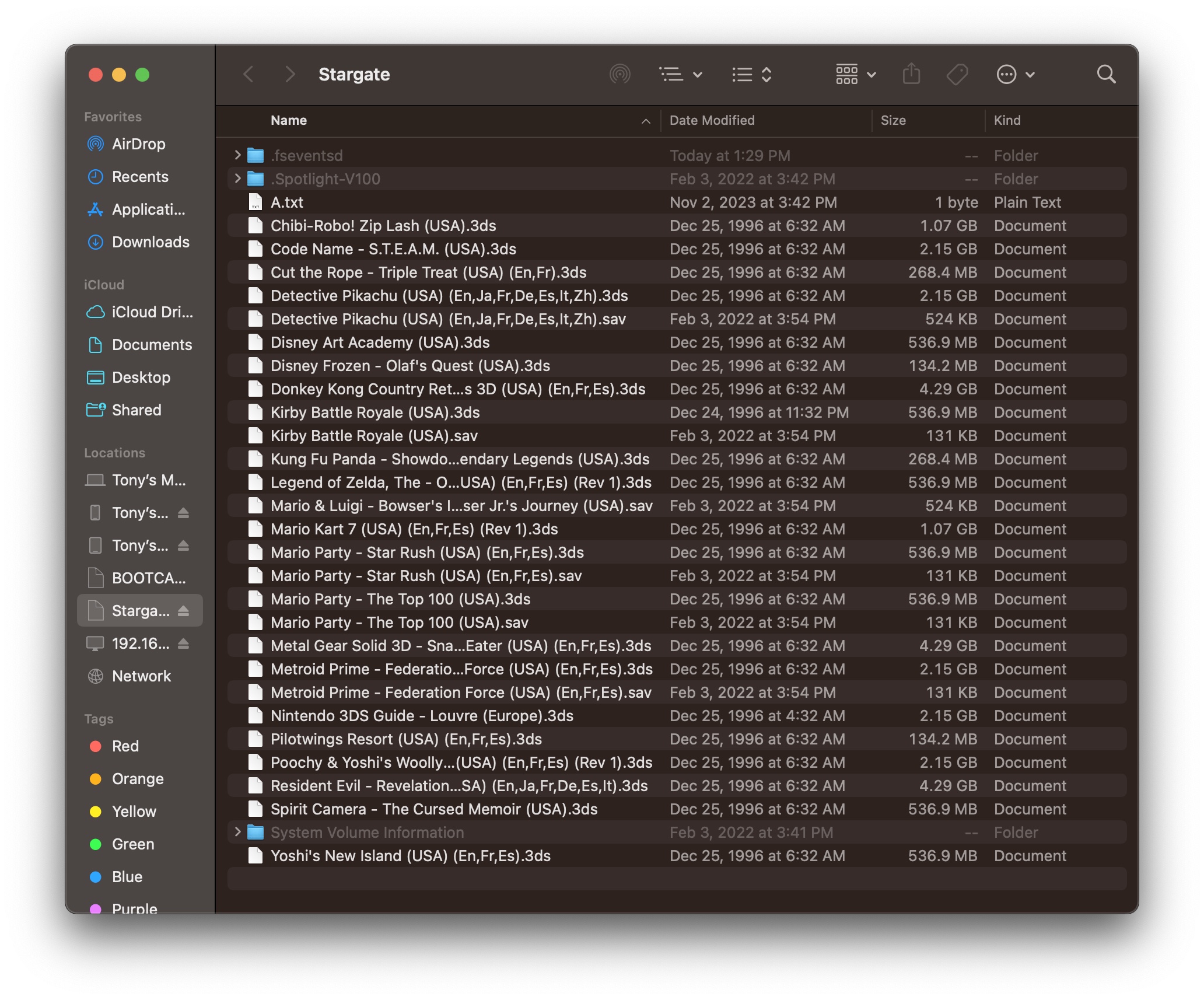
Here’s what looks like in my old 32 GB SD card in finder on macOS with hidden files shown. Those three hidden folders seems not what I am looking for because they are created after the SD card is formatted and inserted on macOS, not by the Stargate flashcard. As shown here, Mario Kart 7 doesn’t have a .sav file, and its save data was lost then copied to the new 64 GB card. While Mario Party- Star Rush has s .sav file, and its save data was carried over to the new 64 GB card. What’s more, I tried to manually delete the .sav file of Mario Party- Star Rush, then undoubtedly, the game’s save data was reset, so it should be this .sav file that stores the save data of corresponding .3ds rom.
I tried to search the internet about this topic. However, news about the Stargate flashcard are too hard to find now, even its official website is closed. But I found another user here.
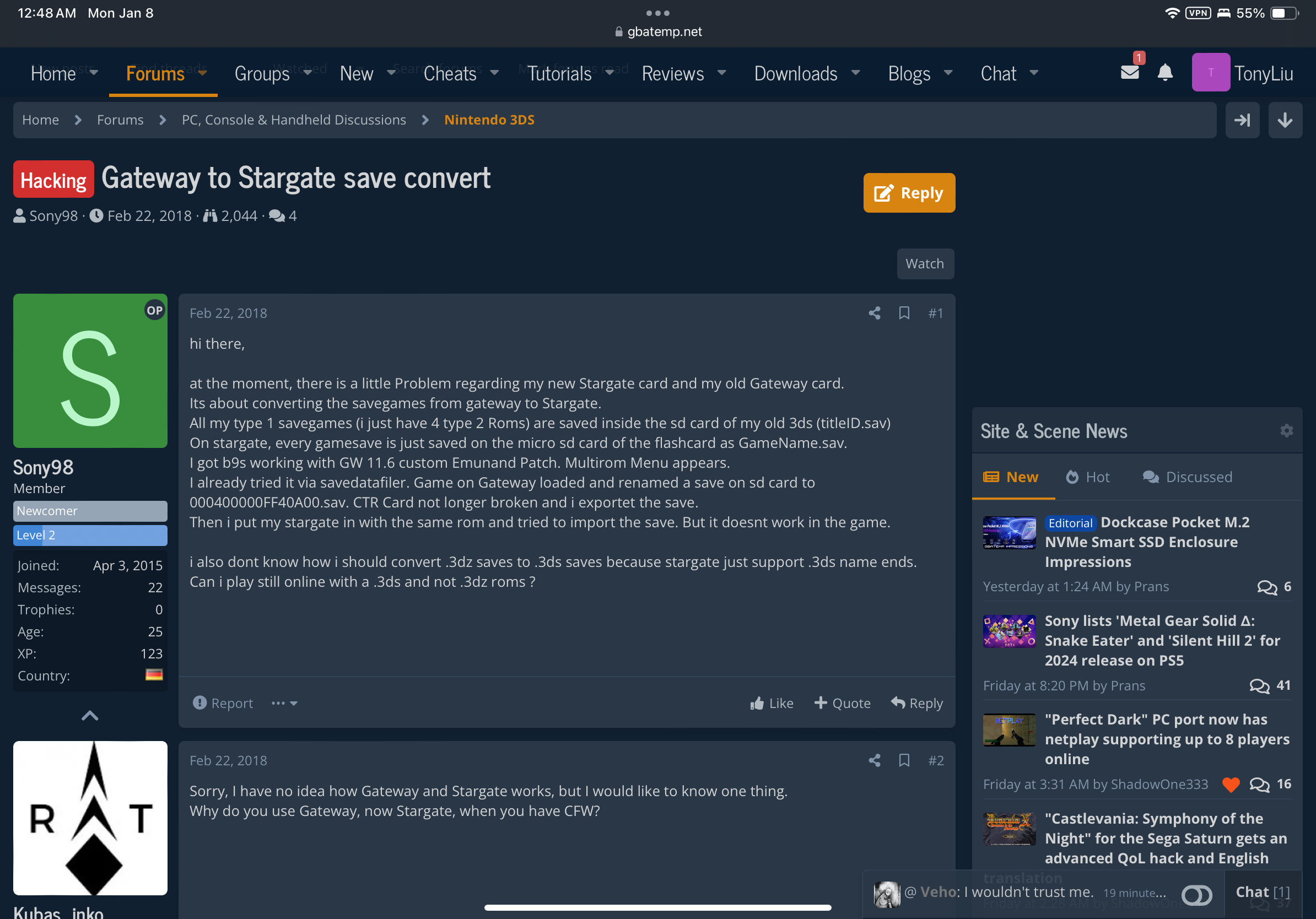
This user mentioned something like type 1, type 2 which I suspect may be related to my problem. But more search about this type 1, type 2 thing didn’t get any meaningful information.
I also have an old 3ds with B9S, so I had an idea of using save data management homebrew apps like checkpoint to manually transfer the save data from my Stargate flashcard. But considering this function was designed to use with official game cartridges, so using it with flashcard may have a risk of corrupting data. And since I have no way to backup my save data of those games without .sav files from the old 32 GB SD card, it’s too risky for me to try.
why some .3ds games in the SD card of Stargate flashcard don’t have a corresponding .sav file?
detailed:
I have a New Nintendo 3DS XL(USA region) that I prefer not to homebrew, and a Stargate flashcard(which doesn’t require homebrew to use encrypted .3ds roms to emulate a real 3ds cartridge) with a 32 GB SD card. I have played several games with this flashcard like Mario Kart 7 and Mario Party- Star Rush. Recently I found the 32 GB SD card is too small to hold more games that I want to play, so I planed to replace it with a new 64 GB SD card. I tried to copy every single file in the 32 GB card to the 64 GB card, then I inserted the new 64 GB card into the Stargate flashcard and started testing on my 3ds. Weirdly, I found some games’ save data was lost and reset, while others are carried over without any problem. So I looked more carefully into what files are in the root path of the 32 GB SD card, and found something very strange. I should have created my save file for every single game that I have here in the SD card, but only some of the [game name].3ds files have a corresponding [game name].sav file that looks like its save data file. And I found out that it’s exactly those games that don’t have .sav file that lost its save data when ran on the new 64 GB SD card. However, if I insert the old 32 GB SD card back into the Stargate flashcard and run those games on my 3ds, those games still have their save data there. So where is the save data of those games stored? How should I swap to a bigger SD card while maintaining the save data that I played?
Post automatically merged:
Here’s what looks like in my old 32 GB SD card in finder on macOS with hidden files shown. Those three hidden folders seems not what I am looking for because they are created after the SD card is formatted and inserted on macOS, not by the Stargate flashcard. As shown here, Mario Kart 7 doesn’t have a .sav file, and its save data was lost then copied to the new 64 GB card. While Mario Party- Star Rush has s .sav file, and its save data was carried over to the new 64 GB card. What’s more, I tried to manually delete the .sav file of Mario Party- Star Rush, then undoubtedly, the game’s save data was reset, so it should be this .sav file that stores the save data of corresponding .3ds rom.
Post automatically merged:
I tried to search the internet about this topic. However, news about the Stargate flashcard are too hard to find now, even its official website is closed. But I found another user here.
This user mentioned something like type 1, type 2 which I suspect may be related to my problem. But more search about this type 1, type 2 thing didn’t get any meaningful information.
Post automatically merged:
I also have an old 3ds with B9S, so I had an idea of using save data management homebrew apps like checkpoint to manually transfer the save data from my Stargate flashcard. But considering this function was designed to use with official game cartridges, so using it with flashcard may have a risk of corrupting data. And since I have no way to backup my save data of those games without .sav files from the old 32 GB SD card, it’s too risky for me to try.
Last edited by TonyLiu,







