- Joined
- Apr 1, 2008
- Messages
- 262
- Reaction score
- 0
- Trophies
- 1
- Age
- 30
- Location
- Sylvarant - Tales of Symphonia
- Website
- Visit site
- XP
- 260
- Country

What else could I add to this picture which I want to make my sig:
*EDIT*
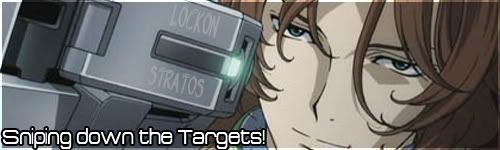
I've tried 'melting' the text into the machine but It still feels incomplete
*EDIT*
I've tried a completely new one:

I'm thinking on using that one instead but I can't think of any better fonts or any other techniques, here's the download link for the .psd file:
Lockon Stratos Cherudium Sig.psd
If you just reveal or hide some layers make just different versions, I can't think of which one to have though.
*EDIT*
I've tried 'melting' the text into the machine but It still feels incomplete
*EDIT*
I've tried a completely new one:
I'm thinking on using that one instead but I can't think of any better fonts or any other techniques, here's the download link for the .psd file:
Lockon Stratos Cherudium Sig.psd
If you just reveal or hide some layers make just different versions, I can't think of which one to have though.