Hardware Right Joycon not working properly

  • Thread starter Thread starter wacko1201
  • Start date Start date
  • Views Views 3,096
  • Replies Replies 4

wacko1201

New Member
Newbie
Joined
Mar 5, 2017
Messages
1
Reaction score
0
Trophies
0
Age
35
XP
81
Country
United States
So I recently swapped the shells on my joycons with clear ones and after putting everything back together the right joycon will not connect to the switch in wireless mode. However, the joycon works perfectly fine when attached to the switch, aside from the switch taking around 10 seconds to recognize the joycon after turning on. When off of the switch, the joycon will not light up when pressing any buttons. The left joycon works without a problem

Things I have tried:
  • Swapping the right and left joycon batteries. The right joycon battery works perfectly in the left joycon, but neither battery works in the right joycon
  • Disconnecting and reconnecting the joycon rail ribbon cables
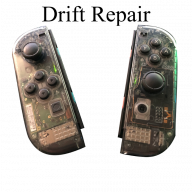
I don't know if the rail might be broken. I am hoping that others who have had this problem could possibly help. Thanks
 
Try this with the joycons attached.

  1. Select System Settings from the Switch's Home screen.
  2. Select Controllers and Sensors from the menu.
  3. Select Disconnect Controllers. ...
  4. Attach a pair of Joy-Cons to the Switch console and hold the X button on the right Joy-Con until the controllers are disconnected.
 
There's a tiny 0 ohm resistor that's easily damaged while modifying the right joycon. Its just to the right of the battery connection socket. That would need to be replaced or bridged for full functionality to return.
 
There's a tiny 0 ohm resistor that's easily damaged while modifying the right joycon. Its just to the right of the battery connection socket. That would need to be replaced or bridged for full functionality to return.
can you show me the picture that resistor
 

Site & Scene News

Popular threads in this forum