Homebrew RetroArch Switch

  • Thread starter Thread starter ShadowOne333
  • Start date Start date
  • Views Views 2,166,571
  • Replies Replies 9,226
  • Likes Likes 100
Yeah tried a nice clean install just puting my savefiles and bios system , play punisher cps1 and after closing and reopen retroarch the history list are buged. =(
 
Hello everyone! I'm a bit of an amateur so I hope someone could help me out.

I'm having some trouble getting the GBA emulator to use the save files I want. I'm trying to use a save file from the A Link to the Past/Four Swords gba game that has Four Swords completed so that I can play the extra dungeon in A Link to the Past.

I put the save file in /retroarch/cores/savefiles. It is named identically to the rom (zelda.gba and zelda.sav). The save is in the .sav format. It won't read it. If I start the game the save files are blank and when I quit I see that the .sav file is still there and a .srm file is create. I tried renaming the .sav to .srm (so it's zelda.gba and zelda.srm) and that won't work either. Starting up the game seems to overwrite my zelda.srm file with a smaller zelda.srm file that has no progress, all save files are empty.

Retroarch has been wonderful and I've had no other problems with it. I just really want to play that extra dungeon that I missed out on growing up because I didn't have anyone to play multiplayer with. Any idea what I'm doing wrong? If no one can figure it out, does anyone happen to know a cheat I could use to get into the dungeon?

Where did the SAV files you're trying to use come from? What emulator?
 
Last edited by FanboyKilla,
Well I wonder what you guys got going on that I don't, because mine has been working fine as far as I can tell. What do you mean by "bugged" specifically?
 
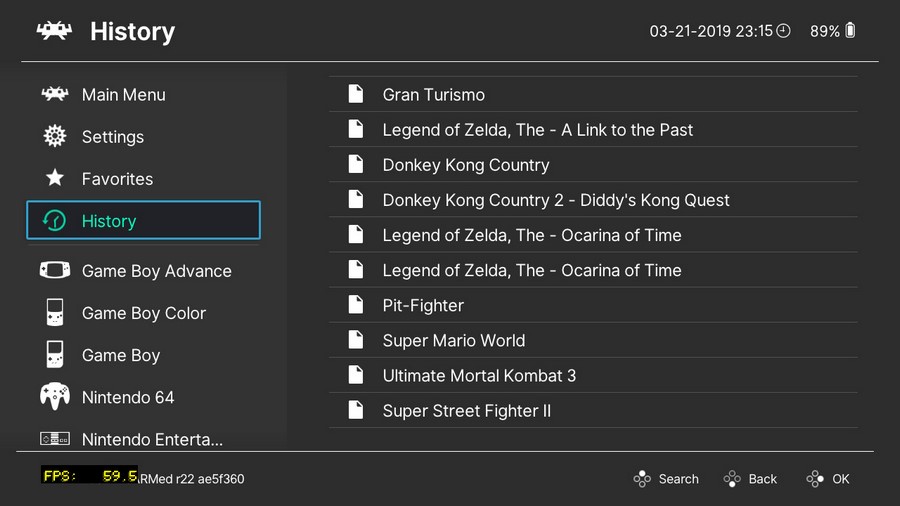
Since the list changed from "name of the file(core)" to "name of the file | core" and file size go from 9 to 16kb , when the retroarch close and open the list get bad texts . So i cant identify the name of the games.. this only happen in the newer builds for me, or since i update to reinx 6.2 ofifical stable yesterday.
 
Just to be clear, we're all talking about this history list right??

2019032122480700-F0813053-F5-E68-D338-B07-D7-D5-A145189-E-Copy.jpg
 
I put the save file in /retroarch/cores/savefiles. It is named identically to the rom (zelda.gba and zelda.sav). The save is in the .sav format. It won't read it. If I start the game the save files are blank and when I quit I see that the .sav file is still there and a .srm file is create. I tried renaming the .sav to .srm (so it's zelda.gba and zelda.srm) and that won't work either. Starting up the game seems to overwrite my zelda.srm file with a smaller zelda.srm file that has no progress, all save files are empty.
I did something like this with Pokemon emerald and for me it worked without problems.
So normally RetroArch shouldn't have problems with something like this.

Have you tested the savefile on your PC?
For testing purpose you could download mGBA directly and try it with the emulator itself on the switch to see if that works.
I think mGBA uses .sav files. If this doesn't work then your savefile is messed up.
 
Last edited by hallo23,
yeah, the recent opened games

Which GUI are you using? ozone or xmb? And you never did post back and tell me what you had set under "Settings > Playlists > Save playlists using old format".

I use ozone GUI if it makes any difference but yeah that's it

Hmmm, yeah ozone working fine for me also.. :unsure:

2019032123151800-F0813053-F5-E68-D338-B07-D7-D5-A145189-E-Copy.jpg
 
Where did the SAV files you're trying to use come from? What emulator?

I've tried the mgba and vba next cores. I've tried three different SAV files (using both .sav and .srm file names).

One from gamefaqs.


One from Zelda Legends Emulation.


And one I got from searching the Forums here from user T-hug.

Still won't let me post the links here but if you need later I can try and upload the files.

Thanks!
 
SHARED SETUPS

Apologies if this has been addressed, but we're all going through the pain of setting RA up on our own when each setup on Switch has mostly the same configuration, sans of course individual roms. Why aren't there any zips with pre-configured installs made by all you clever guys? You spend hours & hours setting it up just so, and I never see you share your hard work. Of course this is a selfish post, but it seems unusual to see no sharing here. Nothing illegal about it either. Surely thumbnails; init / config files are the same across Switches, esp. if we set our ROM folder the same?

I have had to do much work on my pc & search/replace for instance pc folder references to Switch folder refs, & transfer them to the Switch because mine is 100% offline. Once complete I can just as well zip & share. I don't yet because mine is still in development & tbh sux :)
 
I wonder if Wine will ever come to the Switch. I was thinking earlier it would be awesome if Dosbox could run Battlefield 1942. But that needed Windows XP which was the NT kernel.
Nope. Switch isn’t x86, its aarch64. And even if you somehow did get it on Switch you’d be limited to windows for arm shit
 
To be clear I'm not suggesting we share our pc setups. I'm suggesting we share our Switch setups. I have been forced to use & alter my pc setups which work, of course using Switch core files.
 
Last edited by richsmith335,
To be clear I'm not suggesting we share our pc setups. I'm suggesting we share our Switch setups. I have been forced to use & alter my pc setups which work, of course using Switch core files.
Wat. I was responding to someone else who was asking about Wine on Switch
 
  • Like
Reactions: richsmith335
Thank you it was late, im at work now but i will try this later.
Its the same if i update retroarch by the update settings inside it or download from the repo and override manually the files in the microsd?
 
I made some more test using latest version of Dosbox dynarec core on Switch by @m4xw and fr500 (beta-preview available on my Patreon or on m4xw patron discord channel). Ultima 7 and 8 work fine using 10,000 cycles also. These games are not scrolling smooth, but they never scrolled smooth even on real PC.

Controls are fine using right analog for pointer and ZL/ZR for mouse buttons and some keys mapped to buttons (e.g. dpad to cursor keys etc.)

ultima7.jpg


ultima8.jpg


aliencarnage.jpg
 
Last edited by rsn8887,
  • Like
Reactions: hippy dave
I made some more test using latest version of Dosbox dynarec core on Switch by @m4xw and fr500 (beta-preview available on my Patreon or on m4xw patron discord channel). Ultima 7 and 8 work fine using 10,000 cycles also. These games are not scrolling smooth, but they never scrolled smooth even on real PC.

Controls are fine using right analog for pointer and ZL/ZR for mouse buttons and some keys mapped to buttons.

View attachment 161678

View attachment 161679

View attachment 161680
That version of dosbox is public?

Thank you
 

Site & Scene News

Popular threads in this forum