Hacking QUICK/NEWBIE QUESTIONS here!

  • Thread starter Thread starter OSW
  • Start date Start date
  • Views Views 610,090
  • Replies Replies 4,024
  • Likes Likes 7
Okay, I have another question. I have installed TriiForce Beta 7, backed up NAND, used w2n on the wad files, and merged the ticket and title folders to my SD. However, TriiForce still won't recognize it! Any help?
 
Ok i just got Family Feud 2010 and tried to load it but it gives me a black screen, any solutions for this? Im using USB loader GX and my Wii is on 3.4U. Thanks in advance.
 
Hello,

When I try using the News or Forecast channel, I get an error about the System files being corrupt. It displays the correct weather/news at first, but after a couple seconds, I get the error. I have Soft-modded my Wii safely up to menu version 4.2 via the guides on gba temp. My back up games, USB loader, and everything else works perfectly fine. Can anyone help me get my new & forecast channel back? Thanks.
 
How can I format a drive to WBFS on a Mac? I've spent a really long time trying to do this. I tried running WBFS manager in Parallels but it gave me an error when I tried to format the drive.

 
Slyakin said:
Okay, I have another question. I have installed TriiForce Beta 7, backed up NAND, used w2n on the wad files, and merged the ticket and title folders to my SD. However, TriiForce still won't recognize it! Any help?
You might have cIOS rev18 or 19. Triiforce doesn't work with those

joybeba6679 said:
Ok i just got Family Feud 2010 and tried to load it but it gives me a black screen, any solutions for this? Im using USB loader GX and my Wii is on 3.4U. Thanks in advance.
What cIOS?

Dopply said:
What is the latest custom MIOS? I've been a bit confused about this. Thanks!
cMIOS rev5 (waninkoko)

QUOTE(CompC @ May 6 2010, 11:29 PM)
How can I format a drive to WBFS on a Mac? I've spent a really long time trying to do this. I tried running WBFS manager in Parallels but it gave me an error when I tried to format the drive.
WBFS Manager for Mac.
 
Gordinio said:
CompC said:
How can I format a drive to WBFS on a Mac? I've spent a really long time trying to do this. I tried running WBFS manager in Parallels but it gave me an error when I tried to format the drive.

WBFS Manager for Mac.

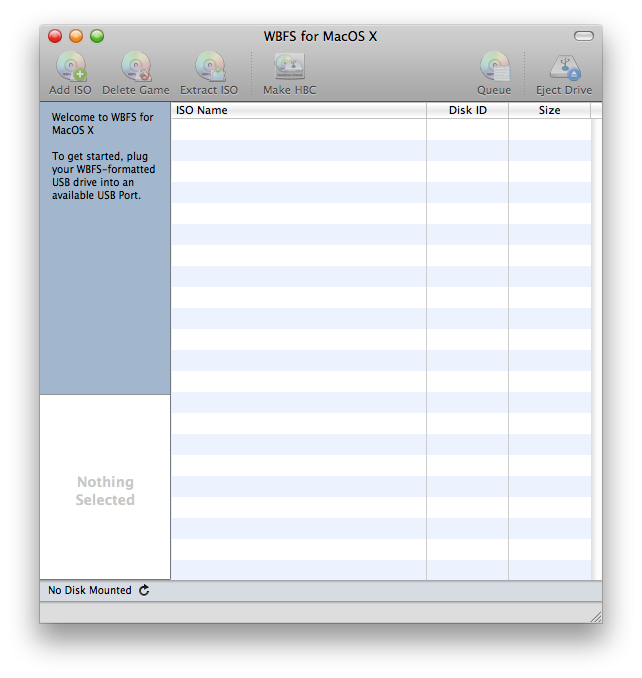
This WBFS Manager for Mac? I can't seem to figure out how to do it from here.

Oh, my hard drive's connected through FireWire. Does it have to be connected through USB? I'll have to go find a cable…

3ep47vz7k0sgs.png
 
i have a question:
my wii is modded with a chip(but i don't know which chip it is)
my wii is 4.1U,i want to know if i can update it for 4.2U without having any risk of bricking or any other problem
thanks
 
Hi, I'm a noob. I've been looking online and across this forum for like 2 hours so far trying to soak up some information on how to mod my Wii. I'm ONLY interested in playing backup games (through burned DVDs). I have 4.2u . Ill appreciate if someone can point me in the right direction of a good guide that would help me do this, and nothing more to my Wii. I have an SD card and DVDs.
Thanks
 
trying to burn gciso backups with imgburn, keeps getting an error during the verify process. Error layouts do not match, help?
 
vdogg123 said:
Hi, I'm a noob. I've been looking online and across this forum for like 2 hours so far trying to soak up some information on how to mod my Wii. I'm ONLY interested in playing backup games (through burned DVDs). I have 4.2u . Ill appreciate if someone can point me in the right direction of a good guide that would help me do this, and nothing more to my Wii. I have an SD card and DVDs.
Thanks
You could follow the stickied softmod guide in the hacking section of the wii forums or if you wanted to learn about hacking while you do it then follow the complete softmod guide: http://sites.google.com/site/completesg/home
 
Evil-Popeye said:
vdogg123 said:
Hi, I'm a noob. I've been looking online and across this forum for like 2 hours so far trying to soak up some information on how to mod my Wii. I'm ONLY interested in playing backup games (through burned DVDs). I have 4.2u . Ill appreciate if someone can point me in the right direction of a good guide that would help me do this, and nothing more to my Wii. I have an SD card and DVDs.
Thanks
You could follow the stickied softmod guide in the hacking section of the wii forums or if you wanted to learn about hacking while you do it then follow the complete softmod guide: http://sites.google.com/site/completesg/home

Thank you so much!!! That guide was very in depth and it works perfectly.

I have another question though. I think I read somewhere that playing a PAL game on a NTSC wii will brick it. Is this true? Even if you use Neogamma?

Also, can you go online to play multiplayer using backed up games?

Thanks for any responses
 
vdogg123 said:
Thank you so much!!! That guide was very in depth and it works perfectly.

I have another question though. I think I read somewhere that playing a PAL game on a NTSC wii will brick it. Is this true? Even if you use Neogamma?

Also, can you go online to play multiplayer using backed up games?

Thanks for any responses
Running a PAL game on an NTSC wii won't brick it.

Allowing the game to update your Wii however can brick it, so be sure to block updates/ run it through a loader like NeoGamma. (of course I'm talking about originals here).

You can play online, no problem. Just don't cheat
tongue.gif
 
ok, so i started from scratch followed all the steps in the sticky thing, installed all the cIOS bs and did the mios patches. I am STILL getting disc read error 1053 for both the GC and WII back ups, what does this mean? I checked my serial number and my drive is good to go, am I burning them incorrectly? Am i using bad discs? I used imgburn and did the verify thing, which I think is what's wrong because it won't verify them, help me plz
 
I have a hardmod (WiiKey 2 FW1.3) and a system menu hack for region free (StartPatch 4.2.6). A couple of days ago everything was fine but now half my games don't work (Unable to read disc error) and I haven't done anything differently. I'm on 4.2U btw.
 
What's the optimum size for a WBFS drive for usbloaders? For formatting to WBFS which tool do you recommend and from what format to it?
 
Hello. I have a few questions. I have a modded Wii, but I guess that's not important. I'm at firmware 4.2 and I've "hacked" my wii using this guide: http://www.metagames-eu.com/forums/les-tut...tml#post1518629

I'm just interested in playing games on an external hard drive. I was looking at the faq and I couldn't understand how I should format my drive. It seems USB Loader GX supports USB and NTFS, so if I just install USB Loader GX and format my hard drive NTSF, will I be able to play the games by just putting the ISOs onto the hard drive?

The guide keeps saying that WBFS is recommended and that few loaders are compatible with NTFS, but there are a few that are (and USB Loader GX and WiiFlow both are, WiiFlow was recommended to me).

If I want to format to WBFS, how exactly do I do that? The guide just says to format to it but doesn't say how. I've looked and found that there are quite a few WBFS Managers that allow you to do it, but which one is best? I have a 320 G hard drive that I can use just for the Wii, so I don't have to worry about partitioning.

And if I format WBFS, what do I have to do with the game ISOs? I mean, do I have to convert them to another format? How does that work? It wasn't quite clear. My computer knowledge is limited.

Okay, thanks.
 
I'm having problems loading TLoZ: Twilight Princess from disc loaders on 4.2U. I've tried NeoGamma R9 beta 10, WiiGator's backup launcher, NeoGamma R7 beta *insert number here*, and through the disc channel with DARKCORP installed. The first time it didn't work, it went straight to a disc read error. I tried it with the launchers I listed, but it did the same thing. That was burned at 2.4x speed.

I burned another one at 2x speed, and that actually got somewhere (Obviously the other disc was bad, and it had a strange section of rings on the outer area of the disc)...It showed the Wii remote safety screen, froze, and went to a disc read error screen...I obviously tried it with all of the launchers I listed...

I then proceeded to burn one at 1x speed, and the same thing happened. DRE after the Wii remote safety screen...Again, tried with the listed launchers.

I know it's not the disc or the brand, because Mario Kart Wii and New Super Mario Bros Wii work just fine on the same DVDs I used for Twilight Princess. I was thinking it might be a bad ISO, but I've loaded it in Dolphin before, and it functioned normally, so I don't think that's it...I've been dying to play TP again, so if anyone could help, I'd really appreciate it.

Also, sorry if this has been asked before, but I searched through this topic and the Backup Launcher section itself, and I didn't see anything.
 
Ok, update on my situation, I got neogamma to recognize the backups (no more 1053 bs) however I'm getting a green screen when i try and play it? wtf? Can I get some help here please
 

Site & Scene News

Popular threads in this forum