
ROM Hack WIP Pokemon Quest Save Editor (Updated)

  • Thread starter Thread starter OblivionReign
  • Start date Start date
  • Views Views 48,132
  • Replies Replies 23
  • Likes Likes 4

OblivionReign

Developer
Developer
Joined
Apr 23, 2016
Messages
3,063
Reaction score
5,652
Trophies
3
XP
11,411
Country
Japan
Finished first release of the Pokemon Quest Save Editor https://github.com/Arch9SK7/PQEditor/releases

Uses your normal encrypted user sav files.

Moves and skill stones are not yet implemented. (This is a WIP)
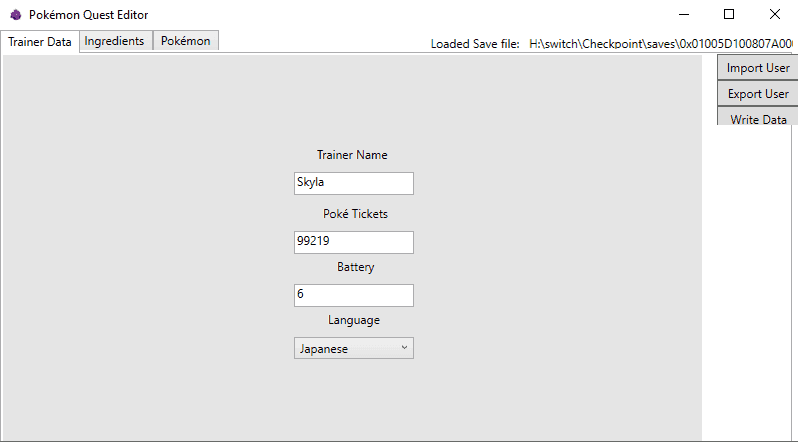
Screenshot_1.png
 
Last edited by OblivionReign,
Any tutorials on how to use this? I have my save file but have no idea how to us the exe. When I click it it does not open.
 
Idk if I'm just dumb but the .exe won't open. Is there anything I'm doing wrong?
Really? Hmm hold on

--------------------- MERGED ---------------------------

Any tutorials on how to use this? I have my save file but have no idea how to us the exe. When I click it it does not open.
I'm fixing it now. Sorry
 
Last edited by JaRocker,
So i reuploaded and tested it 100% works now so if it doesnt for you then its a problem on your end. :) and i didnt put my source because i plan on adding program security to it in which id rather people not see what im coding in.


 
  • Like
Reactions: xSillusx
It's opening in the background but not showing up and is closing in the background after a few seconds. Tried it on a few PC's (32bit and 64bit).

And for your "secure": You should better put the source code in it, so it is more trustworthy, because someone could help debugging it and help with solutions. So this is definitely not a problem at user's end. And no one will steal this program, as there is another one already available including the source code.
 
Sorry Patrick but i do not have to put my source and so i shall not :) If i was going to attack members you'd know. But i really dont see why its not working for anyone else. I have run this on 3 different computers one win10 32bit win10 64bit and win8 and works fine :/
 
Sorry Patrick but i do not have to put my source and so i shall not :) If i was going to attack members you'd know. But i really dont see why its not working for anyone else. I have run this on 3 different computers one win10 32bit win10 64bit and win8 and works fine :/
Wait, who are you again?
 
As I have no experience in coding or anything close to it, idk if this will help at all. But on my laptop it doesn't launch all and on my work pc it shows the error on the attached file.

Also, probably has nothing to do with this but, the Xenoblade 2 Save Editor on this forum that also just had an exe in it, didn't launch on my home pc as well.
And when he released a version with a lot of files together with the exe, it worked.

Again, I'm not requesting anything or complaining or anything like that. Just stating what I've experience. I'm very thankful that people actually release things like this to people like me (who has the coding knowledge similar to a cactus), so thanks for the release!
 

Attachments

  • Untitled.png
    Untitled.png
    10.4 KB · Views: 734
  • Like
Reactions: OblivionReign
As I have no experience in coding or anything close to it, idk if this will help at all. But on my laptop it doesn't launch all and on my work pc it shows the error on the attached file.

Also, probably has nothing to do with this but, the Xenoblade 2 Save Editor on this forum that also just had an exe in it, didn't launch on my home pc as well.
And when he released a version with a lot of files together with the exe, it worked.

Again, I'm not requesting anything or complaining or anything like that. Just stating what I've experience. I'm very thankful that people actually release things like this to people like me (who has the coding knowledge similar to a cactus), so thanks for the release!
Well i just uploaded again (same link) with all the Dll unmerged let me know if it boots for you now? thx
 
Well i just uploaded again (same link) with all the Dll unmerged let me know if it boots for you now? thx
I've tested it on 2 pc's at work and both gave the same error on both the merged and unmerged one. I've also installed the latest .NET framework just to make sure (don't know if this makes a diff). Still same error.

I'm really sorry if I'm like a bearer of bad news of sorts. But thanks again for all the effort you're putting into fixing it!
 
Anyways Skyla, I think it is depending on the .dll's, so if they're merged before, did you compress them? And if you unmerged it, you should attach the dependent .dll's. Or do you want to hide these for some reason?
 
Anyways Skyla, I think it is depending on the .dll's, so if they're merged before, did you compress them? And if you unmerged it, you should attach the dependent .dll's. Or do you want to hide these for some reason?
The dlls are visible. in the releases.
 

Site & Scene News

Popular threads in this forum