Hacking Play PSP emulators full-screen on HDTV with component cables

  • Thread starter Thread starter blackjays24
  • Start date Start date
  • Views Views 14,836
  • Replies Replies 26

blackjays24

Member
Newcomer
Joined
Aug 21, 2013
Messages
24
Reaction score
0
Trophies
0
Age
34
XP
132
Country
Canada
So I've got my PSP 3000 with 6.60 PRO-C2 installed.

My goal is to play my emulators on my big screen via my component cable, which I can do just fine; however, it's severely letter-boxed similar to the image below
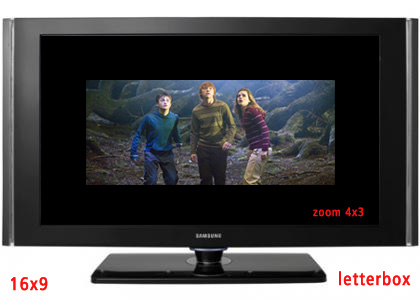
letter_4x3.jpg


My television cannot zoom in enough to compensate for this.

I've tried following a video which instructed me to install tempAR plugin, which I did; however, he then shows a 'graphics' setting which I cannot seem to locate in the plugin.

Also for a emulator like SNES 9x, I cannot even get to the plugin screen to come up at all.

Anyways, in short, I want to play my emulators (NesterJ, Snes9xTYL, Master Boy and Picodrive) in full screen on my HD TV using my component cables on my CFW PSP 3000

If anybody could let me know how to do this, I'd appreciate it greatly.

 
You can do one of two things, install the FuSa SD plugin to enable full screen component, you can find all official version here or the version modified by neur0n here or you can install RemoteJoyLite and use the USB port, pass through a PC and connect to your TV with HDMI (or just use your monitor).
 
Is any step by step guide available for setting up and getting emulators into full screen? Thanks
There's lots of tutorials available on YouTube, they should serve you well. The only thing you need to remember is that the plugin will put your PSP under additional stress, so be sure to set your CPU/Memory frequency to the highest setting you can to avoid slowdown. ;)
 
There's lots of tutorials available on YouTube, they should serve you well. The only thing you need to remember is that the plugin will put your PSP under additional stress, so be sure to set your CPU/Memory frequency to the highest setting you can to avoid slowdown. ;)


Can it cause functionality issues with emulators?

I got the plugin installed and enabled; however, whenever I try to open up SNES9xTYL, NesterJ and Master Boy it just freezes on the PSP PlayStation Portable screen and it fades to black, nothing happens, it's done that twice and I've had to take the battery out in order to reboot.

I tried disabling the plugin and things work fine now
 
You can do one of two things, install the FuSa SD plugin to enable full screen component, you can find all official version here or the version modified by neur0n here or you can install RemoteJoyLite and use the USB port, pass through a PC and connect to your TV with HDMI (or just use your monitor).
FuSA only works on 5.x CFW (official) or 6.39 ME CFW (Neuron version, will never work on PRO CFW), and it has severe slowdown.

RemoteJoyLite would be a better option here, short of spending money on upscaler.
 
  • Like
Reactions: Foxi4
FuSA only works on 5.x CFW (official) or 6.39 ME CFW (Neuron version, will never work on PRO CFW), and it has severe slowdown.

RemoteJoyLite would be a better option here, short of spending money on upscaler.


What's the downside to remotejoylite ? I've seen people saying not to use it
 
FuSA only works on 5.x CFW (official) or 6.39 ME CFW (Neuron version, will never work on PRO CFW), and it has severe slowdown. RemoteJoyLite would be a better option here, short of spending money on upscaler.
So say the release docs, hence me posting an alternative as well. I just noticed that the OP mentioned he's using PRO, my bad. ;)
What's the downside to remotejoylite ? I've seen people saying not to use it
No downsides other than slight lag if your settings aren't right and the obvious downside of having to use a PC as a passthrough device. I've used it extensively, it's fit for purpose.
 
So say the release docs, hence me posting an alternative as well. I just noticed that the OP mentioned he's using PRO, my bad. ;)
No downsides other than slight lag if your settings aren't right and the obvious downside of having to use a PC as a passthrough device. I've used it extensively, it's fit for purpose.


So if your settings are set right, is there no lag?
 
Can't seem to get remote joy to work :-/

I have the plugins enabled on my psp, I connect via USB mode, boot up remote joy (the black window says 'Waiting') I click circle on PSP to disconnect USB mode and nothing happens, it doesn't boot up
 
Can't seem to get remote joy to work :-/

I have the plugins enabled on my psp, I connect via USB mode, boot up remote joy (the black window says 'Waiting') I click circle on PSP to disconnect USB mode and nothing happens, it doesn't boot up
You need to have the USB Type-B driver installed, do you have it?

This guide should help you set things up, just skip the streaming portion of the guide. ;)
 
Can't seem to get remote joy to work :-/

I have the plugins enabled on my psp, I connect via USB mode, boot up remote joy (the black window says 'Waiting') I click circle on PSP to disconnect USB mode and nothing happens, it doesn't boot up


Question. Why not just emulate PSP games on PC and connect the PC to the TV?
 
Scratch that, I just didn't do the rest vhs thing.

I want to be able to play on tv/psp so I can continue my games when I'm not at home, on the portable console
 
Question. Why not just emulate PSP games on PC and connect the PC to the TV?
Compatibility, performance, use of UMD's, wanting to use the PSP as the controller, wanting the genuine experience, there can be many reasons.
Okay, I have it working, but the quality looks like crap. Is there any way around that?
Fiddle around with the settings, especially filtering. Remember, you're blowing up 480x272 to
(likely) Full HD 1920x1080, it's going to be pixelated no matter what you do. You simply can't scale upwards without degrading the quality.
 
Compatibility, performance, use of UMD's, wanting to use the PSP as the controller, wanting the genuine experience, there can be many reasons.


But its possible to use the PSP as controller on PC and you could easily rip games to iso format.
Now about the genuine experience idk... i mean if its the same controller and all.
 
But its possible to use the PSP as controller on PC and you could easily rip games to iso format.
Now about the genuine experience idk... i mean if its the same controller and all.
It's a matter of purism. Crawl the web for a couple of years and you'll notice people arguing over which revision of a system "sounds better" or "delivers better visuals", mention emulators and people like this will take your scalp. Emulation is a mean to an end, but it's not necessarily a go-to solution for many users. I myself prefer to use the original systems as well even though I could probably emulate 95% of my systems without breaking a sweat.
 

Site & Scene News