

So I cleaned my computer out with compressed air, when I turned it on it booted up, I logged into windows then it froze, I tried to reboot and then it doesn't turn on, no post screen, no windows, power must be working since everything seems to be working, fans boot up, lights on my motherboard and ram come on.
It's giving an AO or RO or something on the mobo if that means anything
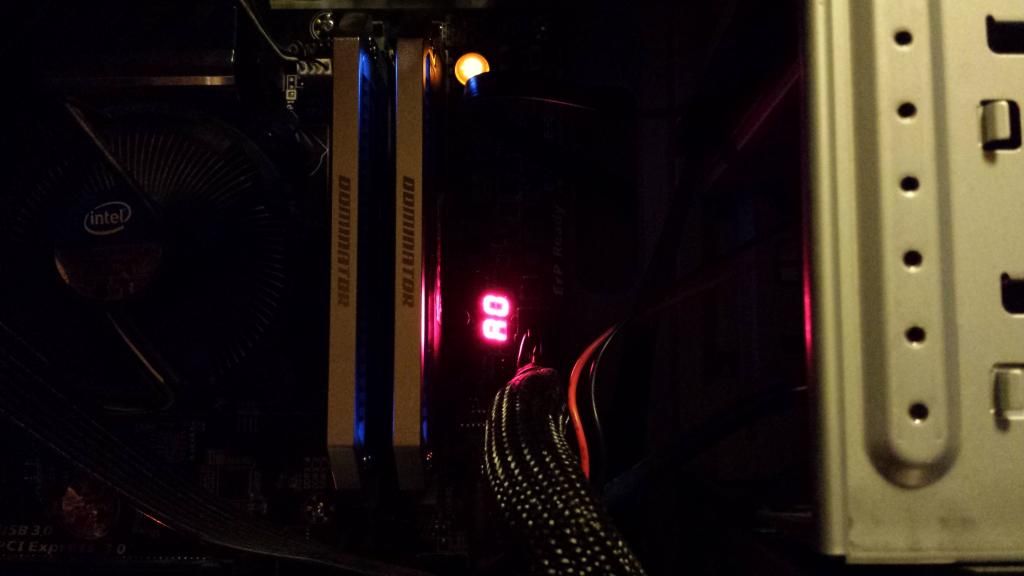
I didn't touch anything but the outside of the case so pretty sure I didn't fry anything, and for similar reasoning of not touching anything I don't think I disconnected anything. I tried unplugging and replugging some things but that didn't help.
build:
GIGABYTE GA-Z87X-UD3H LGA 1150 Intel Z87 HDMI SATA 6Gb/s USB 3.0 ATX Intel Motherboard with UEFI BIOS
Intel Core i7-4770 Haswell Quad-Core 3.4GHz LGA 1150 84W Desktop Processor Intel HD Graphics BX80646I74770
CORSAIR Dominator Platinum 16GB (2 x 8GB) 240-Pin DDR3 SDRAM DDR3 2133 (PC3 17000) Desktop Memory Model
SeaSonic X Series X650 Gold ((SS-650KM Active PFC F3)) 650W ATX12V V2.3/EPS 12V V2.91 SLI Ready CrossFire Ready 80 PLUS GOLD Certified Full Modular Active PFC Power Supply New 4th Gen CPU Certified Haswell Ready
GIGABYTE GV-N660OC-2GD G-SYNC Support GeForce GTX 660 2GB 192-Bit GDDR5 PCI Express 3.0 x16 HDCP Ready SLI Support Video Card
Samsung Electronics 840 Pro Series 2.5-Inch 256 GB SATA 6GB/s Solid State Drive MZ-7PD256BW
Windows 7 professional installed on that
also in there is a 2tb seagate baracuda and a 1 tb wd green but those aren't system files holding
It's giving an AO or RO or something on the mobo if that means anything
I didn't touch anything but the outside of the case so pretty sure I didn't fry anything, and for similar reasoning of not touching anything I don't think I disconnected anything. I tried unplugging and replugging some things but that didn't help.
build:
GIGABYTE GA-Z87X-UD3H LGA 1150 Intel Z87 HDMI SATA 6Gb/s USB 3.0 ATX Intel Motherboard with UEFI BIOS
Intel Core i7-4770 Haswell Quad-Core 3.4GHz LGA 1150 84W Desktop Processor Intel HD Graphics BX80646I74770
CORSAIR Dominator Platinum 16GB (2 x 8GB) 240-Pin DDR3 SDRAM DDR3 2133 (PC3 17000) Desktop Memory Model
SeaSonic X Series X650 Gold ((SS-650KM Active PFC F3)) 650W ATX12V V2.3/EPS 12V V2.91 SLI Ready CrossFire Ready 80 PLUS GOLD Certified Full Modular Active PFC Power Supply New 4th Gen CPU Certified Haswell Ready
GIGABYTE GV-N660OC-2GD G-SYNC Support GeForce GTX 660 2GB 192-Bit GDDR5 PCI Express 3.0 x16 HDCP Ready SLI Support Video Card
Samsung Electronics 840 Pro Series 2.5-Inch 256 GB SATA 6GB/s Solid State Drive MZ-7PD256BW
Windows 7 professional installed on that
also in there is a 2tb seagate baracuda and a 1 tb wd green but those aren't system files holding