Homebrew WIP nxdumptool - Nintendo Switch Dump Tool

  • Thread starter Thread starter DarkMatterCore
  • Start date Start date
  • Views Views 316,884
  • Replies Replies 562
  • Likes Likes 50
Hello guys, I've got a question.

I've tried to execute a dump of a personal game and when I press Start NSP dump process a red error appears in the screen:
readFileFromSecureHfs0PartitionByName: unable to find "/31e1...nca" in Secure HFS0 partition!
readNcaDataByContentId: failed to read 3072 bytes block at offset...
dumpNintendoSubmissionPackage: failed to read header from NCA "3e1..."

Someone else faced that problem?

 
Hello guys, I've got a question.

I've tried to execute a dump of a personal game and when I press Start NSP dump process a red error appears in the screen:
readFileFromSecureHfs0PartitionByName: unable to find "/31e1...nca" in Secure HFS0 partition!
readNcaDataByContentId: failed to read 3072 bytes block at offset...
dumpNintendoSubmissionPackage: failed to read header from NCA "3e1..."

Someone else faced that problem?
Only on gamecards
 
  • Like
Reactions: Amidaraxar
So with gamecards there isn't the possibility of executing the dump in any way?
Seems to be that way, I used to dump my gamecards just fine, I guess latest atmosphere broke it, idk.
You still can go back to a previous atmosphere release and see if that works.
 
Last edited by cucholix,
  • Like
Reactions: Amidaraxar
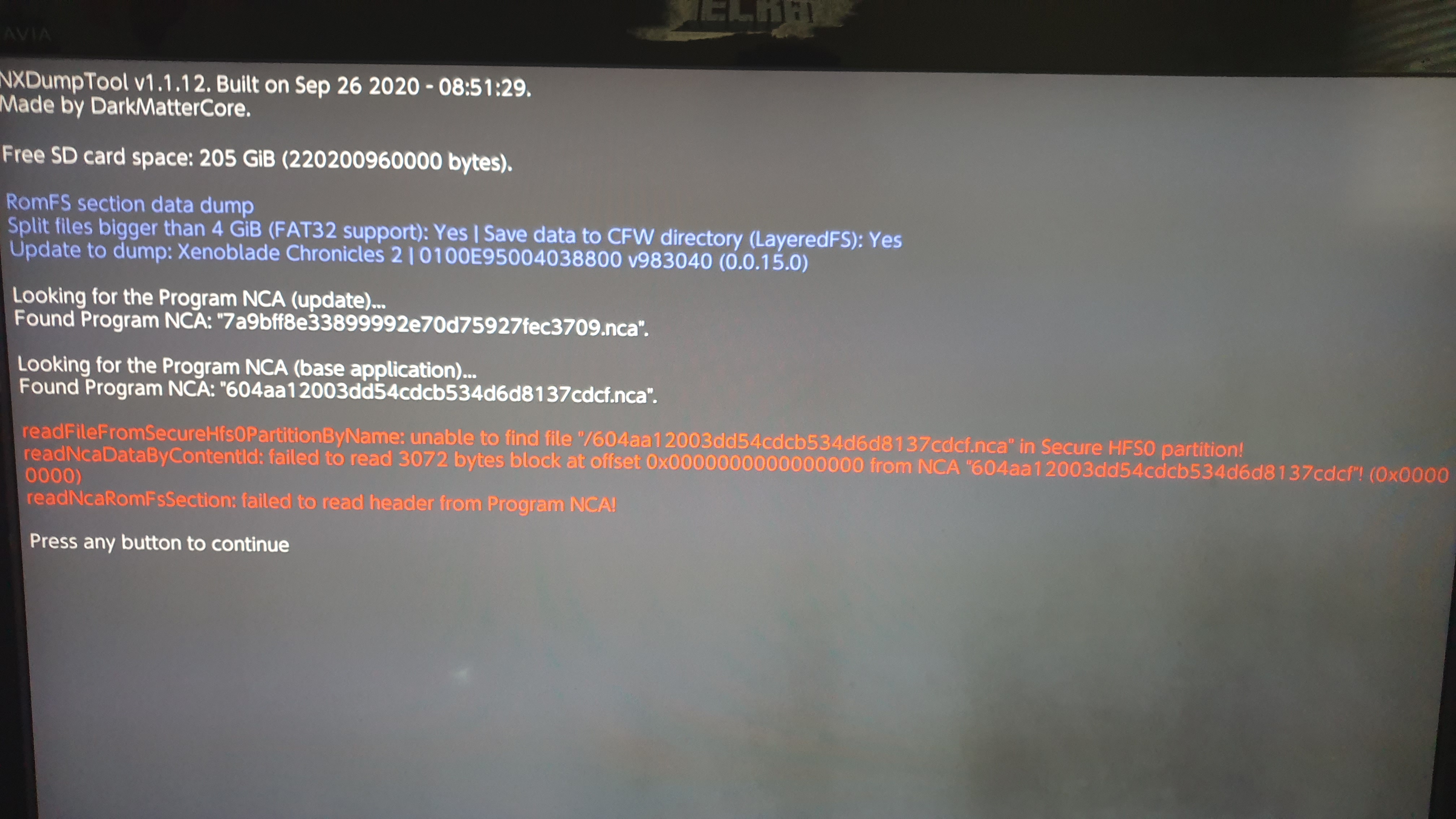
Trying to dump Xenoblade Chronicles 2's RomFS, with "Split files bigger than 4 GiB (FAT32 support)" - Yes; "Save data to CFW directory (LayeredFS)" - Yes; and "Use update/DLC" - v983040 (0.0.15.0) (UPD) (SD card).
However, I get an error, as seen in the second photo.
What do I do?

20201219-074426.jpg

20201219-074447.jpg
 
Trying to dump Xenoblade Chronicles 2's RomFS, with "Split files bigger than 4 GiB (FAT32 support)" - Yes; "Save data to CFW directory (LayeredFS)" - Yes; and "Use update/DLC" - v983040 (0.0.15.0) (UPD) (SD card).
However, I get an error, as seen in the second photo.
What do I do?

20201219-074426.jpg

20201219-074447.jpg

Redownload the NRO from the GitHub repository. There was a silent update last month.
 
  • Like
Reactions: RichardTheKing
This is kind of a noobish question. I collect physical games and just bought a second switch (unpatched) to run cfw on. I would like to dump all of my physical games to my nas for archive purposes. Is there a good guide to making proper dumps using this tool? I would like to get these dumps right the first time and not have to go through re-dumping because I did something wrong.
 
This is kind of a noobish question. I collect physical games and just bought a second switch (unpatched) to run cfw on. I would like to dump all of my physical games to my nas for archive purposes. Is there a good guide to making proper dumps using this tool? I would like to get these dumps right the first time and not have to go through re-dumping because I did something wrong.
Follow the guides from No-Intro:

https://wiki.no-intro.org/index.php?title=Nintendo_Switch_Dumping_Guide

https://wiki.no-intro.org/index.php?title=Nintendo_Switch_Digital_Software_Dumping_Guide
 
Follow the guides from No-Intro

Awesome. Thank you. I understand all of this except the need to use a modified version to dump the initial area. Can you possibly help me understand what the output file card_key_area.bin is for and what to do with it? Thanks again!!!
 
Last edited by gameboyhomeboy,
Awesome. Thank you. I understand all of this except the need to use a modified version to dump the initial area. Can you possibly help me understand what the output file card_key_area.bin is for and what to do with it? Thanks again!!!
You can safely skip that part. It's a game-specific area from the gamecard that can't be dumped through common means - folks from No-Intro only started to dat it some months ago.

It's not required at all by any XCI tools.
 
I m getting this error message for the following titles in the screenshot, what's wrong?
 

Attachments

  • 20210115_093012.jpg
    20210115_093012.jpg
    189.4 KB · Views: 333
  • 20210115_092758.jpg
    20210115_092758.jpg
    173.3 KB · Views: 360
Is there a tutorial on making dumps that can pass NCA signature verification? https://wiki.no-intro.org/index.php?title=Nintendo_Switch_Dumping_Guide doesn't include this part, I think. I tried to make some installed eMMC NSP dumps but they can't pass Tinfoil check. Should I turn some options ON/OFF (remove console-specific data; ticket-less; change NPDM RSA key/sig)? I enabled/disabled the RSA key/sig option but neither output can pass Tinfoil. Thanks!
 
Last edited by GBK,
Is there a tutorial on making dumps that can pass NCA signature verification? https://wiki.no-intro.org/index.php?title=Nintendo_Switch_Dumping_Guide doesn't include this part, I think. I tried to make some installed eMMC NSP dumps but they can't pass Tinfoil check. Should I turn some options ON/OFF (remove console-specific data; ticket-less; change NPDM RSA key/sig)? I enabled/disabled the RSA key/sig option but neither output can pass Tinfoil. Thanks!
Both ticket-less and NPDM RSA key/sig options must be disabled. Remove console-specific data is optional.

--------------------- MERGED ---------------------------

By the way, you're looking for this tutorial.
 
  • Like
Reactions: GBK
Both ticket-less and NPDM RSA key/sig options must be disabled. Remove console-specific data is optional.

--------------------- MERGED ---------------------------

By the way, you're looking for this tutorial.

Thank you for the suggestion! I tried with both disabled but Tinfoil still gives me the error. Is there anything else I should do? The dump is about 120MB so there's no split.

dump.jpg

tinfoil.jpg
 
Thank you for the suggestion! I tried with both disabled but Tinfoil still gives me the error. Is there anything else I should do? The dump is about 120MB so there's no split.
Did you legally acquire these games? Sounds like you installed XCI to NSP conversions, which would explain why even though the options that tinker with NCAs are disabled, the signatures still don't match.
 

Site & Scene News

Popular threads in this forum