Hacking NEW VC INJECTOR :)

  • Thread starter Thread starter DevilKen
  • Start date Start date
  • Views Views 144,807
  • Replies Replies 208
  • Likes Likes 4
DevilKen said:
you can put also the 00000004.app file that have been released on this forum that deactivates the manual option on the Wii menu

I've been searching and searching for the 00000004.app mentioned in the original post, can't seem to find it. The one link I found is dead. Anyone have this hosted somewhere?
 
I just want to add something...

In case someone want to change "the game mode" in neogeo games (console or arcade), you can try to change "wii neogeo bios" by a "Razoola bios"... (Uni-bios)
wink.gif
(Look at the end of game.bin)
 
RPGlover said:
hi
i cant get any injected wad to work. i dunno why. for example: i inject final fantasy II (snes) into DKC2 pal with the auto injector and it works perfekt and if i'm trying the same thing with the new injector, i always get a black screen after the classic controller message. it's the same with any game which worked for me with the auto injector.
i tried it with vista ultimate and win xp home.

any ideas?
somebody?
 
there is no error. everything seems to be fine. i installed the wad as usual, but i get always stuck after the classic controller screen (home button still works). this just beats me, cause with the auto injector everthing was fine
 
yup, common-key is in the injector folder. i just have my wad in the injector folder and the rom in the sub folder and do "vc xxx.wad folder" then i just give the region, after this the id (tried a different one and the same). then the prog finished and i got my wad, which is not working
blink.gif
 
I've been searching and searching on google, and I can't find a single place to get common-key.bin or even a tutorial on retrieving my own...
 
I know that.

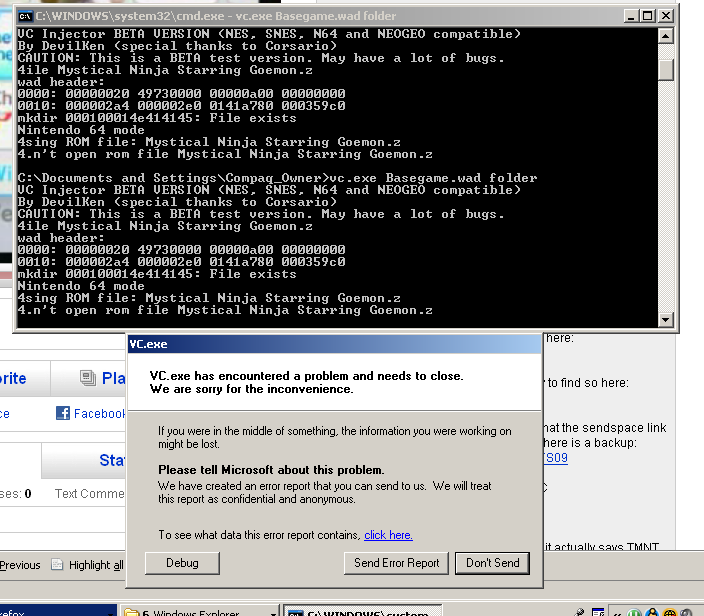
btw, I finally found it, but I'm still getting a windows error message. Here, I'll post a screencap.

commonkeybullsheize.png


(note that I tried several times in the command promp and I still got an error message)
I run on Windows XP SP2
 
Dont worry about this message... allways happens... however i suggest you to read the fist post. Its very well explained how to use the program.

An important point to considere is use that program with shorts folders/files names.

In your screenshot... you are using a "very long" game name, this could be the problem.

I suggest you to try with "ninja.z64" or something similar...
 
sr_corsario said:
Dont worry about this message... allways happens... however i suggest you to read the fist post. Its very well explained how to use the program.

An important point to considere is use that program with shorts folders/files names.

In your screenshot... you are using a "very long" game name, this could be the problem.

I suggest you to try with "ninja.z64" or something similar...
I did read the first post, I must've just skimmed past that or something =P. Okay, I have all those files, all the .app files, but it still says "Can't open 00000005.app"....


EDIT:NEVERMINDNEVERMIND I got it working. lol.
 
Hi everyone,

First, sorry for my english!

So, I have some few problem to inject snes rom. This is step by step what i've done. (i'm on my D drive but same thing if I run on my C drive). I'm using the Donkey Kong Country 3 wad file (i've tested the wad in the Wii and it's working, so the wad is good and valid) and i'm using Windows XP.

This is the structure of my D:\VC directory:
------------
snes
common-key.bin
cygcrypto-0.9.8.dll
cygwin1.dll
dkc3.wad
sha1.exe
VC.exe
wadpacker.exe
wadunpacker.exe
------------

in the snes folder, i have my "Super Mario All-Star", named smas.smc

This is what I type:

D:\VC\vc dkc3.wad snes

and this is the result (only the last few line)
------------
SNES mode
Using ROM file: smas.smc
dkc3.wad is not an app file. Stopping.
------------

Some solution i've found here is to log into the guest account... again i've got error but not the same when i'm into my real account

------------
SNES mode
Using ROM file: smas.smc
Can't open new 00000005.APP
------------

Thanks to help me!
 
Rambytes said:
Some solution i've found here is to log into the guest account... again i've got error but not the same when i'm into my real account

Yes. The "extrange" solution is using a guest account but with all allowed. Then it will work
 
... and how I can all enable access to the guest account? (or I create one???)

If I create a user with admin privilege, I got the [is not an app file. Stopping. ] error

If I create a user with "user" privilege, I got the [is not an app file. Stopping. ] error

If I create a user with "guest" privilege, I got the [Can't open new 00000005.APP] error
 
i successfully injected ISS 98 into sin and punishment using this, this is awesome.

there are some minor graphical glitches, but nothing that effects gameplay. and the picture seems too big for the screen, there's a bit of the screen missing at the bottom, but again nothing major.
 
RadioShadow said:
Fission said:
Anyone been successful with injecting Chrono Trigger Retranslation?
unsure.gif


It crashes when the scene switches to Crono sleeping in bed at the start
It also crashes after the title screen when the dragons fly to the castle.

unsure.gif

Is this a modded patched rom your talking about? Which rom and patch were you using?


Well the tool works perfectly! I now have Earthbound on my Pal Wii!
biggrin.gif


I've even took some pictures:

DSC_0478-1.jpg

Yay! Nintendo have released Earthbound!

DSC_0479.jpg

Pretty!
smile.gif


DSC_0480.jpg

I swear this game was called Mother 2. The save disagrees with me.
I'm not sure why Sonic and Tails are standing on my TV.

DSC_0481.jpg

Oh wait, it is called Earthbound. How silly of me.
tongue.gif


DSC_0482.jpg

Where's the 'Operation Manual' button gone? I'm not sure how to play the game.

DSC_0483.jpg

OMG! TEXT! Now I'm off to play Earthbound!

omg can you please post a download for that!
I've been looking all over the place! (PAL)
 

Site & Scene News

Popular threads in this forum