Hacking MOONESHELL not loading

  • Thread starter Thread starter efiste2
  • Start date Start date
  • Views Views 2,751
  • Replies Replies 15

efiste2

Well-Known Member
Newcomer
Joined
Oct 11, 2009
Messages
45
Reaction score
0
Trophies
0
XP
82
Country
I am running an aceKard2i + 4gb card on a NDSL with AIKIO vers 1.5 and the latest loaders. but simply cannot get moonshell to run. whichever version i download. The latest bersion i have tried is the 2.08lite version, but that shows the same error "EXTENSION MEMORY WAS NOT FOUND". can anyone provide any help in solving this ..............CHEERS
rolleyes.gif
 
efiste2 said:
I am running an aceKard2i + 4gb card on a NDSL with AIKIO vers 1.5 and the latest loaders. but simply cannot get moonshell to run. whichever version i download. The latest bersion i have tried is the 2.08lite version, but that shows the same error "EXTENSION MEMORY WAS NOT FOUND". can anyone provide any help in solving this ..............CHEERS

rolleyes.gif

Here is Akaio 1.5.1 Whit Moonshell 2.09
http://filetrip.net/f9241-Akaio-1-5-1-moon...9-Cool2-09.html
and this Akaio 1.5 whit Moonshell 2.08
http://filetrip.net/f9060-Moonshell-2-08-S...o-1-5-2-08.html
 
Ok i must be doing somehting STUPID here
unsure.gif
i have just installed AKAIO 1.5.1 and the latest loader , and as the pic showed me, i placed the "moonshl2" folder directly onto my sdhc card and the ds_mshl.nds which was downloaded labelled that way, so i didnt need to change it. And i still get the same error message!!! Am i right in thinking that the moonshl2 folder goes straight onto the sdhc card.
 
Extract the Moonshell.
Drag and drop the moonshell folder and the moonshl2.nds(not the _DS_MSHL.nds one). into the root of your memory card. You then proceed to rename the moonshl2.nds into _DS_MSHL.nds If you do that, it'll work without a problem.
 
BoxShot said:
@Kadushy Why are you renaming it as DS_MSHL.NDS? This isn't an R4.

Of course. I know that. I too have an Acekard 2. It still works. Well, you can do it the way I suggested or you can find someone else. The way I suggested works anyways.
 
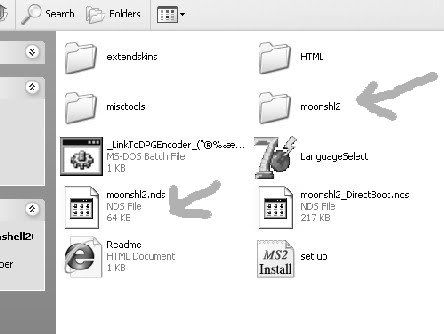
im afraid i STILL cant get it to work, When i download Moonshell 2.09 here is the files/folders i get
untitled1a.jpg

the files i have marked i am putting onto my sdhc card. then i am renaming the moonshl2.nds file to
"_DS_MSHL.nds" is this correct or should i be putting ALL of the files/folders downloaded onto the sdhc card. and am i renaming the file with the correct name ie in terms of higher case letters and the "_" symbol.
Thanks for stickin with me and i must apologise for being such a noob
wacko.gif
 
Try to format your microsd - maybe it will works (after running moonshell it appears something like - corupted card, cant load... after formating microSD - moonshell starts without troubles)

If not work latest version, try an old one... (I am using moonshell 1.6 and no problems - version 2.07/2.08/2.09 cant start on my card, so I am staying with old one
biggrin.gif
)
 
SORTED!!!! thanks so much for sticking with me. I think formattting the mem card did the trick, but confirming i was renaming the file correctly was great, THANKS AGAIN!!!
 
Yep! No problem. Glad to help.


penthaler said:
Try to format your microsd - maybe it will works (after running moonshell it appears something like - corupted card, cant load... after formating microSD - moonshell starts without troubles)

If not work latest version, try an old one... (I am using moonshell 1.6 and no problems - version 2.07/2.08/2.09 cant start on my card, so I am staying with old one
biggrin.gif
)
You should try what I posted in this topic. It might help you find your answer to get moonshell 2 to start working.
 
QUOTE:
"A fatal disk error has occured.

A size that the directory entry shows and
Actual size of the file differs

Recovery report:
Please back up all files to avoid data loss
Restore files after formatting your memory

The application has halted unexpectedly"

MAN, got AK2.1, AKAIO 1.5.1, clearly formatted 8GB microSDHC card, renamed to name you tell us and... this sign appears again and again... So still sticking with WORKING 1.6 MSHL
biggrin.gif
(dont need the latest, when this one works
biggrin.gif
)
 
Another World said:
also try deleting the logbuf.txt file that moonshell creates.

-another world

You don't need to do this, just run diskch on the micro sd:

Start, Computer, Right click on micro sd, tools Error Checking or simalar, ok. DO NOT DEFRAG IT.

Then go to options in moonshell and disable disk check at boot.
 

Site & Scene News

Popular threads in this forum