
Project MHXX/MHGU Save Manager

  • Thread starter Thread starter SilverJolteon
  • Start date Start date
  • Views Views 11,847
  • Replies Replies 33
  • Likes Likes 3

SilverJolteon

Well-Known Member
Newcomer
Joined
Oct 9, 2016
Messages
84
Reaction score
59
Trophies
1
Age
30
XP
613
Country
United States
Seeing so many people trying out MHXX/MHGU for the first time, or returning after Wilds, I decided to finally make a proper thread about this tool that I made at the end of last year.

MHXX/MHGU Save Manager is a web tool that allows you to upload your save data 'system' file for MHXX for the 3DS and Switch, or MHGU for the Switch.

What it does:
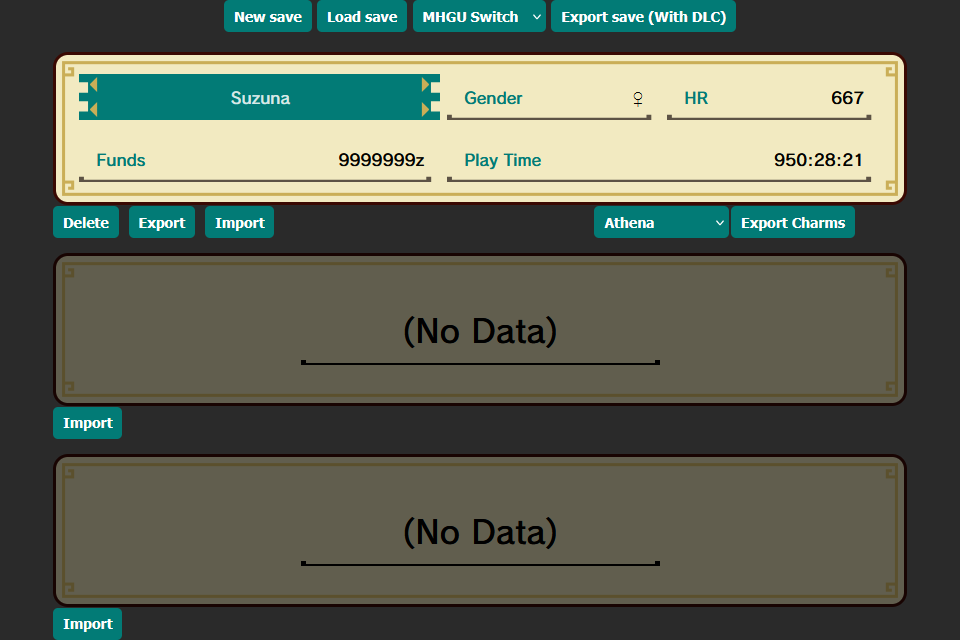
  • Allows conversion between all three versions of the game.
  • Includes all DLC: all quests, all item packs, and all DLC Palicoes (up to 50 can be selected).
  • Reorder, import/export, and delete character slots.
  • Export charms for use with Athena or mhxx.wiki-db.
What it does not do:
  • It will not modify save slot data (IE: edit character, equipment, items, palicoes).
  • Cross-version event quests. Only MHXX Palicoes are available in MHGU, all quests are mutually exclusive between versions.
  • It cannot convert MHX/MHGen save files to MHXX/MHGU.

1742877344906.png


NOTE: Unequip any MHXX-exclusive armor/weapons before transferring to MHGU. Also make sure to keep backups of your save files.

How to use:
  1. Dump your save data using either JKSM/JKSV or Checkpoint. (MHXX 3DS uses ExtData).
  2. The important file is system, transfer it from your 3DS/Switch.
  3. In MHXX/MHGU Save Manager, click 'Load Save' at the top and select your system file.
  4. You can now reorder your save slots by clicking and dragging, export/import/delete individual save slots, and export a list of charms for use with Athena or mhxx.wiki-db.
  5. After you are finished, click the dropdown at the top and select which version of the game you want to export the save file as.
  6. Click 'Export Save (With DLC)' to export a new 'system' file that includes your changes as well as DLC for the respective game.
  7. Re-import the new 'system' file using JKSM/JKSV or Checkpoint.

LINK: https://silverjolteon.github.io/MHGU/save-manager/index.html

Credit:
 

Attachments

Last edited by SilverJolteon,
Hi all!

First of all, thanks so much for your contribution SilverJolteon! I also wanted to ask you something specific, but first a bit about my situation:

I have a soft-modded 3ds that has my MHG save data that has too many hours than I'd care to admit on it. But, I notice there isn't a script for converting generations (NON-ultimate) save data to my (stock, OG) switch MHGU. The service support ended for doing it manually through the applications themselves and it would really suck to have to start over.

I did get a japanese XX with an english patch to work on my 3ds, but I'm unsure if I can import my english generations save data to the japanese XX 3ds.

So I have two, somewhat stupid questions to ask:

- do you have plans to extend support for this script to MHG?
- Do you know if I can import the save data to a stock switch?

Thanks so much!
 
Hi all!

First of all, thanks so much for your contribution SilverJolteon! I also wanted to ask you something specific, but first a bit about my situation:

I have a soft-modded 3ds that has my MHG save data that has too many hours than I'd care to admit on it. But, I notice there isn't a script for converting generations (NON-ultimate) save data to my (stock, OG) switch MHGU. The service support ended for doing it manually through the applications themselves and it would really suck to have to start over.

I did get a japanese XX with an english patch to work on my 3ds, but I'm unsure if I can import my english generations save data to the japanese XX 3ds.

So I have two, somewhat stupid questions to ask:

- do you have plans to extend support for this script to MHG?
- Do you know if I can import the save data to a stock switch?

Thanks so much!
Hi! So my tool is only for MHXX and MHGU, not base MHX or MHGen. I might look more into that though as I have received a few questions about it.
For the time being, it is possible to transfer from MHGen to MHX, to MHXX on a modded 3DS, you can follow this old guide from back in the day. Best of luck!
 
v1.3.2 Changelog:
- Shoutouts are now able to be transferred between versions.
- Exported saveslots now include shoutout data. Blank shoutouts are set to default english values.
- 3D and Circle Pad Pro options are now retained when converted, Brightness and Rumble are set to defaults for switch versions.
 
Last edited by SilverJolteon,
v1.4.0 Changelog:
- You can now manually select which DLC Palicos you want.
- In the DLC Palico Menu you can see information for each, including origin and special skills.
 
  • Like
Reactions: Vulpes-Vulpeos
Hey! Thank you so much for your hard work.

Does this tool include all the DLC? I lost my original save (that was transferred from 3ds) and I remember it had lots of item packages and dlc quests for arenas and stuff. Are they all available in this tool?

Thanks again man!

Edit; I was planning on using this with the pixel mod pack. Is there anything I should know before hand, or is it just drag and drop?
 
Hey! Thank you so much for your hard work.

Does this tool include all the DLC? I lost my original save (that was transferred from 3ds) and I remember it had lots of item packages and dlc quests for arenas and stuff. Are they all available in this tool?

Thanks again man!

Edit; I was planning on using this with the pixel mod pack. Is there anything I should know before hand, or is it just drag and drop?
It includes all but one item pack (USJ) that was time-limited and JP-only, plus all quests and DLC Palicos. Quests are still version-locked.

There aren't any additional steps for the pixel mod pack, that still uses regular save files.

Let me know if you have any questions!
 
Hello. I'm Japanese.
Does this tool allow you to transfer from the 3DS version to the Switch version?
I have a modded 3DS, but do I need to mod the Switch as well?
 
Hello. I'm Japanese.
Does this tool allow you to transfer from the 3DS version to the Switch version?
I have a modded 3DS, but do I need to mod the Switch as well?
Yes, you can transfer back and forth between the Japanese 3DS version, Japanese Switch version, and English Switch version. You do need a modded 3DS and Switch to backup/restore the saves.

はい、日本版3DSバージョン、日本版Switchバージョン、および英語版Switchバージョン間でセーブデータを転送することは可能です。ただし、セーブデータのバックアップ/復元を行うには、改造済みの3DSとSwitchが必要です。(DeepL)
 
Hello, I'm Japanese. This tool is great, but there is one dlc quest that is slightly lacking.
Post automatically merged:

Hello, I'm Japanese. This tool is great, but there is one dlc quest that is slightly lacking.
It seems that I was probably mistaken. I'm sorry.
 
Last edited by luminas,
Hello, I'm Japanese. This tool is great, but there is one dlc quest that is slightly lacking.
Post automatically merged:


It seems that I was probably mistaken. I'm sorry.
Hello, if you do find something missing, please let me know!

こんにちは、何か不足している点があれば、お知らせください!(DeepL)
 
this doesn‘t seem to work for me ☹️ idk if i’m doing it wrong but when i restore my mhxx save from 3ds on the switch via checkpoint and then start mhgu i get an error message that says there is no data to load and smth else abt my sd card 😖
 
this doesn‘t seem to work for me ☹️ idk if i’m doing it wrong but when i restore my mhxx save from 3ds on the switch via checkpoint and then start mhgu i get an error message that says there is no data to load and smth else abt my sd card 😖
Did you make sure to choose the correct language version of the game when exporting?
 
Hello,

When I try to convert my Save File from MHXX JP 3ds to MHGU, i add my system file to the app, but it doesnt find any save file, did i do something wrong ? I added the same file so you can check, but i just get this blank.

Edit. This seems to be an issue with Linux, I used the same file on my Iphone and it worked fine.
1755514390493.png
 

Attachments

Last edited by Vylke_,

Site & Scene News

Popular threads in this forum