Gaming Luma locale switcher problem

  • Thread starter Thread starter legoinventeor
  • Start date Start date
  • Views Views 25,812
  • Replies Replies 8
  • Likes Likes 1

legoinventeor

Well-Known Member
Member
Joined
Oct 12, 2017
Messages
274
Reaction score
82
Trophies
0
Age
21
XP
1,608
Country
Spain
Hello.
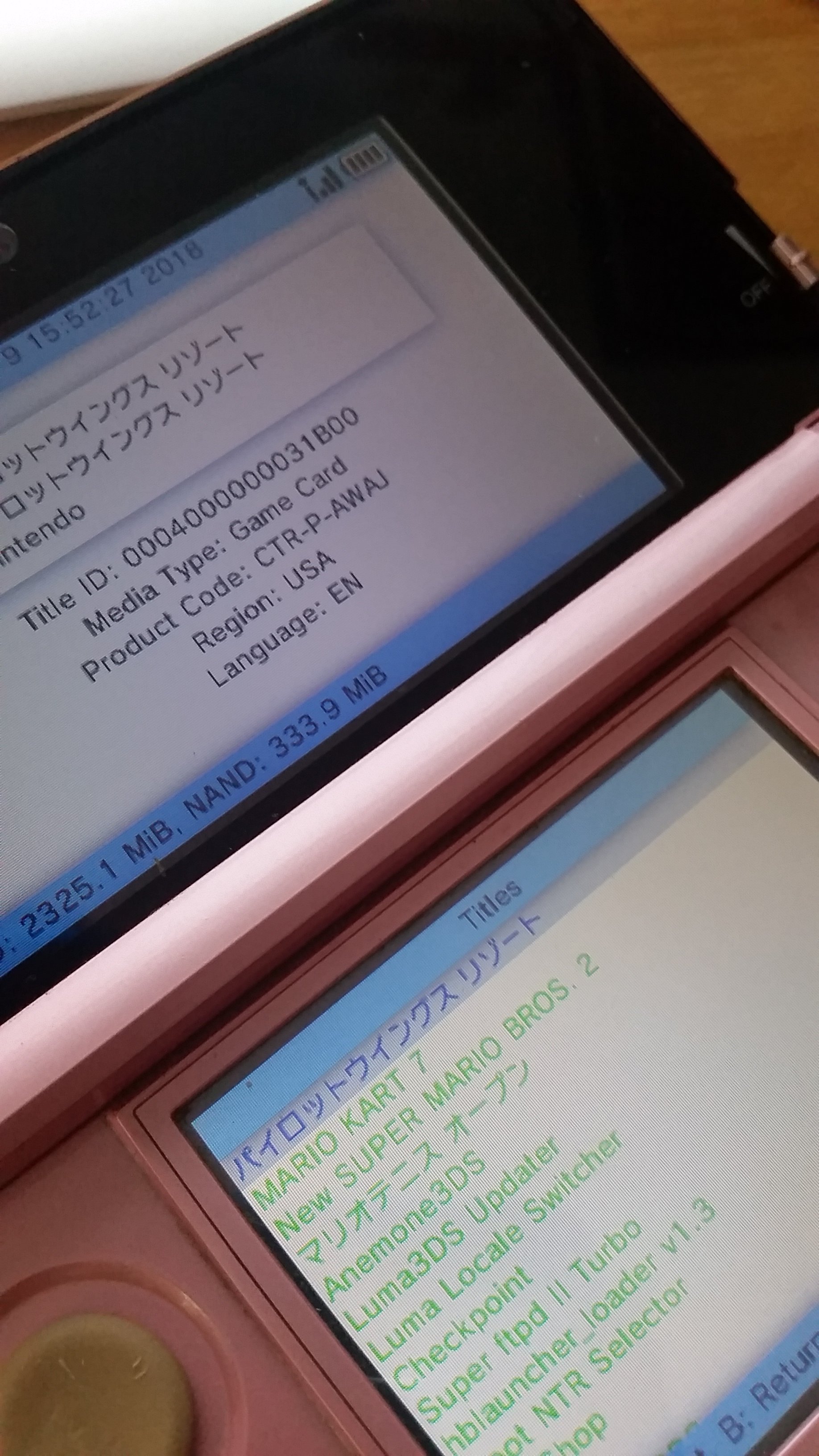
I tried using luma locale switcher to change the language on my japanese games, but nothing I do seems to work. When I try to change reigon and language, the program it says that the reigon and language has been set and it even shows it in the menu. But when I enter the game it still shows text in japanese. I have enabled game pachin in the luma configurations screen so i'm not sure what I did wrong...
Also I think that luma locale switcher broke my animal crossing game. Now when I try to boot it up, it just gives me an error.
I did change the reigon of my console with ctrtranfer. Could it be that?
20180709_155316.jpg
20180709_155236.jpg
 
Last edited by legoinventeor,
  • Like
Reactions: squirousquared
I had this same issue once I updated Luma! Have you tried to go into the path settings on Luma Locale Switcher and changing the path to the second one down labeled "/luma/titles/%s/locale.txt" and then try to change the locale again? That's what solved my issue so hopefully it solves your's as well.
 
I had this same issue once I updated Luma! Have you tried to go into the path settings on Luma Locale Switcher and changing the path to the second one down labeled "/luma/titles/%s/locale.txt" and then try to change the locale again? That's what solved my issue so hopefully it solves your's as well.
Nope, gonna try it out now!
 
I had this same issue once I updated Luma! Have you tried to go into the path settings on Luma Locale Switcher and changing the path to the second one down labeled "/luma/titles/%s/locale.txt" and then try to change the locale again? That's what solved my issue so hopefully it solves your's as well.
Ok, so i tried changing the path but it still doesn't work. On rythm paradise it gives me a black screen. If i put it back to default it works again. It seems that it did do something, but it doesn' work. :mellow:
 
Ok, so i tried changing the path but it still doesn't work. On rythm paradise it gives me a black screen. If i put it back to default it works again. It seems that it did do something, but it doesn' work. :mellow:

Have you tried any other games beside Rythem Heaven, honestly I’ve only used it on Pokemon.
 
First of all, are you sure you are using games that even have English support (eg: Pokemon) and aren't just in Japanese (like most Japanese games are? Because if it doesn't have other languages built into it it's never gonna work and change the language, you just have to get a fan-translation patch for whatever game you want, Rhythm Paradise included, especially since it's a cartridge dump. That game is only in Japanese, not multi-language, so you have to find the English patch for it. Region changing is mainly to make otherwise unplayable games playable and to change the language of multi-language games (although you can also do it through save editing for some like Pokemon and faster too).
 
  • Like
Reactions: Hexe921
First of all, are you sure you are using games that even have English support (eg: Pokemon) and aren't just in Japanese (like most Japanese games are? Because if it doesn't have other languages built into it it's never gonna work and change the language, you just have to get a fan-translation patch for whatever game you want, Rhythm Paradise included, especially since it's a cartridge dump. That game is only in Japanese, not multi-language, so you have to find the English patch for it. Region changing is mainly to make otherwise unplayable games playable and to change the language of multi-language games (although you can also do it through save editing for some like Pokemon and faster too).
Alright, thanks!
 
I had this same issue once I updated Luma! Have you tried to go into the path settings on Luma Locale Switcher and changing the path to the second one down labeled "/luma/titles/%s/locale.txt" and then try to change the locale again? That's what solved my issue so hopefully it solves your's as well.


This solved my issue as stated here: https://gbatemp.net/threads/3ds-noob-paradise-ask-questions-here.359035/page-2474#post-8817067

Thank you SO much! This made my day. I'm finally able to enjoy games in English on my JP o3DS.

Long-live the tech-savvy-youngsters of gbatemp helping the once-tech-savvy-grannies (like me) of gbatemp!
:P
 
  • Like
Reactions: legoinventeor
I had this same issue once I updated Luma! Have you tried to go into the path settings on Luma Locale Switcher and changing the path to the second one down labeled "/luma/titles/%s/locale.txt" and then try to change the locale again? That's what solved my issue so hopefully it solves your's as well.

dude, you saved my life. thank you!
 
  • Like
Reactions: legoinventeor

Site & Scene News

Popular threads in this forum