Hardware left joycon connection problem

  • Thread starter Thread starter Sliter
  • Start date Start date
  • Views Views 3,082
  • Replies Replies 13

Sliter

Well-Known Member
Member
Joined
Dec 7, 2013
Messages
3,308
Reaction score
984
Trophies
1
Location
ᕕ( ᐛ )ᕗ
XP
1,978
Country
Brazil
*The RIGHT Joycon can't connect, not left as said in he title.
TLDR; my right joycon works on handheld mode but can't sync in docked or tabletop mode anymore

Not long ago I got a second hand NS (with Dark Souls, if that mater XD), I have't even played much yet
playing alone It had a problem of sudden disconnecting one time and I died again, but the batTery was low, I played a bit more until I had to charge it .
After that I played normally in docked mode if recall correctly, but last weekend, I went to play in a friend's switch, everything fine, but after a break for some reason it don't wanted to sync, but works on handheld mode and he battery show as full.

we tried connecting again, placing on the switch, taking off, pressing the sync button, ZR ZL together ... someone have any idea?
 
Last edited by Sliter,
and now it's simply dead ...
I put the NS in the dock with both joys, updated the NS played, then took off the dock later and it was dead
 
Well, since I can't warranty because I got it used, I opened it and tried to charge the battery outside, same result.
Testing it voltage, it gave 4v, plugged into the Joycon, it showed only 0,5v
This does mean a short-circuit on it's board ?
 
Sounds like your left joycon's not right. :P

So the joycon works docked but not wirelessly? Sounds like it may be a dead battery. However, I don't recommend charging batteries without a special circuit to regulate voltage and current. They can explode, break, or just charge incorrectly if not charged with proper varying voltage and current. If you want to, do you have a variable voltage power supply or spare batteries, etc. that you can hook up instead of the stock battery? This will let you know if it's only the battery. Can you possibly use the battery from the other joycon to try it?
 
Last edited by IncredulousP,
Sounds like your left joycon's not right. :P

So the joycon works docked but not wirelessly? Sounds like it may be a dead battery. However, I don't recommend charging batteries without a special circuit to regulate voltage and current. They can explode, break, or just charge incorrectly if not charged with proper varying voltage and current. If you want to, do you have a variable voltage power supply or spare batteries, etc. that you can hook up instead of the stock battery? This will let you know if it's only the battery. Can you possibly use the battery from the other joycon to try it?
actually it's the right one, he left os good :v /runs
now it don't work docked anymore, it don't even blink the leds
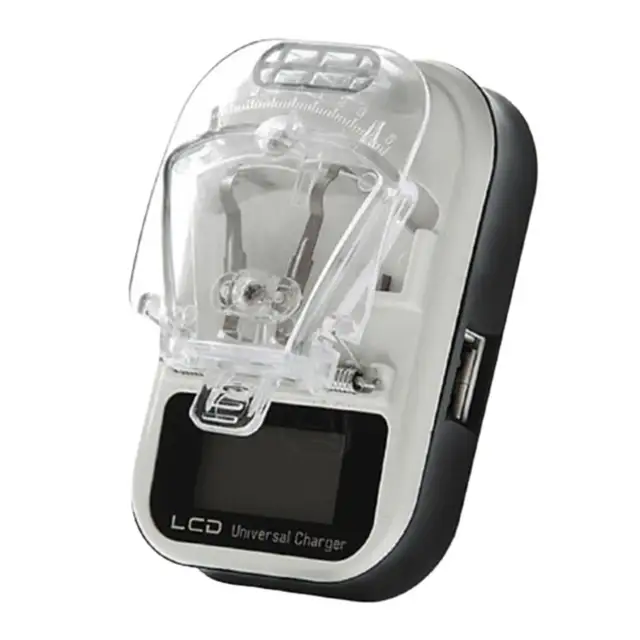
I tried charging on these " universal phone battery charger", one that looks like this, but is a older model.
Universal-LCD-Mobile-Cell-Phone-Battery-Wall-Travel-Charger-with-USB-Port-Promotion.jpg_640x640q70.jpg

These are good to "reactive" some bad battery or for a slow emergency charging, but not as replacement charger...
If the battery is the same, I could try ! But iifis the board, the other battery can be damaged?
 
Last edited by Sliter,

  • Like
Reactions: IncredulousP
Hmm yeah if it doesn't work docked then it may be damaged beyond repair, I wouldn't advice putting any battery in it at this point.
I haven't tried docking again without the battery , so idk if I check where is the short, everything is so small I fear damaging these darn ribbons or I should give up and break everything and look for a new board?
 
  • Like
Reactions: IncredulousP
I haven't tried docking again without the battery , so idk if I check where is the short, everything is so small I fear damaging these darn ribbons or I should give up and break everything and look for a new board?
Well there definitely is the risk of shorting your switch if the joycon power rails are shorted so I can only recommend getting a new joycon. You can try to dock it to see if it works at your own risk, though.
 
  • Like
Reactions: Sliter
Well there definitely is the risk of shorting your switch if the joycon power rails are shorted so I can only recommend getting a new joycon. You can try to dock it to see if it works at your own risk, though.
well, I already connected it to the console when it wasn't giving any life signal, so without the battery idk if would give something like that.
I really wanted to try fixing itmy ow but fear to destroy these small ribbons argh XD I'm going to contact nintendo and see if they could do something for me...
 
  • Like
Reactions: IncredulousP
well, I already connected it to the console when it wasn't giving any life signal, so without the battery idk if would give something like that.
I really wanted to try fixing itmy ow but fear to destroy these small ribbons argh XD I'm going to contact nintendo and see if they could do something for me...
"Listen, Nintendo, I got a deal for you that you can't refuse..."
 
  • Like
Reactions: Sliter

Site & Scene News

Popular threads in this forum