Hacking Just blink blue light

  • Thread starter Thread starter cpassamani
  • Start date Start date
  • Views Views 2,384
  • Replies Replies 10

cpassamani

New Member
Newbie
Joined
Aug 13, 2017
Messages
3
Reaction score
1
Trophies
0
Age
44
XP
72
Country
Brazil
I have a new 3ds XL. FW 11.2.35 U.
I was following the 3DS.GUIDE

In the: Section I - Launching SafeB9SInstaller, after 3- Launch safehax from the list of homebrew
The 3DS doesn't start anymore, just blink blue led for 1 second.
No error was showed in the screen, every pass was checked in green.
Attached the image of the root of the SD card.

Can anyone help?
Thanks
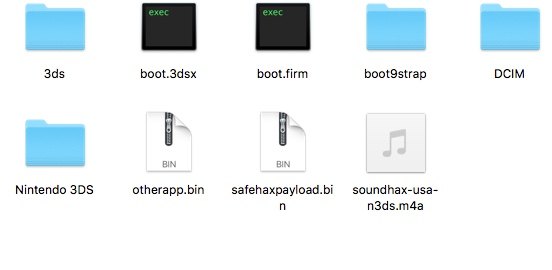
sd.jpeg
 
Try downloading Luma 8.1.1 boot.firm from https://github.com/AuroraWright/Luma3DS/releases again, and if that doesn't work, try a new SD card. You can also try GodMode9.firm renamed to boot.firm on your SD card. If that doesn't work then there's definitely something wrong with your SD card.
 
  • Like
Reactions: cpassamani
I have a new 3ds XL. FW 11.2.35 U.
I was following the 3DS.GUIDE

In the: Section I - Launching SafeB9SInstaller, after 3- Launch safehax from the list of homebrew
The 3DS doesn't start anymore, just blink blue led for 1 second.
No error was showed in the screen, every pass was checked in green.
Attached the image of the root of the SD card.

Can anyone help?
ThanksView attachment 95598
This is kind of similar to what's going on with a 2ds I attempted to save. I was using the ntrboot, and well it kept crashing me to the error screen, and it only flashes for a second and then off it goes :|
 
First step before starting the setup for a CFW, is checking if your SD card is not damaged or in the process of it.

Have you both done that?
 
  • Like
Reactions: cpassamani
First step before starting the setup for a CFW, is checking if your SD card is not damaged or in the process of it.

Have you both done that?
Ohh absolutely, I knew they weren't damaged because I've tried them before on other consoles of mine. I mean I have other sd cards if that is the case, the main problem is, even with no game in the slot or sd card in it, it blinks for just a second and off it goes. I will say that this particular 2ds has been through a lot, and I've almost given up on it.

This was mainly bricked, because after using 2dsaver (which is a great tool!), i accidentally cart updated past a version I wasn't supposed to :| Needless to say I learned the hard way, and I don't think there is much more I can do for it.
 
Ohh absolutely, I knew they weren't damaged because I've tried them before on other consoles of mine. I mean I have other sd cards if that is the case, the main problem is, even with no game in the slot or sd card in it, it blinks for just a second and off it goes. I will say that this particular 2ds has been through a lot, and I've almost given up on it.

This was mainly bricked, because after using 2dsaver (which is a great tool!), i accidentally cart updated past a version I wasn't supposed to :| Needless to say I learned the hard way, and I don't think there is much more I can do for it.
Blinking means it can't find the right boot.firm, it is not bricked. Either your SD card is not working, or you have the wrong boot.firm, or your boot.firm file is corrupted.
 
  • Like
Reactions: cpassamani
Blinking means it can't find the right boot.firm, it is not bricked. Either your SD card is not working, or you have the wrong boot.firm, or your boot.firm file is corrupted.

Well, I never would have thought about that :o Thanks for that input, that being said, is it possible the solution that you provided @cpassamani will work for me?
 
Well, I never would have thought about that :o Thanks for that input, that being said, is it possible the solution that you provided @cpassamani will work for me?
Yes, it should. If your LED is blinking blue for a second and turning off, like @Quantumcat said, it just means your console can not find the HAX payload on your SD card. That means, it's either not there, the file is wrong/damaged, improperly named, your SD card is faulty, or the card reader in your console itself is going bad. 9/10 it's just a bad download, or a complete overlook.

Just redownload the "boot.firm" and put it on the root of your SD card. DO NOT USE Wi-FI to trasnfer the files, do it manually to preserve the integrity.
 
Try downloading Luma 8.1.1 boot.firm from https://github.com/AuroraWright/Luma3DS/releases again, and if that doesn't work, try a new SD card. You can also try GodMode9.firm renamed to boot.firm on your SD card. If that doesn't work then there's definitely something wrong with your SD card.

You were right! The file was corrupted.
The system now launch into the Luma3DS configuration menu instead of SafeB9SInstaller.
I have already ensure that safehaxpayload.bin exists on the root of the SDcard and have enabled the option to show file extensions.

Can you help me again?

Thanks!
 
  • Like
Reactions: Quantumcat

Site & Scene News

Popular threads in this forum