Hacking Issue updating FW 20.4.0

Aglae Pheryl

Well-Known Member
Member
Joined
Feb 25, 2014
Messages
485
Reaction score
62
Trophies
1
Age
56
XP
1,730
Country
France
Hi,

I have a couple of different usd cards that I boot from (Atmosphere) with different games installed.
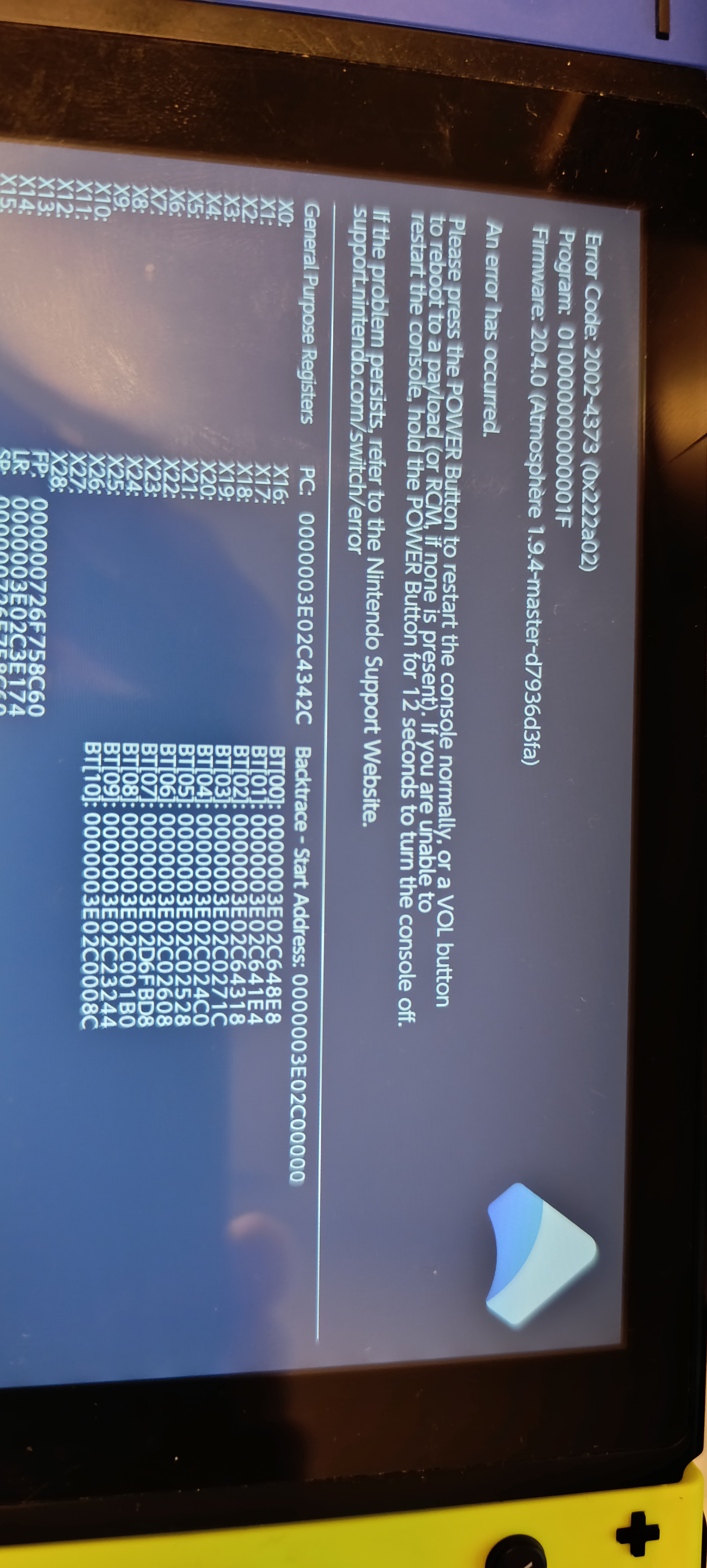
I updated them to both yesterday (Atmosphere 1.9.4 Hekate 6.3.1 & Sigpatch FW 20.4.0 & Firmware 20.4.0) but one of them, when I boot from it, gives me an error message.
Any quick fix just by looking at the picture ?
If I wanted to copy the folder structure from the 'working' upgraded USD, what would I need to copy and what would I need to leave on if I wanted to keep the games & stuff ?
Thanks
1757602747615.png


1757602458248.jpeg
 

Attachments

  • 1757602798197.png
    1757602798197.png
    15.8 KB · Views: 35
Updating DBI might resolve this error.

Did you blank your PRODINFO serial numbers?
Newer Atmosphere versions do crash on that.

Other suggestion on the Atmopshere github issues page ::
OK , i "solved" it by deleting the folder associated with the fatal report.

"420000000007e51a"

This was the folder the internet suggested, that aligned with my report as well.


All your games are in the Nintendo folder.
Other folders are related to Hekate Atmosphere Homebrew apps and other CFW related stuff.
 
Thanks.
What's DBI, how can I update it ?
Where is my capture is the folder that I need to delete, there is no 420000000007e51a file on the USD card ?
 

Perhaps this would help you, seem to be exosphere related.
 
I am not sure what to do from this.
There are a bunch of logs with the name : 010000000000001F

Any idea to fix ?
Otherwise, how can I reinstall whatever seems to be broken but keep the games and partition structure of the usd card ?

BTW, how do you blank PRODINFO serial numbers?

Also, I have another usd card that I had updated and that works fine. I am not sure it is 100% (partitioning or whatever) but is there a way I could transfer some files/folders from the working usd to the crashing one (if so which files & folders) ?
I'd certainly appreciate not losing the games on the crashing card if possible.

And also, I noticed a emuMMC folder on the card that is no longer working (300 GB) that is not on the other working usd.

Thanks,
 
Last edited by Aglae Pheryl,
I am not sure what to do from this.
There are a bunch of logs with the name : 010000000000001F

Any idea to fix ?
Otherwise, how can I reinstall whatever seems to be broken but keep the games and partition structure of the usd card ?

BTW, how do you blank PRODINFO serial numbers?

Also, I have another usd card that I had updated and that works fine. I am not sure it is 100% (partitioning or whatever) but is there a way I could transfer some files/folders from the working usd to the crashing one (if so which files & folders) ?
I'd certainly appreciate not losing the games on the crashing card if possible.

And also, I noticed a emuMMC folder on the card that is no longer working (300 GB) that is not on the other working usd.

Thanks,
you can look for the 010000000000001F folder in SD/atmosphere/contents if you have the folder delete it if you dont have it then rename the contents folder to something else in SD/atmosphere/contents and reboot and see if it fixes it you might have an outdated sysmodule or homebrew i have had this issue more than once.
 
Thanks.
No folder named 010000000000001F in SD/atmosphere/contents
I renamed SD/atmosphere/contents to SD/atmosphere/contents.bak and same error code: 2002-4373 (0x222a02).
I also tried deleting the whole contents folder but still the same error message.
Running Hekate 6.3.1
The console boots fine when selecting the Non Hack (OFW) on the right. [Edit: OFW 11.0.0]

Any other idea I could try ?
 

Attachments

  • 02.PNG
    02.PNG
    171.6 KB · Views: 37
  • 01.PNG
    01.PNG
    178.2 KB · Views: 30
Last edited by Aglae Pheryl,
Thanks.
No folder named 010000000000001F in SD/atmosphere/contents
I renamed SD/atmosphere/contents to SD/atmosphere/contents.bak and same error code: 2002-4373 (0x222a02).
I also tried deleting the whole contents folder but still the same error message.
Running Hekate 6.3.1
The console boots fine when selecting the Non Hack (OFW) on the right. [Edit: OFW 11.0.0]

Any other idea I could try ?
Delete the atmosphere folder in SD/atmosphere then reinstall atmosphere and sigpatches and reboot.
 
Delete the atmosphere folder in SD/atmosphere then reinstall atmosphere and sigpatches and reboot.
Thanks. When you say reinstall this means delete & copy the files over or should I install from somewhere ?
Post automatically merged:

Deleting & copying atmosphere from the working USD failed.
What's the process to format everything and recreate an atmosphere booting usd again please ? I will then reinstall the games.
Thanks,
 
Last edited by Aglae Pheryl,

Site & Scene News

Popular threads in this forum