
Is this normal to need this much space?

Sonic Angel Knight

Well-Known Member
Member
Joined
May 27, 2016
Messages
14,550
Solutions
1
Reaction score
10,406
Trophies
5
Location
New York
XP
14,176
Country
United States
I checked my storage using windows 10 settings cause I kept getting low storage warnings. After I restarted my pc for an driver update, I gained some space back which i find odd. But now that I went to do some cleanup of updates windows doesn't fully remove, I find this obnoxious sight. :blink:

Is the largest files on my system for some reason and I don't remember this when I got this laptop 3 years ago. So if anyone has ideas, I would like to know.

By the way, the laptop is a sager clevo from xotic pc, if that helps. :ninja:
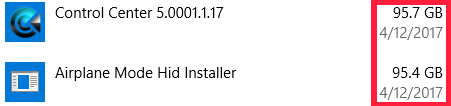

upload_2020-12-26_15-24-43.png
 
Check the directories where those are installed and see if it's actually taking up that space. If so, find the offending files and see what they are.

Either the space used listed is bugged, or those programs are doing some buggy shit.

EDIT: Also, as always, run a scan with Malwarebytes (specifically targeting those directories) and see if anything comes back.
 
Last edited by Tom Bombadildo,
Windows upgrade (lets say from 7 to 10), might leave behind a backup folder, which you can delete (doublecheck the foldername via google).

Windows update (and the driver install routine in general) leaves behind several of the install routines for drivers, in case you want to do a reinstall. You are meant to not touch that folder and let it grow over time. :)

Windows gains back a few GB after reboot, because it cleans the temp directory.

If you want to clean stuff in general (registry cleaning not recommended (isnt needed on SSDs anymore)), CCleaner free version (https://www.ccleaner.com/) is all you need - really.

If you want to look for files and folders with a larger size, treesize free (https://www.jam-software.com/treesize_free) is a good tool for that.

Before you delete a big system file or folder, doublecheck on google if its needed. :)
-

Those filessizes attached to programs are too large for any 'expected' Windows behavior.
 
Last edited by notimp,

Site & Scene News

Popular threads in this forum
