Hardware Interested in dumping e-reader cards

  • Thread starter Thread starter Creative_Sushi
  • Start date Start date
  • Views Views 6,335
  • Replies Replies 4
  • Likes Likes 1

Creative_Sushi

New Member
Newbie
Joined
May 16, 2019
Messages
1
Reaction score
1
Trophies
0
Age
29
Location
Sushi Bar
Website
www.youtube.com
XP
78
Country
United States
Hello.
I am in possession of a complete Japanese Pikmin e-reader (e+) set (including all promo cards) and I am interested in scanning/dumping the codes for archival purposes.

I have attempted to chase down a solution for a long time now, to one point where I decided to scan the cards with my crappy scanner and painstakingly draw out the codes to a readable format by looking at them. Obviously that idea died pretty quick.
I know that If I own a MBV2 cable I can use the e-reader itself as a scanner, that allows it to dump the files in a readable format, but I also know that those pretty much no longer exists. -I've had the eBay search emailed to me for over two years now.

So I've sort of hit a brick wall. Is there another gameboy>PC cord that would have this same functionality? Is there a program that will read poorly scanned dot-codes and translate them to a readable format? Are all these codes already dumped somewhere and I'm wasting my time?

Any help is appreciated.
Thanks.
 
  • Like
Reactions: Deleted User
Is the pikmin set not dumped already? As far as I was aware it was mainly some pokemon promo stuff that was undumped. https://wiki.no-intro.org/index.php?title=Nintendo_-_Game_Boy_Advance_e-Reader_Cards_undumped

I am not sure what the MBV2 would do over any other serial port cable* capable of doing multiboot.

If you fancy your skills with a soldering iron then you have some options here.
https://web.archive.org/web/20161014111841/http://www.reinerziegler.de/GBA/gba.htm#Multiboot
https://web.archive.org/web/20160405013723/http://www.devrs.com/gba/files/mbv2faqs.php
http://problemkaputt.de/gbatek.htm#auxxboopctogbamultibootcable

*two classes of such cable. One class went into specific GBA flash carts to write to them, the other went into the GBA's own serial port. There were various takes on each, including some nice USB stuff somewhere (mainly a conversion chip but still USB rather than having to mess with giveIO or something like that, and have a machine with the relevant hardware).

And as it is an ereader thread I should probably link up
http://ereader.no-intro.org/index.php
http://caitsith2.net/ereader/index.htm
http://users.skynet.be/firefly/gba/e-reader/
http://problemkaputt.de/gbatek.htm#gbacartereader

and for those unaware we did some developments with the super mario advance 4 (super mario 3) ereader stuff the other month
https://gbatemp.net/threads/super-mario-advance-4-all-unreleased-e-reader-cards-translated.529179/
You might also find some tools more to your liking in that discussion as it seems a few have been made/refined since some of the links above were last updated.
 
  • Like
Reactions: Tarmfot
Nice that you are even wanting to dump them! A lot of people can learn from that. We mostly need Rockman/Megaman e-reader cards now. Almost every card is dumped now!
 
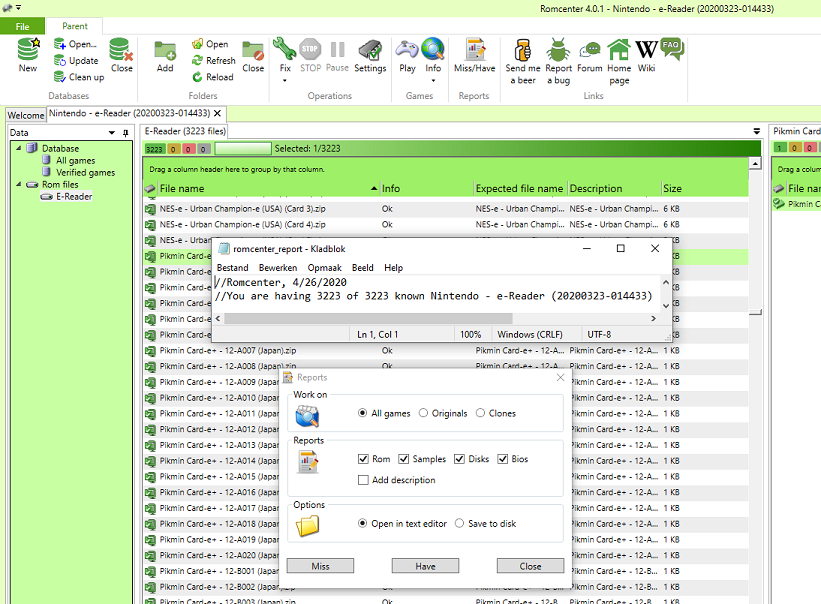
List of dumped Pikmin e-Reader cards

Pikmin Card-e+ - 12-A001 (Japan).zip
Pikmin Card-e+ - 12-A002 (Japan).zip
Pikmin Card-e+ - 12-A003 (Japan).zip
Pikmin Card-e+ - 12-A004 (Japan).zip
Pikmin Card-e+ - 12-A005 (Japan).zip
Pikmin Card-e+ - 12-A006 (Japan).zip
Pikmin Card-e+ - 12-A007 (Japan).zip
Pikmin Card-e+ - 12-A008 (Japan).zip
Pikmin Card-e+ - 12-A009 (Japan).zip
Pikmin Card-e+ - 12-A010 (Japan).zip
Pikmin Card-e+ - 12-A011 (Japan).zip
Pikmin Card-e+ - 12-A012 (Japan).zip
Pikmin Card-e+ - 12-A013 (Japan).zip
Pikmin Card-e+ - 12-A014 (Japan).zip
Pikmin Card-e+ - 12-A015 (Japan).zip
Pikmin Card-e+ - 12-A016 (Japan).zip
Pikmin Card-e+ - 12-A017 (Japan).zip
Pikmin Card-e+ - 12-A018 (Japan).zip
Pikmin Card-e+ - 12-A019 (Japan).zip
Pikmin Card-e+ - 12-A020 (Japan).zip
Pikmin Card-e+ - 12-B001 (Japan).zip
Pikmin Card-e+ - 12-B002 (Japan).zip
Pikmin Card-e+ - 12-B003 (Japan).zip
Pikmin Card-e+ - 12-B004 (Japan).zip
Pikmin Card-e+ - 12-B005 (Japan).zip
Pikmin Card-e+ - 12-B006 (Japan).zip
Pikmin Card-e+ - 12-B007 (Japan).zip
Pikmin Card-e+ - 12-B008 (Japan).zip
Pikmin Card-e+ - 12-B009 (Japan).zip
Pikmin Card-e+ - 12-B010 (Japan).zip
Pikmin Card-e+ - 12-B011 (Japan).zip
Pikmin Card-e+ - 12-B012 (Japan).zip
Pikmin Card-e+ - 12-B013 (Japan).zip
Pikmin Card-e+ - 12-B014 (Japan).zip
Pikmin Card-e+ - 12-B015 (Japan).zip
Pikmin Card-e+ - 12-B016 (Japan).zip
Pikmin Card-e+ - 12-B017 (Japan).zip
Pikmin Card-e+ - 12-B018 (Japan).zip
Pikmin Card-e+ - 12-B019 (Japan).zip
Pikmin Card-e+ - 12-B020 (Japan).zip
Pikmin Card-e+ - 12-C001 (Japan).zip
Pikmin Card-e+ - 12-C002 (Japan).zip
Pikmin Card-e+ - 12-C003 (Japan).zip
Pikmin Card-e+ - 12-C004 (Japan).zip
Pikmin Card-e+ - 12-C005 (Japan).zip
Pikmin Card-e+ - 12-C006 (Japan).zip
Pikmin Card-e+ - 12-C007 (Japan).zip
Pikmin Card-e+ - 12-C008 (Japan).zip
Pikmin Card-e+ - 12-C009 (Japan).zip
Pikmin Card-e+ - 12-C010 (Japan).zip
Pikmin Card-e+ - 12-C011 (Japan).zip
Pikmin Card-e+ - 12-C012 (Japan).zip
Pikmin Card-e+ - 12-C013 (Japan).zip
Pikmin Card-e+ - 12-C014 (Japan).zip
Pikmin Card-e+ - 12-C015 (Japan).zip
Pikmin Card-e+ - 12-C016 (Japan).zip
Pikmin Card-e+ - 12-C017 (Japan).zip
Pikmin Card-e+ - 12-C018 (Japan).zip
Pikmin Card-e+ - 12-C019 (Japan).zip
Pikmin Card-e+ - 12-C020 (Japan).zip

Promotional - Pikmin Puzzle Card-e+ - 12-D001 (Japan).zip
Promotional - Pikmin Puzzle Card-e+ - 12-D002 (Japan).zip
Promotional - Pikmin Puzzle Card-e+ - 12-D003 (Japan).zip
Promotional - Pikmin Puzzle Card-e+ - 12-H001 (Japan).zip
Promotional - Pikmin Puzzle Card-e+ - 12-H002 (Japan).zip
Promotional - Pikmin Puzzle Card-e+ - 12-H003 (Japan).zip
Promotional - Pikmin Puzzle Card-e+ - 12-H004 (Japan).zip
Promotional - Pikmin Puzzle Card-e+ - 12-H005 (Japan).zip
Promotional - Pikmin Puzzle Card-e+ - 12-H006 (Japan).zip
Promotional - Pikmin Puzzle Card-e+ - 12-P001 (Japan).zip
Promotional - Pikmin Puzzle Card-e+ - 12-P002 (Japan).zip
Promotional - Pikmin Puzzle Card-e+ - 12-P003 (Japan).zip

When unzipping, the extension is .raw
Renamed with romcenter and dat file from 23-03-2020 (014433)

Naamloos.png
 
Last edited by DjoeN,
  • Like
Reactions: zfreeman

Site & Scene News

Popular threads in this forum