Hacking Installing an Update from NUS Downloader

MrDaveIsAwesome

Well-Known Member
Newcomer
Joined
Nov 22, 2014
Messages
59
Reaction score
13
Trophies
0
Age
29
XP
361
Country
United States
Hey guys, I'm currently on 5.5.1 and I don't really want to update (breaks coldboothax and I don't wanna have to mess around with all that again)

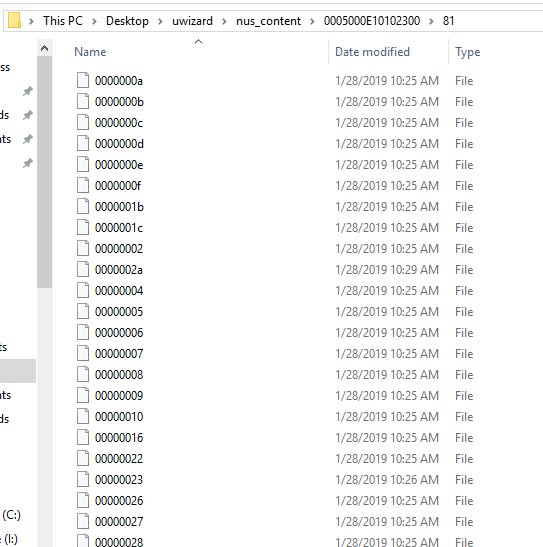
I just got Wii fit U on disc, and i wanted to install an update to it. I can download the update with NUS Downloader, but it comes in this format:
upload_2019-1-28_10-46-2.png


How do I install this onto my Wii u? I put the "005...." folder into my install directory for WUP Installer GX2, but it doesn't even show up in the app. Can anyone shed some light on this?

 
Do you have an American Wii U? In that case 5.5.3 won't disable CBHC, so yeah just update the normal way
 
Well, 5.5.3 is the latest firmware version, which was mostly rolled out due to GDPR (affecting Europe, and thus PAL consoles, so on the PAL consoles system.xml is rewritten in the update, disabling CBHC, although it is just to run the installer again and you're fixed) But on the US and JP consoles, nothing happens by the 5.5.3 (Well nothing that affects you). It does not remove CBHC for you, the only thing you in theory could notice is that the old webhax won't work but as you have CBHC, what does it matter? (Also there is a new stable 5.5.3 webhax so...)
 
I notice in your pic you have the folder as

0005000E10102300\81\(lots of game files)

Move the game files into the 0005000E10102300 folder so you have the game files as

0005000E10102300\game files

And remove the then empty 81 folder

Copy the 0005000E10102300 folder with game files and it should then install
 
  • Like
Reactions: MrDaveIsAwesome
I notice in your pic you have the folder as

0005000E10102300\81\(lots of game files)

Move the game files into the 0005000E10102300 folder so you have the game files as

0005000E10102300\game files

And remove the then empty 81 folder

Copy the 0005000E10102300 folder with game files and it should then install

Alright I will try this and let you know, thanks for the help

--------------------- MERGED ---------------------------

This actually still didn't work...
Here's how i have the files :
upload_2019-1-28_11-53-54.png


WUPInstaller Gx still doesn't recognize it...

Do these files need to be renamed as .app files?
 
Last edited by MrDaveIsAwesome,
  • Like
Reactions: bitzthatbyte
Alright I will try this and let you know, thanks for the help

--------------------- MERGED ---------------------------

This actually still didn't work...
Here's how i have the files :
View attachment 156453

WUPInstaller Gx still doesn't recognize it...
Look MrDavels, if Wupinstaller doesn´t recognize it, i think indeed the problem is just a bad location.
1) Open the folder that contains all the update, and copy all the files.
2) Put on ur SD card, and open the folder named Install. Games, updates, dlc and whatever you want to get on you´re console, must be in the direction: SD/Install.
3) If it is Wup installer Gx, create a folder named game 1 in the install folder, like this: SD/Install/game1 and there you put you´re update.
That´s all.
 
Look MrDavels, if Wupinstaller doesn´t recognize it, i think indeed the problem is just a bad location.
1) Open the folder that contains all the update, and copy all the files.
2) Put on ur SD card, and open the folder named Install. Games, updates, dlc and whatever you want to get on you´re console, must be in the direction: SD/Install.
3) If it is Wup installer Gx, create a folder named game 1 in the install folder, like this: SD/Install/game1 and there you put you´re update.
That´s all.

I tried that:
upload_2019-1-28_12-9-59.png


But it still isn't recognized. I also had it named as the actual folder name from NUS downloader (005...) This still didn't work...
 
I tried that:
View attachment 156456

But it still isn't recognized. I also had it named as the actual folder name from NUS downloader (005...) This still didn't work...

I know I might not bring the answer you want, but I've spent quite alot of time in the Wii U subforum (since slightly before Haxchi, altough I didn't have an account back then) but I've never seen your method for updating the Wii U, the most similar would be downloading the updated titles via JNUSdownloader. But still, why not update the regular way and be sure it's safe and works when you can? But instead doing something more risky? I mean you struggle as it is now, the risk of doing something wrong is there?
 
I know I might not bring the answer you want, but I've spent quite alot of time in the Wii U subforum (since slightly before Haxchi, altough I didn't have an account back then) but I've never seen your method for updating the Wii U, the most similar would be downloading the updated titles via JNUSdownloader. But still, why not update the regular way and be sure it's safe and works when you can? But instead doing something more risky? I mean you struggle as it is now, the risk of doing something wrong is there?

Well im not trying to update the wii u itself, just install one update for a game. I would update it but I have heard updating to 5.5.2 gets rid of coldboothax
 
Well im not trying to update the wii u itself, just install one update for a game. I would update it but I have heard updating to 5.5.2 gets rid of coldboothax

And I tell you it won't as you have an american console (your firmware is 5.5.1 U that is) And 5.5.3 has been out since september or something so you shouldn't update to 5.5.2 only.
CBHC won't be removed from your console and still works on the latest firmware (which is 5.5.3)
 
  • Like
Reactions: MrDaveIsAwesome
And I tell you it won't as you have an american console (your firmware is 5.5.1 U that is) And 5.5.3 has been out since september or something so you shouldn't update to 5.5.2 only.
CBHC won't be removed from your console and still works on the latest firmware (which is 5.5.3)

my mom always told me to never trust a swede, but hey it worked just like you said it would! So thanks man, Ill just install the update the legit way
 

Site & Scene News

Popular threads in this forum