Installing Adrenaline 6.61
UPDATE: Please note that the below methods are now all out of date. They are being kept for archival reasons only. Adrenaline is now installed via it's own VPK, without requiring any of the below steps or any PSP bubble. Installation steps are below if you need it:
Step 1: Download the latest Adrenaline Release
Step 2: Transfer to your Vita, and install the VPK using VitaShell
Step 3: Launch Adrenaline, it will download the 6.61 eboot
Step 4: ???
Step 5: Profit
UPDATE: Developer Freakler has created a quick and easy Vita homebrew app that will essentially install Adrenaline for you! It also lets you install a custom live area theme, which is neat  I've kept the manual method in the spoiler below, in case you simply want to do it yourself.
NOTE: You will need to have a PSP demo/game installed on your Vita to use the manual method. If you don't have a PSP demo now, check out the first spoiler that shows you have to install Adrenaline without PSN access.
It can be downloaded here, and here are some quick install instructions if you need it:
Step 1: Download and install EasyAdrenalineInstaller
Step 2: Download 6.61 EBOOT (direct link), rename it to 661.PBP and move it to ux0:/pspemu/adrenaline (using VitaShell 1.42, if you need help see the guide below on how to install)
Step 3: Launch EasyAdrenalineInstaller and follow the on-screen steps.
Step 4: ???
Step 5: Profit
UPDATE3: The below method current has some issues, if you don't have a PSP game you'll have to sit tight while we figure out how to get around that.
UPDATE2: Since PSN spoofing has gone down, some people haven't been able to get their PSP demo/game downloaded in order to have a base game. All credit for this method goes to @mummysboy who was messing around and has come up with a work around that manages to install Adrenaline using a PSP demo and the license file from a Vita homebrew app. Below you will find a tutorial on how to get a base game without PSN, PSP, or PS3 access and how to install Adrenaline using that base game.
And that's it! It's really very simple, and should only take about 5 minutes max to fully install.
To use the built-in Adrenaline menu:
While in Adrenaline, hold down the "PS Vita" button until the Vita menu appears and hit the "Settings". This will open up Adrenaline settings instead of the official settings. Use "L" and "R" to switch tabs, "X" to choose options, and "O" to back out. You can use this menu to exit the eCFW if need be.
Step 1: Download the latest Adrenaline Release
Step 2: Transfer to your Vita, and install the VPK using VitaShell
Step 3: Launch Adrenaline, it will download the 6.61 eboot
Step 4: ???
Step 5: Profit
I've kept the manual method in the spoiler below, in case you simply want to do it yourself.NOTE: You will need to have a PSP demo/game installed on your Vita to use the manual method. If you don't have a PSP demo now, check out the first spoiler that shows you have to install Adrenaline without PSN access.
It can be downloaded here, and here are some quick install instructions if you need it:
Step 1: Download and install EasyAdrenalineInstaller
Step 2: Download 6.61 EBOOT (direct link), rename it to 661.PBP and move it to ux0:/pspemu/adrenaline (using VitaShell 1.42, if you need help see the guide below on how to install)
Step 3: Launch EasyAdrenalineInstaller and follow the on-screen steps.
Step 4: ???
Step 5: Profit
UPDATE3: The below method current has some issues, if you don't have a PSP game you'll have to sit tight while we figure out how to get around that.
Step 1: Download this file pack and extract it somewhere on your PC
Step 2: Install taiHen and use Molecular Shell to install VitaShell 1.42 if you haven't already (see Step 1 below in my manual tutorial if you need help)
Step 3: Reboot your Vita, install taiHen again, and open VitaShell to gain access to all files.
Step 4: Start an FTP server, and transfer the pspemu folder in the zip to the root of ux0. You should now have /adrenaline/ as well as /PSP/GAME/NPEG00011 and /PSP/License in your pspemu folder.
Step 5: Go to ux0:/license/app/VITASHELL and download the license file to your PC
Step 6: Rename that license file to EP9000-NPEG00011_00-0000000000000000.rif
Step 7: Transfer the license file to ux0:/pspemu/PSP/LICENSE
Step 8: Install Easy Adrenaline Installer
Step 9: Shut down your Vita and boot into the Recovery Menu (hold R+PS button+Power button)
Step 10: Rebuild the database
Step 11: Reboot into your Vita, install taiHen, and launch Easy Adrenaline Installer. Follow the on screen instructions to install Adrenaline
Step 12: Enjoy your tasty Adrenaline!
Step 2: Install taiHen and use Molecular Shell to install VitaShell 1.42 if you haven't already (see Step 1 below in my manual tutorial if you need help)
Step 3: Reboot your Vita, install taiHen again, and open VitaShell to gain access to all files.
Step 4: Start an FTP server, and transfer the pspemu folder in the zip to the root of ux0. You should now have /adrenaline/ as well as /PSP/GAME/NPEG00011 and /PSP/License in your pspemu folder.
Step 5: Go to ux0:/license/app/VITASHELL and download the license file to your PC
Step 6: Rename that license file to EP9000-NPEG00011_00-0000000000000000.rif
Step 7: Transfer the license file to ux0:/pspemu/PSP/LICENSE
Step 8: Install Easy Adrenaline Installer
Step 9: Shut down your Vita and boot into the Recovery Menu (hold R+PS button+Power button)
Step 10: Rebuild the database
Step 11: Reboot into your Vita, install taiHen, and launch Easy Adrenaline Installer. Follow the on screen instructions to install Adrenaline
Step 12: Enjoy your tasty Adrenaline!
I see a few people are having some difficulties figuring out how exactly to get Adrenaline installed, or are running into some kind of error, so this is a quick tutorial on how to do so with clear, concise directions that should hopefully clear up some confusion.
What you need:
What you need:
- A PS Vita on 3.60 with taiHen installed (go to beta.henkaku.xyz on your Vita after a clean reboot)
- A PSP demo/game (the Locoroco Midnight Carnival demo seems to be the preferred game and is confirmed working)
- Adrenaline (EDIT 11/18: Added PSP minis fix)
- Vita Shell 1.42
- 6.61 EBOOT (direct link)
- An FTP client (I use Filezilla)
- Notepad
First things first, download all the files above. Then, make sure you have taiHen installed by going to beta.henkaku.xyz after a clean boot. Once installed, open up Molecular Shell and hit "Select" to enable the built in FTP browser. Connect to the FTP server via your client of choice, and transfer the Vita Shell 1.42 VPK to your Vita. Once it's finished transferring, disable the FTP server, then hit "Start". This will bring up a menu where you will see "Enable unsafe homebrew". Set this option to "On". Then reboot your Vita, install taiHen, open up Molecular Shell again, and install VitaShell.
Once VitaShell is installed, close Molecular Shell and open up VitaShell. You should now have access to the full file system, including the pspemu folder. (if you don't see pspemu still, restart your Vita and install taiHen again). Hit "Select" again to start an FTP server, and connect as before. This time, transfer the contents of the Adrenaline.zip (which will be a folder called adrenaline) to ux0:/pspemu. Then, rename the "EBOOT.PBP" file you downloaded to "661.PBP" and transfer that to ux0:/pspemu/adrenaline.
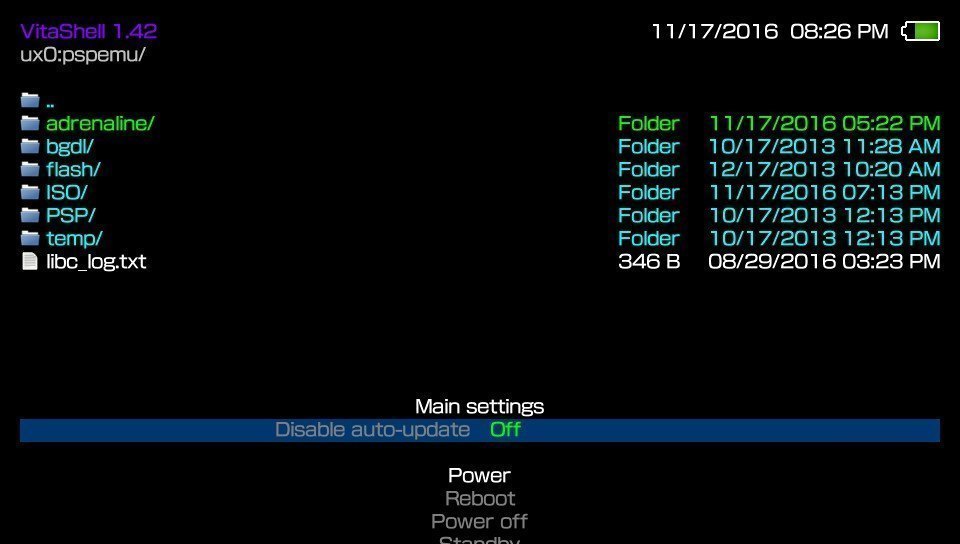
At this point, your pspemu folder should similar to this:
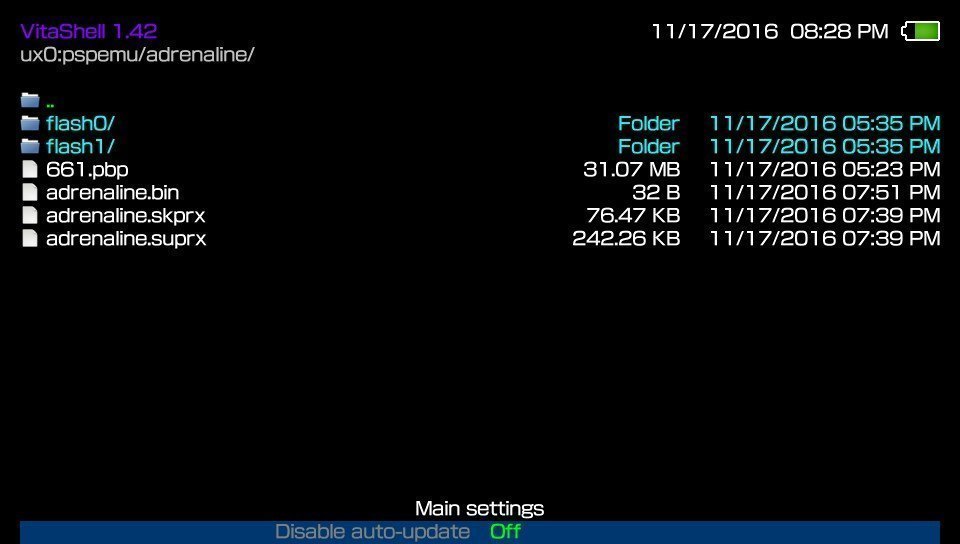
And your adrenaline folder should look similar to this (minus the flash folders):
At this point, your pspemu folder should similar to this:
And your adrenaline folder should look similar to this (minus the flash folders):
Next, keeping VitaShell's FTP server open, navigate to ux0:/tai and transfer the config.txt file to your PC. IF you don't have a config.txt file, simply create one on your PC.
IF YOU'RE USING LOCOROCO MIDNIGHT CARNIVAL: I've included a preset config.txt for you, assuming you don't have one in your taiHen folder. DO NOT use this file if you're using any other PSP base game, DO NOT use this if you already have an existing config.txt.
Open config.txt, and add the following lines:
Change *TITLEID to the TitleID of your PSP game. If you need help finding the TitleID of your demo/game, head to Gamefaqs and search for the title of your game. Once you find it, go to their "Release Information" tab and under "Product ID" will be the TitleID of your game (make sure you're using the proper region). You can also find your TitleID in the pspemu folder by navigating to pspemu/PSP/GAME. If you have any legit PS1/multiple PSP games installed, you'll see multiple folders so in that case simply check Gamefaqs.
NOTE: When entering your TitleID, make sure you remove all spaces and dashes. For example, if you're using the Locoroco Midnight Carnival demo, your TitleID would be "*NPUG80318".
Once you're finished editing/creating your config.txt, transfer this back to ux0:/tai and overwrite if prompted.
IF YOU'RE USING LOCOROCO MIDNIGHT CARNIVAL: I've included a preset config.txt for you, assuming you don't have one in your taiHen folder. DO NOT use this file if you're using any other PSP base game, DO NOT use this if you already have an existing config.txt.
Open config.txt, and add the following lines:
Code:
        *KERNEL
        ux0:pspemu/adrenaline/adrenaline.skprx

        *TITLEID
        vs0:sys/external/libpgf.suprx
        ux0:pspemu/adrenaline/adrenaline.suprx
Change *TITLEID to the TitleID of your PSP game. If you need help finding the TitleID of your demo/game, head to Gamefaqs and search for the title of your game. Once you find it, go to their "Release Information" tab and under "Product ID" will be the TitleID of your game (make sure you're using the proper region). You can also find your TitleID in the pspemu folder by navigating to pspemu/PSP/GAME. If you have any legit PS1/multiple PSP games installed, you'll see multiple folders so in that case simply check Gamefaqs.
NOTE: When entering your TitleID, make sure you remove all spaces and dashes. For example, if you're using the Locoroco Midnight Carnival demo, your TitleID would be "*NPUG80318".
Once you're finished editing/creating your config.txt, transfer this back to ux0:/tai and overwrite if prompted.
Now that you have all the proper files transferred on your Vita, we're going to install the exploit. First, reboot your Vita and install taiHen as normal. Once done, open up your PSP game/demo. As it's loading, you will be prompted to install Adrenaline. Press "X".
IF ADRENALINE DOESN'T LOAD: This means you didn't use the correct TitleID for your game. You will need to re-edit the config.txt in ux0:/tai to the correct TitleID (you can do this in VitaShell to make things a bit quicker), reboot, install taiHen, and try again.
After that, the exploit will start installing. Once finished, hit X, and you will boot straight into your eCFW. From now on, whenever you want to open up Adrenaline, simply open the game (while taiHen is installed) and it will boot straight to your eCFW!
IF ADRENALINE DOESN'T LOAD: This means you didn't use the correct TitleID for your game. You will need to re-edit the config.txt in ux0:/tai to the correct TitleID (you can do this in VitaShell to make things a bit quicker), reboot, install taiHen, and try again.
After that, the exploit will start installing. Once finished, hit X, and you will boot straight into your eCFW. From now on, whenever you want to open up Adrenaline, simply open the game (while taiHen is installed) and it will boot straight to your eCFW!
To use the built-in Adrenaline menu:
While in Adrenaline, hold down the "PS Vita" button until the Vita menu appears and hit the "Settings". This will open up Adrenaline settings instead of the official settings. Use "L" and "R" to switch tabs, "X" to choose options, and "O" to back out. You can use this menu to exit the eCFW if need be.
Q: Do I need to install taiHen to use Adrenaline?
A: Yes. Whenever you reboot, you will need to install taiHen in order for the exploit to load properly. Regular Henkaku will not work.
Q: Where do I put my "backups"?
A: All ISOs/CSOs need to be put into ux0:/pspemu/ISO. Create the folder yourself.
Q: Where do I put homebrew?
A: Homebrew goes in the same old PSP/GAME/ folder (so ux0:/pspemu/PSP/GAME/)
Q: What about PS1 games?
A: At this time, v1 of Adrenaline does not support PS1 loading.
Q: How do I use PSP plugins?
A: Plugins in Adrenaline work the same as it does on a normal PSP, put a "seplugin" in ux0:/pspemu and create a text file called "game.txt". In that text file, you put the path of the plugin and add a "1" after it to enable the plugin. For example, "ms0:/seplugins/PSPpluginExample.prx 1"
Q: I don't see the pspemu folder! When I try to create one I get an Error 0x8001000D!
A: Make sure you're using VitaShell 1.42. If you're sure you are, reboot your Vita, install taiHen, and check VitaShell again.
Q: I want to use a smaller game for Adrenaline, but when I edit tai/config.txt it doesn't work!
A: Make sure you reboot and reinstall taiHen after making any changes to the config.txt file.
Q: I keep getting "Error decoding PSAR" and now I can't launch my base game!
A: This may be related to a corrupt 6.61 eboot used. Download it again, and transfer it over to your Vita. You must delete the flash folders in pspemu/adrenaline to restart the install.
A: Yes. Whenever you reboot, you will need to install taiHen in order for the exploit to load properly. Regular Henkaku will not work.
Q: Where do I put my "backups"?
A: All ISOs/CSOs need to be put into ux0:/pspemu/ISO. Create the folder yourself.
Q: Where do I put homebrew?
A: Homebrew goes in the same old PSP/GAME/ folder (so ux0:/pspemu/PSP/GAME/)
Q: What about PS1 games?
A: At this time, v1 of Adrenaline does not support PS1 loading.
Q: How do I use PSP plugins?
A: Plugins in Adrenaline work the same as it does on a normal PSP, put a "seplugin" in ux0:/pspemu and create a text file called "game.txt". In that text file, you put the path of the plugin and add a "1" after it to enable the plugin. For example, "ms0:/seplugins/PSPpluginExample.prx 1"
Q: I don't see the pspemu folder! When I try to create one I get an Error 0x8001000D!
A: Make sure you're using VitaShell 1.42. If you're sure you are, reboot your Vita, install taiHen, and check VitaShell again.
Q: I want to use a smaller game for Adrenaline, but when I edit tai/config.txt it doesn't work!
A: Make sure you reboot and reinstall taiHen after making any changes to the config.txt file.
Q: I keep getting "Error decoding PSAR" and now I can't launch my base game!
A: This may be related to a corrupt 6.61 eboot used. Download it again, and transfer it over to your Vita. You must delete the flash folders in pspemu/adrenaline to restart the install.