how to setup Wii AV cables

  • Thread starter Thread starter Hockeydavid
  • Start date Start date
  • Views Views 1,980
  • Replies Replies 17
  • Likes Likes 1

Hockeydavid

Well-Known Member
Newcomer
Joined
Aug 12, 2018
Messages
66
Reaction score
9
Trophies
0
Age
23
XP
410
Country
United States
Hi,

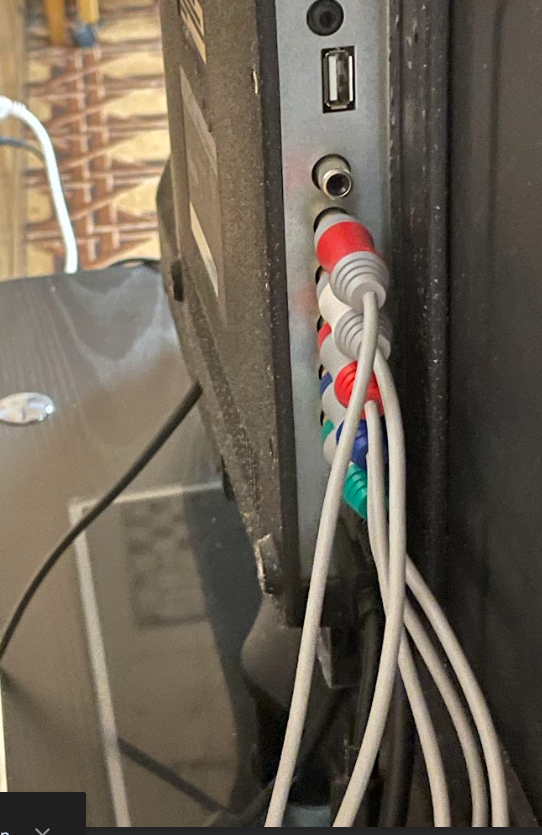
I was feeling nostalgic, so I dug up my old wii in my basement. However, I can't figure out how to set up the AV cables and my parents have long forgotten how to setup the will. I attached a screenshot of how I set up the av cables, but the wii doesn't show up when I switch to the AV port. I only have the wii AV apparatus with 5 cables consisting of green, blue, white, and two reds. I entered the cables based on color and I believe the bottom two ports are for audio. Any help would be greatly appreciated.
1742325298971.png
 
  • Like
Reactions: Aep
Do you have input named "component" instead of "av" in your TV? You're right that the white/red pair is audio and the RGB is component video. If the colours correspond to inputs on your TV set, everything should be setup correctly.
 
Do you know what the black port if for? Are sure your tv actaully supports component video? It might be helpful to have a pic of the ports with nothing in them.

Here's trick you can try. Switch your tv to component video then try plugging the green pin into every port and see if you can get a black and white picture. That will help you figure out what ports to use. If none of them work then something is wrong.
If your tv doesn't actually have competent input you can try the same trick with the tv set to av, although you'll need to get actual composite cables to get colour.
 
You need to switch your Wii's input mode to component.

If you can hear audio, you can blindly do this by imitating videos and feeling for vibration in the wiimote (which lets you know when you're above a button)
 
You need to switch your Wii's input mode to component.

If you can hear audio, you can blindly do this by imitating videos and feeling for vibration in the wiimote (which lets you know when you're above a button)
I don't think thats necessary, it should do it automatically.
 
Do you know what the black port if for? Are sure your tv actaully supports component video? It might be helpful to have a pic of the ports with nothing in them.
Black port is ALWAYS coaxial SP/DIF i.e. digital audio output over copper.
 
Did you guys own a Wii U? If so that's probably the Wii U component cable and your Wii is still set to composite video instead. If that's the case have a look for a set of AV cables with the same pljg on the Wii side but is yellow, red, and white on the TV side. You can use that cable to either play as is, or use it to switch to component output on the Wii and then use the better cable instead.

But if your Wii is already set up to output component video it should just work if you set your TV to the correct component input, as the others have said.
 
Here are the AV ports without the cables. Did I mess up the inputs? Also I can't figure out what the sixth black port is for. I'm attempting to set up the wii on an old seki tv, as that is what my family used when I was a kid. I don't think the wii would work on my modern roku tv because that tv only has 3 AV ports.

1742328700951.png
 
Most modern TVs can't properly output 480i (which is the default until specifically selecting the component video mode), so this is definitely a necessary step.
I find that hard to believe that any tv old enough to have component ports doesn't support 480i in at least some capacity.
And, just to clarify your point, in case it really is the issue, the wii doesn't have a setting for cable type, it just has it for resolution. You'd need to select "480p" in the settings.
 
Here are the AV ports without the cables. Did I mess up the inputs? Also I can't figure out what the sixth black port is for. I'm attempting to set up the wii on an old seki tv, as that is what my family used when I was a kid. I don't think the wii would work on my modern roku tv because that tv only has 3 AV ports.

View attachment 491799
Judging by the setup, it's up from down.

Meaning the bottom ports are for component (video) and the two top ports are for audio.

Mysterious black port is probably for something very old - don't bother with it at all.

Find and read the instruction manual on the TV if you're curious.

It probably supports AV even with those inputs.
 
Your setup was right from start and I think I've explained the "mysterious" black port competently enough in my previous post...

Does your TV have input (when switching inputs from the remote) called component? If so, that's the one you need to select on your remote. The initial setup of your cable was correct and deductable from your initial message with some reading and basic understanding of TV video connections :)
 
Here are the AV ports without the cables. Did I mess up the inputs? Also I can't figure out what the sixth black port is for. I'm attempting to set up the wii on an old seki tv, as that is what my family used when I was a kid. I don't think the wii would work on my modern roku tv because that tv only has 3 AV ports.

View attachment 491799
Thanks, for the pic, you did indeed have it set up right. Also, you never mentioned if you could hear any audio or not?
 
Boot your console with the cable disconnected from it and plug it in 10 or so seconds later, this will force your (I assume American) console to 480i which is the lowest common denominator (so that it will work even if you accidentally set it to composite, as 480i Y is by definition black and white composite and viceversa)
 
Hi,

I was feeling nostalgic, so I dug up my old wii in my basement. However, I can't figure out how to set up the AV cables and my parents have long forgotten how to setup the will. I attached a screenshot of how I set up the av cables, but the wii doesn't show up when I switch to the AV port. I only have the wii AV apparatus with 5 cables consisting of green, blue, white, and two reds. I entered the cables based on color and I believe the bottom two ports are for audio. Any help would be greatly appreciated.


View attachment 491797
That is component, not AV. Which is better! Set it up with Component on your TV.
 
  • Haha
Reactions: N7Kopper and lwiz
That is component, not AV. Which is better! Set it up with Component on your TV.
AV stands for "Audio-Video". "Component" is a type of analogue AV that splits the chroma and luma signals onto separate lines. Whilst the term "Component" is commonly associated with the five-RCA cable setup running a Y/Pb/Pr colour encoding, it also applies to SCART cables using the RGB colour encoding.

So there. He got it working already anyway, it was as simple as plug the males into the females like Abdool heaven.
 

Site & Scene News

Popular threads in this forum