Hacking Help with IMGburn

  • Thread starter Thread starter Kirah
  • Start date Start date
  • Views Views 2,812
  • Replies Replies 15

Kirah

Active Member
Newcomer
Joined
Dec 19, 2009
Messages
38
Reaction score
0
Trophies
0
XP
166
Country
United States
Ive been trying to burn some wii ISO files to dvd using imgburn, and it works out nicely untill the end of the process
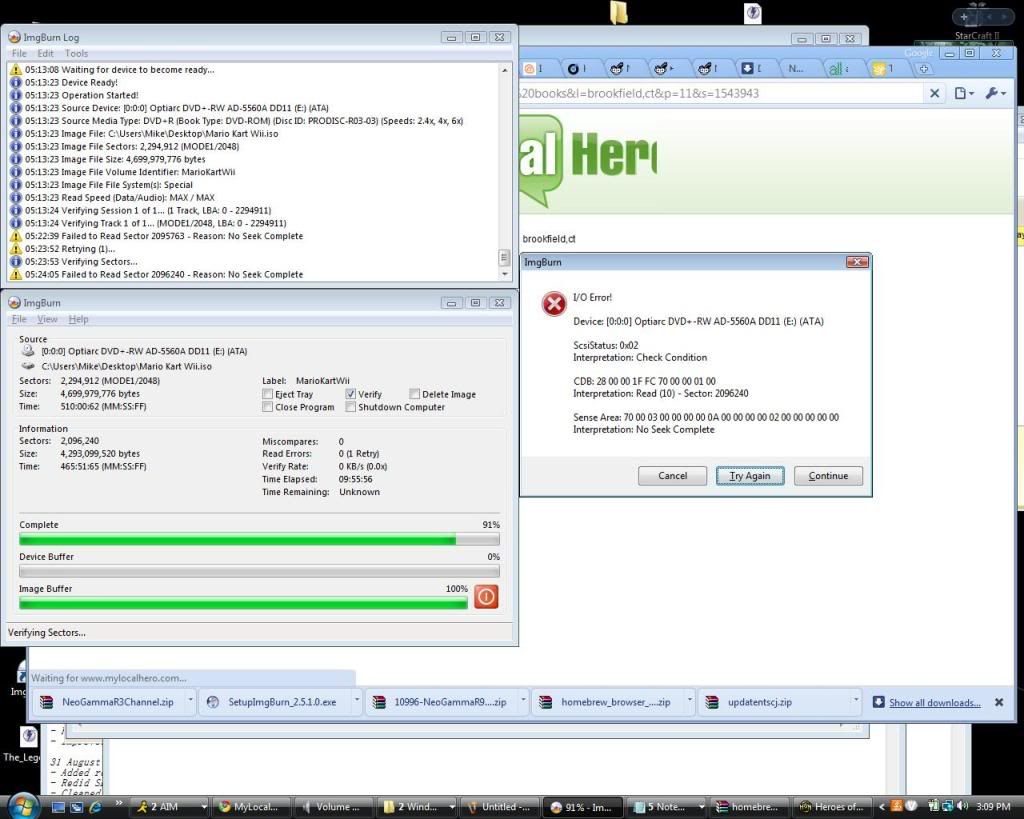
halppme.jpg

I get that error, and it happens at 91% both times when its "verify"ing the dvd (after the burn)
this happened so far with both the Twilight Princess and Mario Kart ISOs I have tried to burn.

Any help would be appreciated :|

 
Im running on a Dell M1730 laptop with 4gb of ram
The whole process runs really smoth except for that last part, and I would hate to waste more DVDs :|

I tried putting the discs into the wii and running them via neogamma, but it ends up loading somwhat then says how it cannot read the disc. Once I take it out, it says "please insert the Mario Kart Wii/ whatever game i burned into the wii" or somthing like that.
 
I just burned it without the verify, and still no dice :|

Im thinkin of just trying to use a USB loader instead of burning backup disks.

Can anyone recommend a good beginner friendly USB loader app, that would let me put the ISO files on a drive and play them through the wii like that, without all this hassle -_-
 
Memorex DVD +R 8x

Could it be a problem the way im using Neogamma?
Im still fairly new to this, so when I downloaded a "channel" (still not sure as to what this is..) I just stuck it in the Neogamma folder of my SD card. So the channel WAD file is with all the other Neogamma files.
 
I got the same error yesterday when burning WarioWare Smooth Moves, but I retried a while after and it worked, Dell d630 latitude btw, it may be your discs...
 
Yeah, the DVDs im using are VERY old, so im guessing the problem probally lies with them :|

Im trying the USBloader GX right now, because I have a 300gb external HD, and it would be nice to just backup all my games on there and also put some other ISO files on it.

Everything is running nicely so far, the only problem im having is that im formatting the USB HD on my computer, then I have to reformat it on the Wii in the USBloader, then format it again on my computer. It seems like they format it in different manners not recognized by eachother.
 
My laptop is running Windows Vista, and right now my HDD is unformatted.

I downloaded WBFS Manager 2.5, but for some reason it does not like my HDD, failing to see its even there or somthing.

So im using Killdisk to clear it (ugh, taking over 5 hours for a 300gb USB HDD -_-) then im going to use partition magic to do a fat32, and see if it will recognize it then and let me partition it to WBFS so I can use the whole drive.
 
Vista is the cause ...

Download the latest version of wbfs manager (3.0) and install.

Plug in the HDD and run wbfs manager as admin (find the WBFSManager.exe in the wbfs folder in programfiles, rightclick and choose admin)

Now it should recognize the HDD and be able to format
smile.gif
 
thank you!

EDIT: okay I figured my previous problem out haha
my problem now is that its a 270gb HDD, and when I partition it in WBFS manager it makes it .27gb ....so when I try to transfer over my iso files of course there is not enough space.

any reason why WBFS manager is doing this? When im partitioning through windows it recognizes it as its full size.
 
Yeah, try Wiitch if your Wii can recognize the HDD. Host the ISO's yourslef and tell Wiitch to download the ISO's from your IP to the HDD.

Note: I am a complete nuthead, so this probably won't work, but it's worth a try.
 
^ haha stated above, I got it to work n_n
I went into my computer, then manage, and hdd manage, it was off or somthing, just messed around and got it to work :]

new problem though, but its with WBFS manager not the drive itself :|

EDIT: figured it out haha, it was somthing stupid I did under disk management, everything should work now :]
 
Kirah said:
Memorex DVD +R 8x

Could it be a problem the way im using Neogamma?
Im still fairly new to this, so when I downloaded a "channel" (still not sure as to what this is..) I just stuck it in the Neogamma folder of my SD card. So the channel WAD file is with all the other Neogamma files.
Everyone seems to have missed this, so I'll answer. First, the wii doesn't really like DVD+R disks, so if you still want to use DVD's try -R

Second, a channel is not required, it is just for convinience. You install a wad with a wad manager app, and then you can load neogamma, or whatever channel you installed from the wii menu, instead of having to go in to the homebrew channel first
 

Site & Scene News

Popular threads in this forum