Graphics Card Help

  • Thread starter Thread starter Deleted User
  • Start date Start date
  • Views Views 1,448
  • Replies Replies 3
D

Deleted User

Guest
Hi Good Morning everyone!
I'm gonna be honest... I do not want to improve performance for entertainment purposes.
I've gathered these two screenshots about my dedicated memory to Graphics. As you'll see, I have 4096MB available and I'm only using 1850MB.
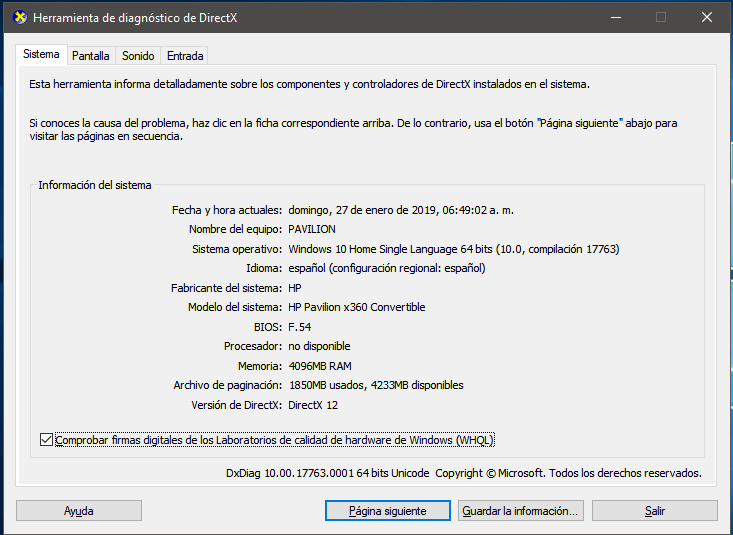
Captura.PNG

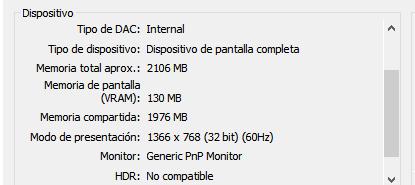
And here's a screenshot of my VRAM:
Captura 2.PNG


I would like to know, if I can sneak into the BIOS and add more RAM into my integrated Graphics Card.
And I honestly don't know if this could harm my computer... I'm a noob with this kind of stuff.
Thanks in advance.
 

Attachments

  • upload_2019-1-27_7-18-36.png
    upload_2019-1-27_7-18-36.png
    10.8 KB · Views: 91
I don't read Spanish but when you say you are only using 1850MB that looks like a page file, especially as the next value is greater than the memory size at 4233MB I am guessing the next word means available (or at least a very similar word in French means available, and is similar to the English word dispensable which sort of means that) and the whole thing is under something called paginacion.

The page file is a bit of hard drive space set aside for the computer to use when it runs out of memory, or does not need something immediately available in memory and wants some memory free to do other things (modern operating systems are complicated things designed to get speed wherever they can, this is but one way they do it).

At the same time cheap/non performance laptops tend to share their system memory with the graphics card, at the cost of not having as much system memory available. This would be what the second screen appears to deal with where it looks like it kicks 130MB (don't know if it means 128 but this is a mebibytes vs megabytes thing).
If you did want to change it then yes the BIOS would be where you do it. Hunt through the settings related to graphics or memory. Cheaper laptops from big vendors will sometimes block you from changing such things as well.
Frankly though 128/130 should be fine for everything you are likely doing on such a machine, especially at 1366x768 resolution, and if you lose more memory then you have a decent browser session and it will swallow it all up.
 
  • Like
Reactions: Deleted User
It’s so long ago I worked with Windows… hopefully I remember correctly:
There are two kinds of RAM you have to look at:
  • Physical RAM installed in the computer
  • Virtual memory, consists of physical RAM and the swapfile on the HDD/SSD
If any program asks Windows: “How much RAM is free?” it will normally report the virtual memory. Windows takes care of distributing the loaded programs and data to the RAM and will use (the slow) swap option only if needed (and put currently not really needed parts into the swap file to have more free RAM).
Your first screenshot shows 4096MB of physical RAM with a total virtual memory of 5946MB and only 1850MB are currently used. The rest is available for any program you may additionally want to start.
Captura.PNG


The second screenshot shows a GPU with 130 MB dedicated memory. If needed the GPU may also use (physical) main RAM of 1976MB – which is definitely enough – it’s almost half of your main RAM. There may be options in the BIOS/UEFI to change the amount of shared memory; this depends on the hardware. Changing these options will not harm the computer.
Captura 2.PNG
 
  • Like
Reactions: Deleted User
Hi!
Thanks for replying.
I've tested in my BIOS settings, and I can't change the value of dedicated VRAM. Nor in UEFI settings (actually, all I can do there is hardware tests)

However, I could add a value in Registry Keys and now I have 576MB of dedicated VRAM.
I don't know why is that, as I explicitely added 512.
I was using only 128MB out of my RAM.

The thing is that I work with huge 2D graphics and my performance suffers a little.
I'll have to test if this worked though.
 

Site & Scene News

Popular threads in this forum