Hacking GATEWAY PUBLIC RELEASE 2.6

  • Thread starter Thread starter AmeenX
  • Start date Start date
  • Views Views 136,757
  • Replies Replies 712
  • Likes Likes 13
...this past day has been fun.

I know that there have been some users who have shared a picture of devmen on their home screen. I want to share the applications which I installed when the 2.6 release was announced.

notes :
- I did NOT use govanify's devmenu
- The generic icon is the CEC Box Tool
- The 3DS Sound channel is a channel that I picked up from a Japanese 3DS update...using my US system
- All applications work as they should

15e9wu1.jpg
 
Am I supposed to have to reinstall the .cias every time I reboot into Gateway mode? I installed the Dev Menu CIA and then some others, deleted the others, but then when I went back to system NAND and then back into EmuNAND, the Dev menu icon was no longer there.

e: It's listed as a "program" inside of Devmenu.3ds and when i launch it and press Home, it shows up. it just doesn't show up upon launch of EmuNAND.

e2: It's somehow fixed itself. I give up.
 
Might as well post it here too https://mega.co.nz/#!709SEJrD!5kg83SClvZk6oR-q_XNDhsXiIk6A4s6akgkZxWcHPYI Put .3ds and xorpads in folder, drag and drop .3ds onto .bat file, get (hopefully) working .cia.
Code:
Decompressing section .code to exefs/code.bin...
Saving section banner to exefs/banner.bin...
Saving section icon to exefs/icon.bin...
Remove region lock (y/n)?n
"Filling .rsf"
  File "tools\rsfgen.py", line 32
    print ccode
              ^
SyntaxError: invalid syntax
"Building .cia"
[ROMFS ERROR] Invalid RomFS Binary.
[NCCH ERROR] NCCH Build Process Failed
[RESULT] Failed to build outfile
"Done."
Press any key to continue . . .
I happen to have python already on my PC, might be an incompatibility with my version. Bad idea to use python in a windows program without including the binary really :P
 
Savegame Cheating might be possible now from SD Cart:

Testobject: Fantasy Life EUR (00001131)

- Use SDK-5.2.2 SaveDataFiler.csu and rename it to .3ds
- Start it the usual way
- Backup your SD Save

A new folder named "filer" was created on your SD Cart.

In my Case the needed files are in SDCARD\filer\ExtData\20141106072547\00001131
(fl_ext0.fsd is the same content as _fl_ext0.fsd)

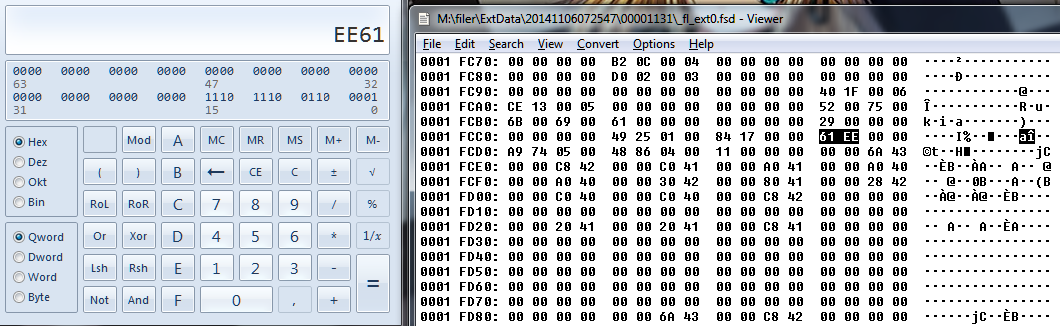
I searched around for my Characters Name and found it 52 00 75 00 6B 00 69 00 61 R.u.k.i.a

After a try to find ingame Stuff i hit the Jackpot:

jackpotfjrti.png


Money: 61025 > EE 61
Experience: 75081 > 01 25 49

Currently testing if changing will work or not.

EDIT:

IT WORKED.


OMG! do you think there is anyway to transfer my EUR save to USA?!
I downloaded EUR to try out the game and I fell in love with it... i would kill to be able to purchase the game (USA) and continue with my save and buy the DLC.
 
...this past day has been fun.

I know that there have been some users who have shared a picture of devmen on their home screen. I want to share the applications which I installed when the 2.6 release was announced.

notes :
- I did NOT use govanify's devmenu
- The generic icon is the CEC Box Tool
- The 3DS Sound channel is a channel that I picked up from a Japanese 3DS update...using my US system
- All applications work as they should

15e9wu1.jpg
Which SDK version are those tools from? Did you have to repack them?
 
Savegame Cheating might be possible now from SD Cart:

Testobject: Fantasy Life EUR (00001131)

- Use SDK-5.2.2 SaveDataFiler.csu and rename it to .3ds
- Start it the usual way
- Backup your SD Save

A new folder named "filer" was created on your SD Cart.

In my Case the needed files are in SDCARD\filer\ExtData\20141106072547\00001131
(fl_ext0.fsd is the same content as _fl_ext0.fsd)

I searched around for my Characters Name and found it 52 00 75 00 6B 00 69 00 61 R.u.k.i.a

After a try to find ingame Stuff i hit the Jackpot:
jackpotfjrti.png
Money: 61025 > EE 61
Experience: 75081 > 01 25 49

Currently testing if changing will work or not.

EDIT:

IT WORKED.


Hey, nice find.
I was wondering it this offset is "static". If in every save the money and exp will be in the same place.

Also, can you confirm this works for the US version?
 
Which SDK version are those tools from? Did you have to repack them?

I managed to install other SDK related files, icon shows but no function >>> crash/reboot 3ds on starting.

Wish he would share some more infos :)

Hey, nice find.
I was wondering it this offset is "static". If in every save the money and exp will be in the same place.

Also, can you confirm this works for the US version?

Offset might not static, but should work for most other games.
 

Site & Scene News

Popular threads in this forum