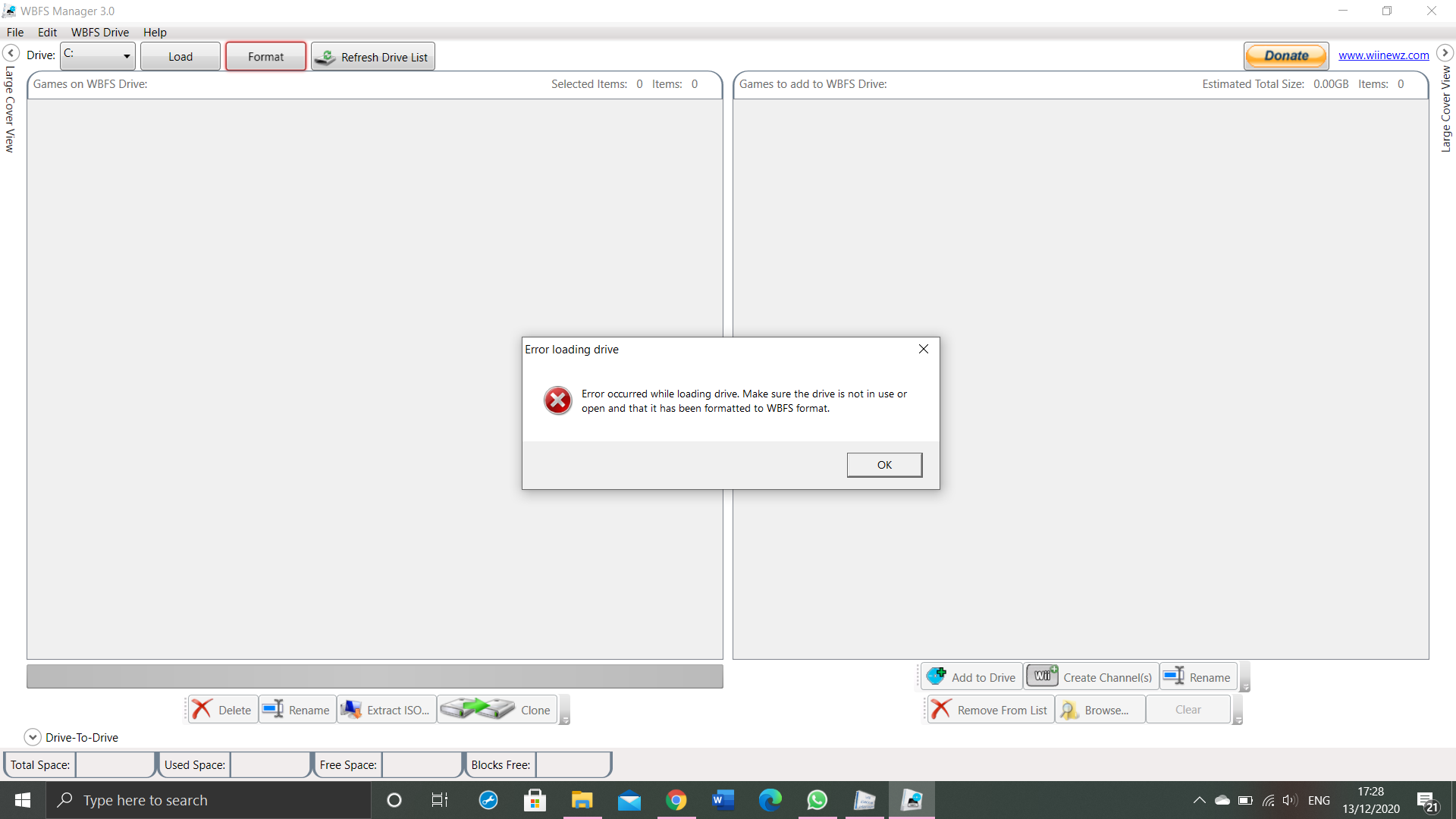
Gaming *error wii backup manager* games does not transfer properly

difficult_guy

Member
Newcomer
Joined
Dec 13, 2020
Messages
20
Reaction score
6
Trophies
0
Age
47
XP
75
Country
United Kingdom
hi guys,

I am bit of new here,

I managed to download homebrew on my wii console but I have following issues,

1) USB Loader does NOT show on wii desktop screen I have to open it though homebrew all the times

2) I am trying to download games into my USB drive via Wii Backup manager but it does NOT work as all the games transferred does NOT show the names of games and it does not change into .wbfs extension.

3) I do put my USB drive into right (botton) usb slot, since games are not written into right format, wii console does not recognise them


I will appreciate your help guys


upload_2020-12-13_17-31-16.png


upload_2020-12-13_17-30-45.png


upload_2020-12-13_17-30-37.png
 

Attachments

  • upload_2020-12-13_17-25-44.png
    upload_2020-12-13_17-25-44.png
    667.2 KB · Views: 675
  • upload_2020-12-13_17-26-18.png
    upload_2020-12-13_17-26-18.png
    216.5 KB · Views: 488
  • upload_2020-12-13_17-28-56.png
    upload_2020-12-13_17-28-56.png
    231.7 KB · Views: 414
  • upload_2020-12-13_17-30-23.png
    upload_2020-12-13_17-30-23.png
    231.7 KB · Views: 459
  • upload_2020-12-13_17-30-53.png
    upload_2020-12-13_17-30-53.png
    231.3 KB · Views: 361
I've seen those sorts of file names before. they're usually caused by corruption. maybe the pc is losing connection during transfer. it sounds like your hdd is bad tbh. and, if you want to get into usb loader gx from the home menu, you need to install a forwarder.
 
I've seen those sorts of file names before. they're usually caused by corruption. maybe the pc is losing connection during transfer. it sounds like your hdd is bad tbh. and, if you want to get into usb loader gx from the home menu, you need to install a forwarder.

Thank you very much for your instant reply.

I am using windows 10 laptops and I have formatted USB drive into right format but I managed to copy games from disc to usb that work but I do have SERIOUS issue while copying downloaded games from laptop to USB drive.

I dont interrupt my laptop during file transfer but these files does not get extension name changed into right format.

you can whatsapp me at 00447877050108

I need some serious help PLEASE
 
I'm thinking it's related to the hdd. I've seen that particular error before, and it was caused by corruption. I deleted the files, then redownloaded and retransferred the games. maybe someone else has another suggestion, but that's what I think.
 
I'm thinking it's related to the hdd. I've seen that particular error before, and it was caused by corruption. I deleted the files, then redownloaded and retransferred the games. maybe someone else has another suggestion, but that's what I think.


I just reformatted my USB stick. opened files in Wii Backup manager but this time result is still very same, as you can see attachments.

you are welcome to join me via teamviewer, please

upload_2020-12-13_18-22-45.png
 
I think I just figured out your problem. you're trying to transfer over .7z files. they need to be extracted first.

Thank you much for looking into this but I have folder with all extracted/unzipped files, when I try to add them into Wii Backup manager, these files get stuck.... as you can seen on the top right corner of an attachment.

upload_2020-12-13_18-56-7.png
 
I'm not sure what to do with nkit files. you'll have to wait for someone like @alexander1970 . he might know. from what I read, no backup loader can launch them. they're just supposed to be extremely compressed images for storage purposes like the nsz files for the switch.
 
  • Like
Reactions: Alexander1970
I'm not sure what to do with nkit files. you'll have to wait for someone like @alexander1970 . he might know. from what I read, no backup loader can launch them. they're just supposed to be extremely compressed images for storage purposes like the nsz files for the switch.

I am using normal Wii console (see attachment)

I have downloaded roams from various websites, like -snip-

I have unzipped all these files and I am trying to follow same procedure as guys does on youtube......


upload_2020-12-13_19-6-57.png


it says ADDING FILES FINISHED but file does not show in the folder.....

fSVhXaFtUpQ_QX09KwvhA5SlyTftfO2grIy3oU8hPeMrDrWgPfFi3QNy9Q9_mZi2jSWiAlN0bZ_NnjlvNMXH0qGy7U-R3jf1XfR5s1d6Gi6ovz3bRBGVRlC1zSHpe09H3xM7w7oMcLOlgmP2TtUer5JSyp8mfYHfLjUEIshIr9BjCjeW5YzDMBMrzgkEvQ7eHmvvZDxF9deuH1HEOeF-sZcA9SnW4wTAacKK85NxUPx_2Azmu5wrJeIEg4cEt_s5mAjriW9-DDG4S_o2tDJJ6xT0eIll4cAj0VfC3Ryg4i_Qg9sGZkAu4TEBoKfTDwSC3gzS80yho3cmR_eXdtVZ4TaI9Ny7-piWxWfw_X7bVVMtCjDGPITc-b0oopNMME7H_wrUMtHf92d_OLBMa1fimOynRFCV5e_rDFzWHgLiR13fVGcH1nHTdGNx7fI8hI5iBFboQQ-y83-_9filk1Vlb53fN_5U3K1bWVGx2CBEPRT-ifIecisFsOtYQ-8rVDPTv7bFTor5fP1PYfKsY6B67uzH9uSGtvX1YEj1VvJe-gAS1GjIMe3bCziccatL47uF4GhMlcDHjAiQHgsHpg992nIyXTv5yRhYD0aLixeKfSTaMEHde1Qs2yLCB6ttyBASvFT6JvSlU3bgyXI04jPjTHZffU_5T5jwGriEUDvyBKeSaLMn_qQLEtqpK9tKKJY=w708-h943-no
 
Last edited by Flame, , Reason: please dont link to warez. -flame
nkit files I think need to be uncompressed, but I don't know much about them, so I don't know how to do that. you'll just have to wait for someone else who knows. I had never even heard of nkit until the past year or so.
 
  • Like
Reactions: Alexander1970
nkit files I think need to be uncompressed, but I don't know much about them, so I don't know how to do that. you'll just have to wait for someone else who knows. I had never even heard of nkit until the past year or so.

I have tried again, I can not further extract these files.

Do you recommend any website where can I download right format of files for Nintendo Wi

upload_2020-12-13_19-15-57.png


fSVhXaFtUpQ_QX09KwvhA5SlyTftfO2grIy3oU8hPeMrDrWgPfFi3QNy9Q9_mZi2jSWiAlN0bZ_NnjlvNMXH0qGy7U-R3jf1XfR5s1d6Gi6ovz3bRBGVRlC1zSHpe09H3xM7w7oMcLOlgmP2TtUer5JSyp8mfYHfLjUEIshIr9BjCjeW5YzDMBMrzgkEvQ7eHmvvZDxF9deuH1HEOeF-sZcA9SnW4wTAacKK85NxUPx_2Azmu5wrJeIEg4cEt_s5mAjriW9-DDG4S_o2tDJJ6xT0eIll4cAj0VfC3Ryg4i_Qg9sGZkAu4TEBoKfTDwSC3gzS80yho3cmR_eXdtVZ4TaI9Ny7-piWxWfw_X7bVVMtCjDGPITc-b0oopNMME7H_wrUMtHf92d_OLBMa1fimOynRFCV5e_rDFzWHgLiR13fVGcH1nHTdGNx7fI8hI5iBFboQQ-y83-_9filk1Vlb53fN_5U3K1bWVGx2CBEPRT-ifIecisFsOtYQ-8rVDPTv7bFTor5fP1PYfKsY6B67uzH9uSGtvX1YEj1VvJe-gAS1GjIMe3bCziccatL47uF4GhMlcDHjAiQHgsHpg992nIyXTv5yRhYD0aLixeKfSTaMEHde1Qs2yLCB6ttyBASvFT6JvSlU3bgyXI04jPjTHZffU_5T5jwGriEUDvyBKeSaLMn_qQLEtqpK9tKKJY=w708-h943-no


This is my console
 
maybe the dark site, but I can't give you the name as it's against the rules. I haven't looked for wii games on usenet, but I found many ps4 games on there. that might be another avenue. you can check how old the content is in years/months/days, so you're probably going to find the right format for older uploads. just make sure to get a provider with good retention. I use astraweb, which has a retention of 4,000+ days, so anything less than 4,000 days old can be downloaded at full speed. corrupted files can be fixed with par. however, I have seen some files with no par files or that were corrupted on the indexing site I go to.
 
Hello.:)

I'm not sure what to do with nkit files. you'll have to wait for someone like @alexander1970 . he might know. from what I read, no backup loader can launch them. they're just supposed to be extremely compressed images for storage purposes like the nsz files for the switch.

Thank you.1111xmas_wink.gif

I have tried again, I can not further extract these files.

Do you recommend any website where can I download right format of files for Nintendo Wi

View attachment 237892

fSVhXaFtUpQ_QX09KwvhA5SlyTftfO2grIy3oU8hPeMrDrWgPfFi3QNy9Q9_mZi2jSWiAlN0bZ_NnjlvNMXH0qGy7U-R3jf1XfR5s1d6Gi6ovz3bRBGVRlC1zSHpe09H3xM7w7oMcLOlgmP2TtUer5JSyp8mfYHfLjUEIshIr9BjCjeW5YzDMBMrzgkEvQ7eHmvvZDxF9deuH1HEOeF-sZcA9SnW4wTAacKK85NxUPx_2Azmu5wrJeIEg4cEt_s5mAjriW9-DDG4S_o2tDJJ6xT0eIll4cAj0VfC3Ryg4i_Qg9sGZkAu4TEBoKfTDwSC3gzS80yho3cmR_eXdtVZ4TaI9Ny7-piWxWfw_X7bVVMtCjDGPITc-b0oopNMME7H_wrUMtHf92d_OLBMa1fimOynRFCV5e_rDFzWHgLiR13fVGcH1nHTdGNx7fI8hI5iBFboQQ-y83-_9filk1Vlb53fN_5U3K1bWVGx2CBEPRT-ifIecisFsOtYQ-8rVDPTv7bFTor5fP1PYfKsY6B67uzH9uSGtvX1YEj1VvJe-gAS1GjIMe3bCziccatL47uF4GhMlcDHjAiQHgsHpg992nIyXTv5yRhYD0aLixeKfSTaMEHde1Qs2yLCB6ttyBASvFT6JvSlU3bgyXI04jPjTHZffU_5T5jwGriEUDvyBKeSaLMn_qQLEtqpK9tKKJY=w708-h943-no


This is my console

Your .nkit Files do not work in the WiiBackup Manager.
You have to process/uncompress/complete them with the NKit Processing App from the Toolkit.
https://wiki.gbatemp.net/wiki/NKit

Only uncompressed/untrimmed Wii ISO Files and WBFS Files work directly with the WiiBackup Manager.

Thank you.:)

-----------------------------------------------------------------------------------------------------------

I am using normal Wii console (see attachment)

I have downloaded roams from various websites, like xxxxx

I have unzipped all these files and I am trying to follow same procedure as guys does on youtube......


View attachment 237891

it says ADDING FILES FINISHED but file does not show in the folder.....

fSVhXaFtUpQ_QX09KwvhA5SlyTftfO2grIy3oU8hPeMrDrWgPfFi3QNy9Q9_mZi2jSWiAlN0bZ_NnjlvNMXH0qGy7U-R3jf1XfR5s1d6Gi6ovz3bRBGVRlC1zSHpe09H3xM7w7oMcLOlgmP2TtUer5JSyp8mfYHfLjUEIshIr9BjCjeW5YzDMBMrzgkEvQ7eHmvvZDxF9deuH1HEOeF-sZcA9SnW4wTAacKK85NxUPx_2Azmu5wrJeIEg4cEt_s5mAjriW9-DDG4S_o2tDJJ6xT0eIll4cAj0VfC3Ryg4i_Qg9sGZkAu4TEBoKfTDwSC3gzS80yho3cmR_eXdtVZ4TaI9Ny7-piWxWfw_X7bVVMtCjDGPITc-b0oopNMME7H_wrUMtHf92d_OLBMa1fimOynRFCV5e_rDFzWHgLiR13fVGcH1nHTdGNx7fI8hI5iBFboQQ-y83-_9filk1Vlb53fN_5U3K1bWVGx2CBEPRT-ifIecisFsOtYQ-8rVDPTv7bFTor5fP1PYfKsY6B67uzH9uSGtvX1YEj1VvJe-gAS1GjIMe3bCziccatL47uF4GhMlcDHjAiQHgsHpg992nIyXTv5yRhYD0aLixeKfSTaMEHde1Qs2yLCB6ttyBASvFT6JvSlU3bgyXI04jPjTHZffU_5T5jwGriEUDvyBKeSaLMn_qQLEtqpK9tKKJY=w708-h943-no
Please be so kind and remove the ROM Links,it is against GBATemp Rules.Thank you.:)
 
Last edited by Alexander1970,
maybe the dark site, but I can't give you the name as it's against the rules. I haven't looked for wii games on usenet, but I found many ps4 games on there. that might be another avenue. you can check how old the content is in years/months/days, so you're probably going to find the right format for older uploads. just make sure to get a provider with good retention. I use astraweb, which has a retention of 4,000+ days, so anything less than 4,000 days old can be downloaded at full speed. corrupted files can be fixed with par. however, I have seen some files with no par files or that were corrupted on the indexing site I go to.


I have done everything within my capacity to sort this out, while watching lots of youtube video. Its embarrassing to ask people to help but I know someone can help me, as I might be doing some simple mistake somewhere.

YES I have used many different sources to download contents to avoid corrupt data but I think, its human error on my side.....

I need some experts help here. please
 
@alexander1970 to the rescue! :P

--------------------- MERGED ---------------------------

I have done everything within my capacity to sort this out, while watching lots of youtube video. Its embarrassing to ask people to help but I know someone can help me, as I might be doing some simple mistake somewhere.

YES I have used many different sources to download contents to avoid corrupt data but I think, its human error on my side.....

I need some experts help here. please

I'd just decompress them with the app @alexander1970 listed. it would make things a lot easier.
 
  • Like
Reactions: Alexander1970
Hello.:)


Thank you.View attachment 237893


Your .nkit Files do not work in the WiiBackup Manager.
You have to process/uncompress/complete them with the NKit Processing App from the Toolkit.
https://wiki.gbatemp.net/wiki/NKit

Only uncompressed/untrimmed Wii ISO Files and WBFS Files work directly with the WiiBackup Manager.

Thank you.:)

-----------------------------------------------------------------------------------------------------------


Please be so kind and remove the ROM Links,it is against GBATemp Rules.Thank you.:)


Thanks mate, I have downloaded Nkit and converted files into nkit.iso and I found out, its actually same format and I am still missing something fundamental here.....

I am willing to give you access via teamviewer if you can sort this out for me please

--------------------- MERGED ---------------------------

@alexander1970 to the rescue! :P

--------------------- MERGED ---------------------------


I'd just decompress them with the app @alexander1970 listed. it would make things a lot easier.

These files are already decomposed into relevant format ... need some more technical support please
 
Thanks mate, I have downloaded Nkit and converted files into nkit.iso and I found out, its actually same format and I am still missing something fundamental here.....

I am willing to give you access via teamviewer if you can sort this out for me please

--------------------- MERGED ---------------------------


These files are already decomposed into relevant format ... need some more technical support please

I did it a long time ago,so please a "Moment" of Patience,I will take a Look on it and will try to give you more Help.:)

Thank you.:)
 
  • Like
Reactions: difficult_guy

Site & Scene News

Popular threads in this forum