Hacking DSTWO Skins

  • Thread starter Thread starter CannonFoddr
  • Start date Start date
  • Views Views 283,058
  • Replies Replies 626
  • Likes Likes 3
I am and now people are interested, lease give me suggestions so you won't be dissapointed, im making the ui first (the eos skin) i think its going to be mainly the grey fox ninja for that.
 
R4Liam said:
I am and now people are interested, lease give me suggestions so you won't be dissapointed, im making the ui first (the eos skin) i think its going to be mainly the grey fox ninja for that.
I personally would like Snake in there somewhere, but it's just my personal preference. Grey Fox is awesome as well.

I made my own bottom screen yesterday, perhaps you can make it better (or not use it entirely, as it is REALLY plain and not well-made at all).


http://tinypic.com/r/28042ys/3

Also, the loading screen that I use (also not impressive): http://tinypic.com/r/35lb1bs/3
 
Uncle FEFL said:
R4Liam said:
I am and now people are interested, lease give me suggestions so you won't be dissapointed, im making the ui first (the eos skin) i think its going to be mainly the grey fox ninja for that.
I personally would like Snake in there somewhere, but it's just my personal preference. Grey Fox is awesome as well.

I made my own bottom screen yesterday, perhaps you can make it better (or not use it entirely, as it is REALLY plain and not well-made at all).


http://tinypic.com/r/28042ys/3

Also, the loading screen that I use (also not impressive): http://tinypic.com/r/35lb1bs/3

dont worry, i will have snake as the plugin screen. I have good plans for the plugin screen
wink.gif
. That is a good image but i've already included that logo. I have kept this theme quite simple anyway. Simple but effective!
 
R4Liam said:
here is the mgs theme for the eos of dstwo:....i will be updating this so this isnt the final one but i think it is good enough for a release! hope you all like it.
I think I'll wait a while for the 'final' before adding to the first if you don't mind
 
The cat boy has been workings on a Lucario theme all day. I am almost done. All I need to do is work on the start menu and the GBA emulator GUI and I will be done and it will be released
happy.gif
(do note if some of the colors are off, I do apologize since I am partly color blind >.
 
Nifty
smile.gif
also you do know you can change the clock?

Cannonfoddr: I think you should look at this thread, It's a guy who says he works with FEF51 with DS2tools and he has an upload service to put skins on DS2tools, I think you ought to put it on the first post so people upload their skins
http://gbatemp.net/t240399-eostools-ds2tools-and-twone-skins
 
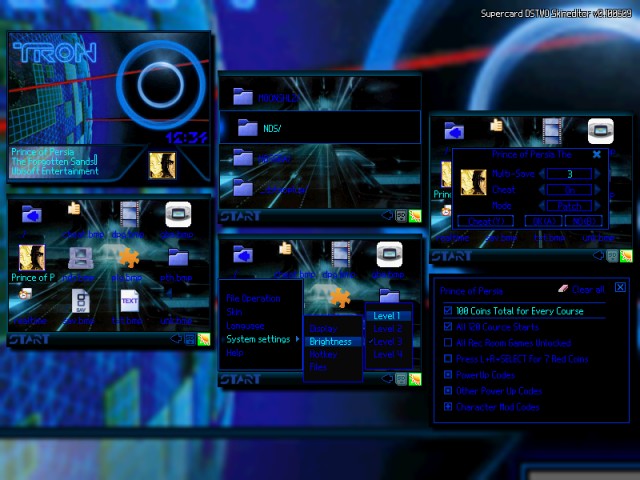
Now, Im pretty sure somebody had requested a Tron theme somewhere in this (or another) thread here, but i cant seem to find the post. Anyhow, it got me inspired to try to make one for it.

Its taken me quite a while to complete, as i couldnt just leave EOS all lonely, and had to make matching elements for the plug-in menu, loading screen, and the GBA emulator.

I made this mostly manually using GIMP, and only used the skin editor for the preview and checking text colors.
I think it turned out quite good, if i dont say so myself =)

and for credits sake, i borrowed the base 'folder' image from the iDSTWO theme, cuz its a nice clean looking icon =)

"I'm warning you. You're entering a big error, Flynn,
I'm going to have to put you on the game grid."


12179-Tron_preview.png

TronTheme

edit 07/13/10: updated dl with a new '2' for the clock and fixed rts screen
 
@ alidsl: thanks for the heads-up about that - I did actually know about it some time ago about that program & the website (you may've noticed the number of skins on first post had increased a little)

I never included the website mainly because it's in french.
As for the program I didn't think of adding it since I had already included links all the skins available on the first post but since you have mentioned it - I've now included it on the first post.
 
I've noticed that a lot of skins don't include the images for the firmware update screen (part of the plug-in) or the patch screen (companion folder to UI in _dstwo folder). I think the only skins I've seen to be this complete are those by VatoLoco, like "Don't Panic", "Green Neon", and "Tron". I commend VatoLoco for going the extra mile. In my opinion, it looks cheesy when I see "Pink" leftovers in the patch screen after using an awesome skin.

Now before this starts a flame war, I am not proficient enough with graphic apps to make my own backgrounds and icons. I'm just wondering how difficult it is to do a complete suite like "Don't Panic". I know that the user has to copy a lot of file to a lot of places (and hopefully be smart enough to backup the default files), but to me it's worth it to have a complete theme.

 
a regular skin, the skin for the DSgames area is 52 images to edit, this includes the icon folder and the unused progress bar stuff

the real time menu area is about 92 images in total, which is alot more imo

personally I dont skin the real time stuff since IMO the default looks great and incredibly well detailed as it is. I also dont skin the firmware update images because, how often is there one? there has been a grand total of one and no signs of there ever being another unless theres some sort of DS firmware update that comes out of nowhere.

I also thought vatolocos efforts were impressive in going the extra mile but yeah its a lot of extra work for little reward imo
 
Good points Viz. You've quantified and qualified, to me at least, why the real-time menu and update screens are considered going beyond the call of duty ;-)

But it brings up a good question. The firmware update images are in the same folder as the DSgames images. Since some themes include them and some don't, would it be a good practice for themes without custom firmware update images to include the default, Pink, images so that they overwrite whatever is there?

viz said:
a regular skin, the skin for the DSgames area is 52 images to edit, this includes the icon folder and the unused progress bar stuff

the real time menu area is about 92 images in total, which is alot more imo

personally I dont skin the real time stuff since IMO the default looks great and incredibly well detailed as it is. I also dont skin the firmware update images because, how often is there one? there has been a grand total of one and no signs of there ever being another unless theres some sort of DS firmware update that comes out of nowhere.

I also thought vatolocos efforts were impressive in going the extra mile but yeah its a lot of extra work for little reward imo
 
Rascal said:
I've noticed that a lot of skins don't include the images for the firmware update screen (part of the plug-in) or the patch screen (companion folder to UI in _dstwo folder). I think the only skins I've seen to be this complete are those by VatoLoco, like "Don't Panic", "Green Neon", and "Tron". I commend VatoLoco for going the extra mile. In my opinion, it looks cheesy when I see "Pink" leftovers in the patch screen after using an awesome skin.

Now before this starts a flame war, I am not proficient enough with graphic apps to make my own backgrounds and icons. I'm just wondering how difficult it is to do a complete suite like "Don't Panic". I know that the user has to copy a lot of file to a lot of places (and hopefully be smart enough to backup the default files), but to me it's worth it to have a complete theme.

Rascal, thanks a bunch for the complement on my efforts for completeness (dstwo has a lot of bits to skin...some even seem redundant to me), and also for giving my skins a spin on your DSTWO =)
Ive been building all sorts of themes [and icons] (R4, DSO, akaio, sakura, moonshell2, etc) for like @ 2 years now, and spend a lot of time (prolly way too much, actually =P) just flipping through all the GUIs,..so i pretty much added content to whatever i see while im cruising through my DS,
cuz i also dont like seeing leftovers/remnants from the default skin.

..but as Viz said, its a lot of effort for little reward, and i dont skin the bits that i know im not going to see when doing a general browse, like the firmware update stuff (prolly wont touch the iReader, either).

edit: thanks Kuschel =)
 
I don't really think that it is necessary to skin stand alone plugins / programs such as the iReader or the the GBA emulator at all. (or the soon coming SNES emulator)

I mean as it says, they're stand alone's, and are not directly connected to the EOS itself. The only reason why I skinned the GBA emu at all was just a matter of perfection. But now with the iReader out well... I won't skin that one either.

Imho it's enough to have the NDS_GAME menu as well as the plugin menu skinned. (There are plugins out that can#t be skinned at all unless you extract the .nds file.)

I'm still using moonshell 1.71 with the nice bluemoon skin or however it was called, it's perfect as it is. (and mostly fits to any blue skin) 2.10 just won't run, but well... doesn't matter too much.

I might skin the ingame menu or the upcoming SNES emulator though, should I be bored enugh. (Man how I hate the need for perfection -.-")
 
The Three-Legged, Nuclear Powered, Hell Raven has another treat for all you GBATempers.

I traveled all of time to construct this skin, and I hope you all like it. Tis not perfect, but it still looks awesome.

I might add a iReader skin into it at a future point.

Anyway, here's a Chrono Trigger skin. A tribute if you will of not only my favorite game of all time, but one of the greatest RPG's to even exist.

Plugin Screen
pluginChrono.png


Main EOS Screens
ctmainskinprevies.png


Realtime Menu
ReatimeChrono.png


GBA Skin
GBAChrono.png


Skin Download Link.
http://www.mediafire.com/?vg22rct7x8f5gll


Please ignore the black background on the Realtime menu Exit icon. It will end up being transparent when used on an actual DSTwo.
 

Site & Scene News

Popular threads in this forum