
[DSpico] Pico Launcher Enhanced, and PicoDex, a browser tool for the SD card

  • Thread starter Thread starter rasalopa
  • Start date Start date
  • Views Views 2,101
  • Replies Replies 16
  • Likes Likes 9

rasalopa

Member
Newcomer
Joined
Jul 20, 2026
Messages
16
Reaction score
26
Trophies
0
Age
38
XP
76
Country
Mexico
Hi everyone. I have been working on a few things for the DSpico for the last weeks and I
wanted to share them here.

Pico Launcher Enhanced is my fork of Pico Launcher. It keeps everything the
original does and adds:

- Favorites (press X) and completed marks (hold X), shown above the game's icon, with a gold star on the most launched game
- A menu from the app bar: recently played, favorites, statistics, game deletion and the favorites and completed filters
- Jump by first letter with L and R, random launch with SELECT + A, screenshots of both screens with a long press on START
- Launch count and last played date per game; play time is recorded but hidden until it is measured right
- An about sheet with the version, the commit and the repository the build came from
- Brightness control for the DS Lite backlight
- Per folder background music, and night variants for theme backgrounds

Latest release: v1.8.0, September 21, 2026.
Notes: https://github.com/rasalopa/pico-launcher-enhanced/releases/tag/enhanced-v1.8.0

Install is the same as the original, rename LAUNCHER.nds to _picoboot.nds in the root of your
SD card. Your existing gamedata.json carries over.

https://github.com/rasalopa/pico-launcher-enhanced

PicoDex is a browser tool for the SD card. No install and no backend, you open the
card and it manages covers, folder icons and file associations. It can also set your own cover art and icons from any image, shows every screenshot the launcher saved, and speaks English, Spanish and Russian. It also tells you which Pico Loader release your card is running, and warns you when the files in _pico did not
all come from the same one, which happens if you update by copying only the files you
think changed. And for a retail nds game it shows what the loader will do at boot, if an
anti piracy fix matches your exact rom revision, the save type and size, and any game
patch. Chromium only sorry (Chrome, Edge, Brave, Opera).

https://rasalopa.github.io/picodex/

The board LEDs, the DSpico board has two status leds that the firmware leaves
dark. I made a firmware fork that uses them, blue for SD card activity and red when the firmware stops on a fault, which otherwise freezes with no visible sign. Here it is reading, and then saving:
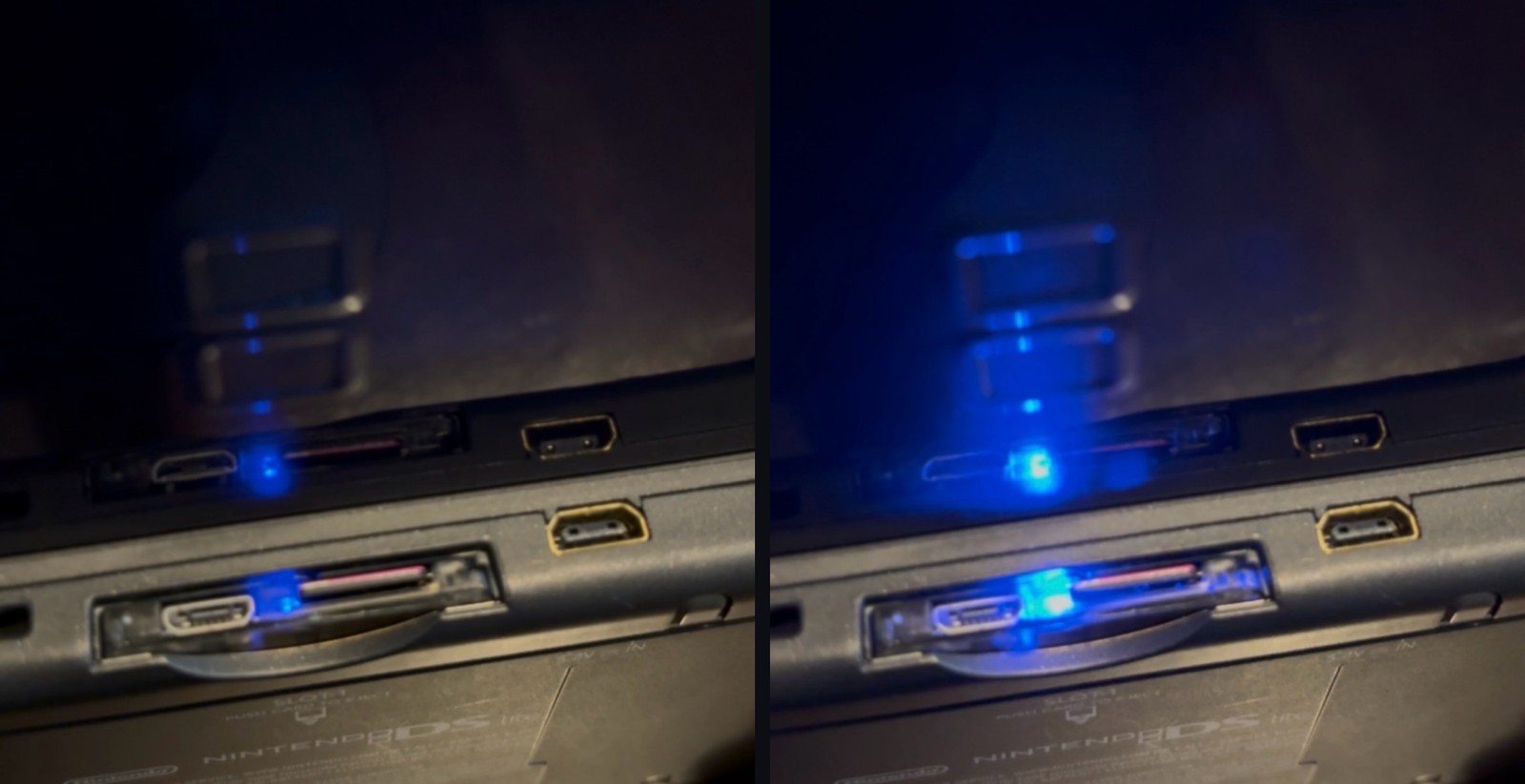
comparison.jpg


This one needs compiling the firmware yourself, so I also sent it upstream as a pull
request with the feature behind a build flag that is off by default. If it gets merged
it would be there for everyone without a custom build.

https://github.com/LNH-team/dspico-firmware/pull/26

Everything is open source. Thanks to the LNH team for the DSpico and for making all of
this possible in the first place. If something is broken or you want something, issues
are the fastest way to reach me.
 
Last edited by rasalopa,
v1.6.0 is out.

Main thing: jump by first letter. in a folder sorted by name, L and R jump to the previous / next initial and the counter shows the letter you land on, so a big library is quick to move through. (asked upstream in #75, kept it on the shoulders so the d-pad stays free for normal movement.)

Also in this one:

- the cheats menu wraps around, and a hint now points out that X turns all cheats off. the shortcut was always there but nothing on screen said so. (both from #83)
- picking a game from recents or favorites keeps the focus on the game, not the top bar.
- the banner shows a small "Enhanced" tag so tools reading the card can tell the fork apart.

notes and download: https://github.com/rasalopa/pico-launcher-enhanced/releases/tag/enhanced-v1.6.0

still based on upstream Pico Launcher, all credit for the base goes to the LNH team.
 
PicoDex v0.8.1 is out.

Main thing: it speaks Spanish now. Every view, every dialog, and the messages
about what is wrong with your card too, which used to come out in English even
with the rest of the app in Spanish. The switch is in the footer and it
remembers your choice, and on a first visit it follows your browser.

And this is the part I would like help with: you can add your own language, and
it does not have to be finished. Every string is optional and anything you
leave out reads in English, so thirty strings translated is a real
contribution and not a draft. A language that had to be complete before it
shipped would have blocked every release after it, which is backwards for a
project that wants translations.

Adding one is your own file plus two lines. the six steps are here:
https://github.com/rasalopa/picodex/blob/main/CONTRIBUTING.md#translations

If you want a language, there is an issue to claim one so two people do not translate the same one:
https://github.com/rasalopa/picodex/issues/3

Notes: https://github.com/rasalopa/picodex/releases/tag/v0.8.1
app: https://rasalopa.github.io/picodex/
 
Pico Launcher Enhanced v1.7.0 is out.

- hold START about half a second: saves both screens as BMP to /_pico/screenshots, two files sharing a number, confirmation message on the lower screen. launcher only, not in-game. sent upstream as PR #85.
- random game is now SELECT + A. on the DSi SELECT + volume is brightness, so a bare SELECT was launching games by accident (issue #11).
- statistics moved from START to a long press on the clock button, START had to be free.
- from upstream: folder covers, a cover.bmp inside the folder.
- fixes: focus when leaving an empty folder (#10), stale sprite at boot, cover tools on windows and linux (#12).

install is the same as always: rename LAUNCHER.nds to _picoboot.nds, your data carries over.

next on PicoDex: a gallery for these screenshots, and uploading your own cover and icon from the browser.

v170-reddit.png
 
Last edited by rasalopa,
Wonderful works. Will there be save state planned?

thanks! no save states planned, sorry. my two projects are the launcher and the browser tool, and save states would have to live in the loader, the part that runs the game, which is not mine. on a real ds the game owns the whole console once it starts, so freezing it and bringing it back is a very different beast from anything the launcher does. the closest thing i have played with is a soft reset back to the launcher, it works in some games but it is not ready for anyone yet.
 
This is a great project, awesome job!! :grog:
Would you consider adding save backup/restore from backup? So at least we can backup a save and then restore it if something goes wrong in the game. :gun:
 
This is a great project, awesome job!! :grog:
Would you consider adding save backup/restore from backup? So at least we can backup a save and then restore it if something goes wrong in the game. :gun:

thanks! good idea, and it fits picodex better than the launcher: the card is plugged into the computer anyway, so copying your saves out to a folder and putting one back if a game eats it is a natural thing to add there. it also covers the case where the card itself dies, which a backup on the same card would not. noted, no date yet.
 
  • Like
Reactions: captainmorgan
thanks! good idea, and it fits picodex better than the launcher: the card is plugged into the computer anyway, so copying your saves out to a folder and putting one back if a game eats it is a natural thing to add there. it also covers the case where the card itself dies, which a backup on the same card would not. noted, no date yet.
Thank you!!
 
thanks! no save states planned, sorry. my two projects are the launcher and the browser tool, and save states would have to live in the loader, the part that runs the game, which is not mine. on a real ds the game owns the whole console once it starts, so freezing it and bringing it back is a very different beast from anything the launcher does. the closest thing i have played with is a soft reset back to the launcher, it works in some games but it is not ready for anyone yet.
Got it. looks like there is a lot of hardware side to dabble to make it works. Gemini said almost impossible to make it but gemini was known for lying to me lol. I might dabble into it and see where it takes.

Btw, I tried your picoDex. The cover fetchers not able to get any cover for me. Below is the screenshot.

1789026067845.png


1789026017963.png
 
Got it. looks like there is a lot of hardware side to dabble to make it works. Gemini said almost impossible to make it but gemini was known for lying to me lol. I might dabble into it and see where it takes.

Btw, I tried your picoDex. The cover fetchers not able to get any cover for me. Below is the screenshot.

View attachment 590035

View attachment 590034

that one is on me, not on your card. i think i found it: all 36 of your games have no cover, which means your card has no _pico/covers/nds folder yet, and picodex was creating that folder from four downloads at the same time. the browser refuses that, and every write failed. mine never showed it because my card already had the folder.

fixed on my side, it goes out with the next version. if you want your covers today: make the folder _pico/covers/nds on the card by hand and run it again. that should be all it takes, and if it works it also tells me i got the cause right.

the 11 "without match" are a different thing and normal: those names have no entry in the box art catalog, mostly romhacks. the next version lets you set those by hand, cover and icon, from an image on your computer.
 
  • Like
Reactions: captainmorgan
that one is on me, not on your card. i think i found it: all 36 of your games have no cover, which means your card has no _pico/covers/nds folder yet, and picodex was creating that folder from four downloads at the same time. the browser refuses that, and every write failed. mine never showed it because my card already had the folder.

fixed on my side, it goes out with the next version. if you want your covers today: make the folder _pico/covers/nds on the card by hand and run it again. that should be all it takes, and if it works it also tells me i got the cause right.

the 11 "without match" are a different thing and normal: those names have no entry in the box art catalog, mostly romhacks. the next version lets you set those by hand, cover and icon, from an image on your computer.
Thanks it works. Great stuff. I havent tried the launcher and how it looks inside yet. Will report back. Thanks.
 
Thanks for the fantastic work!

Would it be possible, in a future build, to include an option to change the soft reset shortcut? On the original 3DS, the R + L + Start + Select + D-pad Down shortcut is impractical.
 
Thanks for the fantastic work!

Would it be possible, in a future build, to include an option to change the soft reset shortcut? On the original 3DS, the R + L + Start + Select + D-pad Down shortcut is impractical.

thanks!

quick question before i answer, because that combo doesn't come from the
launcher. what are you running when you press it, and on what setup?
twilight menu, gbarunner3, the loader itself?

going back to the launcher from in-game is something i've been working on
separately, it isn't released yet, and the combo i use there is a different
one from what you describe.
 
thanks!

quick question before i answer, because that combo doesn't come from the
launcher. what are you running when you press it, and on what setup?
twilight menu, gbarunner3, the loader itself?

going back to the launcher from in-game is something i've been working on
separately, it isn't released yet, and the combo i use there is a different
one from what you describe.
Sorry, I was using the launcher from Ansem's build (https://ansem-xae.github.io/dspico.html) earlier, and that combo belongs to that build.

That is indeed the combo, intended to going back to the launcher from DS/DSi in-game.
 
Last edited by InnerSelfX,
Sorry, I was using the launcher from Ansem's build (https://ansem-xae.github.io/dspico.html) earlier, and that combo belongs to that build.

That is indeed the combo, intended to going back to the launcher from DS/DSi in-game.

mystery solved then. that one is from ansem's package, so it is not something
i can change from here.

the one i use for going back to the launcher is a different combo and it is
not out yet, so nothing useful i can tell you today. but i hear you on the
3ds, that many buttons at once is awkward on that one.
 
  • Like
Reactions: InnerSelfX
Pico Launcher Enhanced v1.8.0 is out, and PicoDex caught up too.

launcher:
- the app bar went from six icons down to three: back, a menu and display settings. recents, favorites, statistics, delete and the two filters live in the menu now, each with its name, nothing behind a long press anymore. people kept saying the icons fought the themes, this is the answer.
- an about sheet from the menu's title row: pico launcher by the LNH team on one side, enhanced by me on the other, the repository and commit the build came from, and a cheat sheet of the controls that have no button. a build made from another repository names that repository there.
- the version shows on the boot screen and in statistics, so a bug report can say which build it is.
- statistics redrawn: four figures with icons, the three most launched games, the last one played. the game count left the top corner and lives here now (#18).
- the markers moved above the game's icon: a gold star for the most launched game, the heart and the check. custom themes can still place or hide them.
- the letter L/R lands on shows as a toast on the touch screen, and the theme selector opens on the theme you use (#17).
- play time is switched off, not removed: it counted the clock while a game was open, not play (#9). back when the counting is fixed.

notes and download: https://github.com/rasalopa/pico-launcher-enhanced/releases/tag/enhanced-v1.8.0
install is the same as always: rename LAUNCHER.nds to _picoboot.nds, your data carries over.

picodex, two releases since the last post here, v0.9.0 and v0.10.0:
- your own cover art and icons from any image on your computer, converted to what the launcher expects and checked the same way. icons on GBA too.
- the screenshot gallery promised above: every capture on thed, open full size, save as PNG or delete.
- covers for games with Chinese, Japanese, Korean or Cyrillic file names, read from the title inside the ROM.
- no more kiosk demos where the real cover should be.
- Russian, complete, from a community translation.

app: https://rasalopa.github.io/picodex/
notes: https://github.com/rasalopa/picodex/releases/tag/v0.10.0

still based on upstream Pico Launcher, all credit for the base goes to the LNH team.

v180-Menu.png
v180-Statistics.png
 

Site & Scene News