

Hacking DSTwo problem, help appreciated

kryptoknight

Member
Newcomer
Joined
Oct 29, 2011
Messages
6
Reaction score
2
Trophies
0
Age
42
XP
140
Country
United States
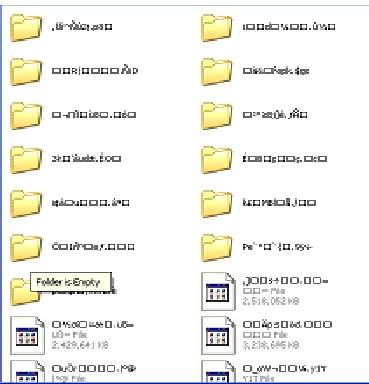
So I was playing my dslite using the dstwo supercard(which I've had for several months now and had no trouble from) and it freezes up during a game. When I powered down and back on it comes up "No Find System Files" and whe I took my card out and looked at it on my PC it now looks like this:
error.jpg


Does it need reformatted? Any idea what happened here?
 
I think the card file system got corrupted for some reason . A reformat should fix this problem . After that directly try using a program to restore your save files before doing anything else to the card .
 
I think the card file system got corrupted for some reason . A reformat should fix this problem . After that directly try using a program to restore your save files before doing anything else to the card .

Thank you so much, that's what I figured happened. Is there a particular program you would recommend? Is there any way to try to restore the files? The PC this was backed up on has since, unfortunately, met it's end when the HDD died. Otherwise I'd have to backup all those games all over again. (Which I can do, but it'll take a lot longer.)
 
I think the card file system got corrupted for some reason . A reformat should fix this problem . After that directly try using a program to restore your save files before doing anything else to the card .

Thank you so much, that's what I figured happened. Is there a particular program you would recommend? Is there any way to try to restore the files? The PC this was backed up on has since, unfortunately, met it's end when the HDD died. Otherwise I'd have to backup all those games all over again. (Which I can do, but it'll take a lot longer.)
Try Recuva. There are some others you can google out, but recuva should be able to do it, that is, if the files are still recoverable(they might not be).
 
I think the card file system got corrupted for some reason . A reformat should fix this problem . After that directly try using a program to restore your save files before doing anything else to the card .

Thank you so much, that's what I figured happened. Is there a particular program you would recommend? Is there any way to try to restore the files? The PC this was backed up on has since, unfortunately, met it's end when the HDD died. Otherwise I'd have to backup all those games all over again. (Which I can do, but it'll take a lot longer.)
Try Recuva. There are some others you can google out, but recuva should be able to do it, that is, if the files are still recoverable(they might not be).
Okay, done and done. However it looks like they are good and gone, all Recuva is finding (even on a deep scan) is a bunch of mp3s that must have been on the card before I bought it. (I got it used, but it had been formatted and was blank.) Guess I rebuilt things the long way... Oy. Thanks for the help though guys!
 
Not nessery recuva didn't find anything on my card too when I formated it . Try using easeus recovry wizard here . Its not a free software but it allows you to recover 1 gb of data for free which is more than enough for the saves .
 
Not nessery recuva didn't find anything on my card too when I formated it . Try using easeus recovry wizard here . Its not a free software but it allows you to recover 1 gb of data for free which is more than enough for the saves .
Okay, so with Easus, I still wasn't able to get more than a couple of saves but i was also able to restore some of the backup game files along with those saves so I won't at least be starting from nothing. Again, can't thank you guys enough for the help on this.
 
I once had a problem somewhat similar to this, random files were being created and renamed with strange characters. However, windows was able to fix it by itself and it was fine. Always make sure to eject your card before removing it from the usb port :teach:.
 

Site & Scene News

Popular threads in this forum
