Homebrew DSi Moonshell2 Skin

  • Thread starter Thread starter Keeley
  • Start date Start date
  • Views Views 8,952
  • Replies Replies 27

Keeley

Well-Known Member
Member
Joined
Nov 15, 2008
Messages
421
Reaction score
2
Trophies
1
Location
Saskachewan
Website
Visit site
XP
138
Country
Canada
Well after I took a break I decided to make another skin but this one wasn't too based on the DSi system menu, I hope you guys like it and help me make it better!


Nintendo DSi Skin V.1
Download link: Click here
A screenshot of my need improving skin.
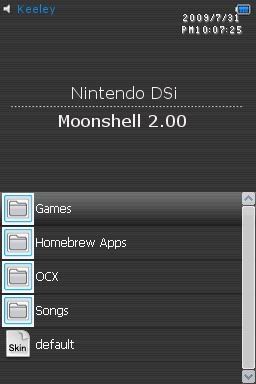
00_PSUB.jpg


Nintendo DSi Skin V.2
Download link: Click here
Screenshot of my newly made skin.
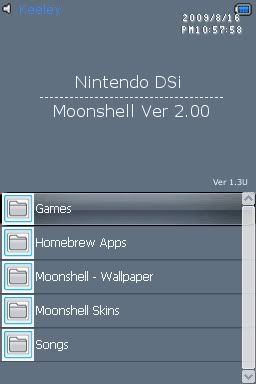
NintendoDSi2.jpg


Credits: Thanks rockstar99 for letting me use your icons!
NOTE: For BOTH files there is either a "template" or "put in root" picture, you MUST use that to get a better backround otherwise it will look very funny/ugly.

I got a new skin, more on a Windows theme than DSi theme this though....

Windows Theme Skin
Download link: Click here!
Screenshot.
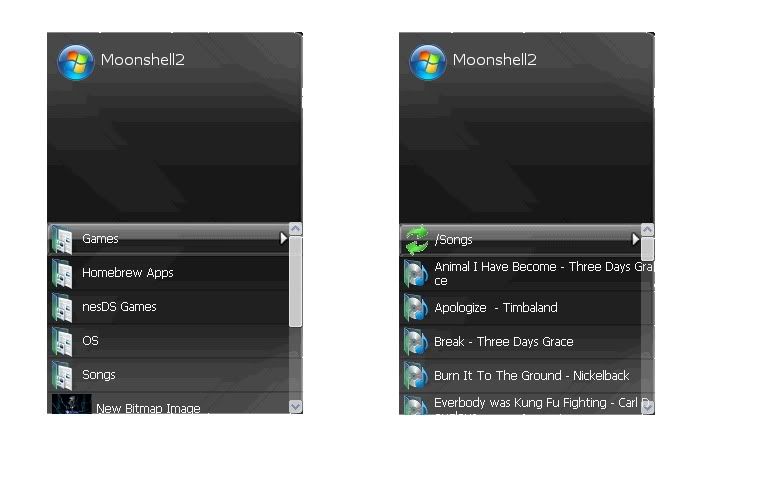
NewBitmapImage.jpg


Same as the other skins use Template.bmp as the background or it will look bad!

Well I finally got sometime to work on my skin and now I present to you....

Windows Theme Skin V2
Download link: Click here!
The Backround will look like this.


Oh and also I made this awhile back in August but never got around to release it, its not much different from the other DSi Themes but its pink so...

Nintendo DSi Skin - Pink
Download link: Click here!
Screenshot of it hotness/pinkness

I will get the pics later...
 
HAWT

Nice for a first skin!

Some notes:

The clock looks kinda ugly at the moment, the two colors clash.
The scrollbar simply doesn't fit. It's really not that hard to change. It took a bit of thinking for me, but I managed to get it to work.

Hmm... The top screen shouldn't say Moonshell2 Firmware, but just "Moonshell 2.00". Feels more professional.
 
@Briankealing

Thanks for the constructive criticism! Hmm so i need to change the clocks colour, change the scrollbar and put "Moonshell 2.00", I can do the "Moonshell 2.00" easily but what do you think the scrollbar should look like and what colour the clock should be? Also I don't know if you've noticed or not depends on your DS but the "lines" on the top are messed up xD so I'm gonna redo again this time with "Moonshell 2.00" and see how it turns out!

@benjaminlibl

Do you have any suggestions to make it look better? Any help is appreciated!
 
Great skin, if you can, lower the clock under the battery, turn the scroll bar into a sort of clearish white? and maybe match the scroll bar with the clock. If you turned this into a sakura theme, I would be grateful.
 
@Petting Zoo

Can you actually lower the clock? Gonna check the .ini but if there is I need the coordinates xD, I'll maybe make a Sakura skin if you tell me how xD Clearish white eh okay I'll try that xD
 
I think u should delete the frame of the clock and make the digits white to make it look nicer... i can give u my scrollbar but i think it doesn't suit on ur background.. nice skin btw..
smile.gif
 
Keeley said:
@Petting Zoo

Can you actually lower the clock? Gonna check the .ini but if there is I need the coordinates xD, I'll maybe make a Sakura skin if you tell me how xD Clearish white eh okay I'll try that xD
I don't know about the clock, though janouis' idea about the clock sounds good, maybe in a whitish colour? Also I'm pretty sure Sakura skins should be easy seeing as Moonshell 2 was based off Sakura
smile.gif
. Anyway this thread has tools to make Sakura themes, a tester and some more resources.
 
@PettingZoo,

I think that you can't lower the clock, put I'll try Janouis's idea right after I shower, been working all day
frown.gif
and I'll make a Sakura skin tomorrow
yaynds.gif
but for some reason when I complile the Moonshell2.skn it completly ignores my "FL_BG_Bottom.bmp" "FL_BG_Top.bmp" and "FL_BG_TopMsg.bmp" I'm gonna try this on another computer.

Thanks for all your suggestions guys!

EDIT: Found out why it "ignored" the files I made a "template" to test something out and it turns out that when you compile the skin it actually "donwgrades" the quality and I actually gave you guys the "bad" file
blush.gif
I'll upload a better one with all your suggestions soon!
 
Background is kinda plain. Try adding some additional images or a different font for the logo. Another tip, take off your name and add it when scrolling up to the topmsg file only. It will work, promise. Take off the battery icon since it's interfering with the clock a bit. Add a new skin icon also. Just resize the skin icon from normal and add it to any of the icons.

Other than that, good job.
 
the windows skin is alright. the scroll bar could be a little bit thinner, since its overlapping the other files.
 
Dude we have the same taste of music...Three Days Grace is Awesome! my favorite rock band aside from Breaking Benjamin!
yaynds.gif
the skin is good but i think u should add some polish to it...
 

Site & Scene News

Popular threads in this forum