

Hacking Dios Mios Lite

  • Thread starter Thread starter G0dLiKe
  • Start date Start date
  • Views Views 937,246
  • Replies Replies 4,287
  • Likes Likes 18
Status
Not open for further replies.
2 Questions with version 1.3 :
1. For those of us with older Wii's that can read DVD-R, does "real disk loading" mean ONLY retail disks or does that include burned backups, too?
2. With all Nintendo code gone, is the compatibility for retail disks now the same as running them off the SD?
I would like to know that aswell...
Ok, did a couple of tests over the weekend and I was rather surprised that "real disk loading" doesn't actually mean it can load them from the disk channel ! It just gets stuck at a nearly blank GCLoader spIash screen guess it means it only works from a loader that has been set up to use it. I've tried running it from an old loader that uses the old gamecube disk loading methods, instead of loading the game from the drive, it loads the last game I had opened off of the SD card.

I'm gonna update my WiiFlow-mod to a version that officially supports 1.3+ disk loading and report back but just thought I'd throw that out there first.

Edit : As a feature request, I would say it would be really nice if it could load real disks from the disk channel as well. The added splash screen while loading from the disk channel is pretty cool IMO . . . but it would be nice if it actually LOADED.

 
No reason not to upgrade. It's just installing a wad file. And if something breaks, install the old version again or something

Wait I thought if I upgrade I can't go back to the old one, or at least I'll lose the ability to run original disks, if that's true I don't see why I don't upgrade if only for Shadow The Hedgehog!

Edit: To make sure, I don't have to convert disks again as the new DML runs the old disk format, right?


Hey , your from kuwait :P ? im from there too! just its rare to find people from my country here LOL

Anyway , im running my gamecube backups fine on the old rev58 using CFG

But , whats the point of upgrading to 1.3 ?
 
But , whats the point of upgrading to 1.3 ?
1. Cool splash screen.
2. Much better NoDisk support (practically only need a disk for audio streaming games to work and some other small exceptions)
3. All regions of the troublesome Pokemon games are supposed to work, not just the NTSC ones.
4. I'm sure there's others but they don't come to mind off hand.
 
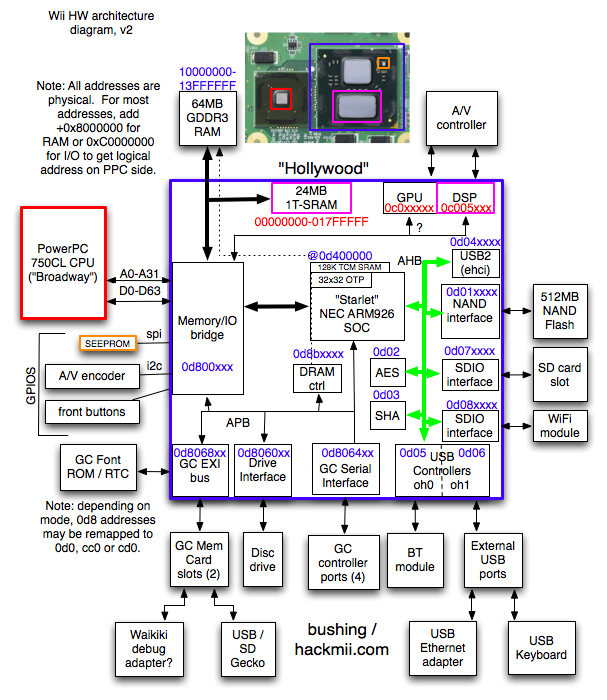
For anyone who keeps wondering why DML can't use your classic controller, notice here that the Bluetooth ("BT module") is actually connected to USB internally.
(I found this posted to another thread)
Here's an overview of the Wii hardware architecture:

wii_hw_diagram_v2.png
This diagram does make me wonder, though, if the WiFi couldn't be used to emulate the GC broadband adapter (one of many things Nintendo should have done in the first place.)
 
Hey , your from kuwait :P ? im from there too! just its rare to find people from my country here LOL

Yeah I was born and raised here in Kuwait but I'm actually an immigrate, I been coming to gbatemp a lot :)

2. Much better NoDisk support (practically only need a disk for audio streaming games to work and some other small exceptions)

Excuse me for asking this but does this mean audio streaming games like Crazy Taxi work now with audio or don't work anymore unless we use a disk? :O
 
Excuse me for asking this but does this mean audio streaming games like Crazy Taxi work now with audio or don't work anymore unless we use a disk? :O
Originally DML needed a disk (almost any disk at all) in the Wii in order for it to be able to play games off of the SD.
Now they've gotten to the point where, when you play games off of the SD card, ALMOST all of them work with the disk drive empty.
Audio streaming games can still be played off of the SD card but I think they still need there to be some disk in the drive. (The audio still doesn't work right, though.)
There are also a couple other games that just need there to be a disk in the drive when you START it but then you can take it back out and it will keep running just fine. (I've heard they'll just get temporarily stuck on the GCLoader screen but you can pop a disk in and they'll finish loading up.)

Note : I'm not sure if this applies anymore but I know that when converting them with DiscEX, audio streaming files used to needed to use some option on it to "32k align" them or they couldn't be compressed or something. I'm not sure how or if they'd work with the new GCreEx format.

Anyone who knows care to explain how the conversion process is supposed to work now?
 
I just installed DML 1.3 and OH MY GOD, this is a totally different experience, loading times are much faster now, also you can have a disk without needing to install a different version with no disk!

Shadow The Hedgehog and Rayman 3 work fine now with no disk, streaming audio games like Crazy Taxi and Crash The Wrath Of Cortex still work with no audio, disk or not, hopefully they'll get fixed eventually, I'm still using the old DiscEX format btw!

One game still doesn't work without a disk is Sonic Gems Collection "particularly the first 3 games" I hope this get's addressed and fixed later on, or maybe an option to list the .dol files at start to choose the game we wanna play, this would fix it I assume!

I haven't tested if original GC disks work or not, I'm too lazy to do so but I sure hope they still work even at least for Resident Evil Code Veronica!

my other SD didn't run any GC games sadly, always hangs in the DML screen, but it's probably an issue with the SD, I formatted it and now I'm transferring the data back, I'll test it and confirm in a minute!

Anyway I recommend everyone to upgrade to DML v1.3!
 
take the leap, its nothing major, you can always roll back. 1.3 is working great for most people, myself included.

my only issue is with tony hawk 3 and 4. can anyone else try it and see if it works? i know it worked on a really old rev, im talking like rev 12 or so, but now it just freezes after accessing the memory card. i deleted my old THPS saves thinking maybe they got corrupted, but it locks with no memory card in.

tony hawk underground 1 and 2 work fine. just 3 and 4 freeze.
 
ATTENTION DML LOVERS:

Some of you might be familiar with my previous posts about in-game loading times with a couple of my SD cards. I have been consistently using F-Zero GX as my benchmark tool and measuring the time it takes to go from the cup selection screen to the track selection screen in Practice mode.

I had previously reported that, with the real disc, this takes approximately 2 seconds. My 32GB Lexar card takes approximately 2.5 seconds when formatted to 64KB clusters and much more than that if formatted to 32KB.

I am very happy to report that the new GCReEx extracted file format is BLAZING FAST!!!
It now takes about 1 second for this event to occur with my SD card, which makes it faster than loading from the retail disc.

I urge everyone to try this new format and compare their loading speeds to the ISO format from DiscEx.

The only drawback of the new format is that the games will take a little more space in your SD card (in the order of several megabytes), but it is pretty darn well worth it for the speed you get.

I will now proceed to convert all my games to the new format.

Kudos to Crediar for this brilliance.


PS: Now, if only I could get rid of that new loading screen :evil:
 
i feel ignored :/, i just updated to 1.3 (Was r58) and now it just shows a screen which says on the top "GCloader 0.3 (Apr 26 2012)

Thats it , it freezes on that , tried 2 games (shadow the hedgehog and sa2b) which were working on r58 but wont work on 1.3 :/
 
Whenever i load something , it freezes on GCloader Screen
Was working on rev58 :/
what now
What game are you loading?
Which backup loader are you using?
Do you have a disk in the drive?
If you can't figure out what the problem is you could always just go back and re install the old DML59mod which is the last of the old DML versions but it would be nice to have the new version working.
I had previously reported that, with the real disc, this takes approximately 2 seconds. My 32GB Lexar card takes approximately 2.5 seconds when formatted to 64KB clusters and much more than that if formatted to 32KB.

I am very happy to report that the new GCReEx extracted file format is BLAZING FAST!!!
The only drawback of the new format is that the games will take a little more space in your SD card (in the order of several megabytes), but it is pretty darn well worth it for the speed you get.

PS: Now, if only I could get rid of that new loading screen :evil:
This makes me kinda wonder, since with the GCReEx format it no longer has to potentially fish the information out of the disk image in mid cluster, how much difference does it being formatted in 64k clusters still make. As far as the space issue, a smaller cluster size would make storing the files more efficient.

As for the loading screen, maybe it could be made optional or have a custom splash screen. I actually kinda like the new screen.
 
I tried and tried but for some reason none of the games in my other SD run, it freezes on the GCLoader screen and even before that it takes a bit longer to get this screen to show up, it's a Sony 8GB SD formatted as FAT32 64 cluster, however my other SanDisk 32GB SD runs just fine with the new DML, can anyone explain to me what am I doing wrong? :O
 
This makes me kinda wonder, since with the GCReEx format it no longer has to potentially fish the information out of the disk image in mid cluster, how much difference does it being formatted in 64k clusters still make. As far as the space issue, a smaller cluster size would make storing the files more efficient.

As for the loading screen, maybe it could be made optional or have a customer splash screen. I actually kinda like the new screen.
I would like to know the answer as well. Perhaps I'll do a quick test before copying the bulk of the games.
 
Status
Not open for further replies.

Site & Scene News

Popular threads in this forum


