Hacking Dios Mios Lite

  • Thread starter Thread starter G0dLiKe
  • Start date Start date
  • Views Views 937,259
  • Replies Replies 4,287
  • Likes Likes 18
Status
Not open for further replies.
Maybe use this?
http://www.ridgecrop...m?guiformat.htm

Click on the picture.
Be careful so you don´t format wrong drive etc:)

PS: Haven´t tried it, can´t guarantee anything, but it should work.

Yeah, that is what you need to use to format FAT32 on Windows 7. Microsoft stop you doing it because they want you to use exFAT, but once formatted then it will work fine.

 
Can anybody explain this?
170c2abe46953cbdc9ec15591650942b757acb9880ebc03295a30180c51b201e6g.jpg
 
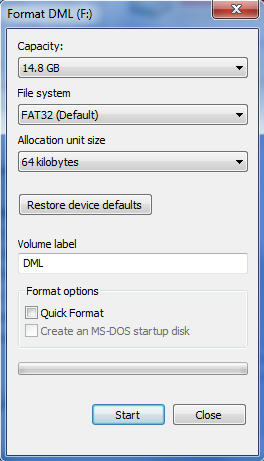
Alright, sorry for being really newbie to this. When i try to format my SD card, the allocation size(I think that's the other term for cluster size), it gives me 16kb-8192kb. In that list, 64kb is not found. Is there a program where I can format it to 64kb? Or do i just deal with 32kb.

-Sony 4gb class 4. (Bought off cheap site).
What are you using to format it? Windows should let you select FAT32 and 64k.
It didn't had that option on my SD cards either (integral 4GB class 4 and Sandisk 8GB class 4). I tried windows 7 and the latest easeus partition manager. But I just went with regular FAT, which had the option and works just as well.
Alright, thanks man. Gonna try out fat.
 
When you select FAT you will be losing significant amount of space from the SD card.
My SD is 2GB & I have 1.5GB data than can be copied easily to FAT32 formatted card but not to FAT!
donno why but it seems that I lost ~450MB free space in FAT format.
Hope someone could explain this.
 
The loss of space when formatting always happens due to the way the file system allocated cluster sizes. A 250GB hard drive for example, will be reported at 232GB if formatted with NTFS using default allocation size of clusters.

A cluster (allocation unit) size is something which represents the smallest amount of disk space that can be allocated to hold a file. The smaller the cluster size, the more efficiently your disk stores information.
In this case (with games) we don’t need efficiency but speed.
So the ideal SD card that should be recommended to everyone in the beginning of this topic should be between 16gb-32gb. This way you can format FAT32 with 64K cluster size.

Of course this would not be true is someone can test that other cluster sizes work more efficiently.
For me the 64K cluster size made a huge difference with Legend of Zelda Twilight Princes.
 
Just use the max cluster size available (FAT or FAT32)
I have a microSD 2GB sandisk (non SDHC with an SD adapter) formatted to FAT - 64kb and DML runs with minor lags in some games.
With my microSD 16GB SDHC class2 sandisk with SD adapter formatted to FAT32 - 64kb I did noticed the same performance as the 2Gb sandisk.
Someone said they need to optimize SD code in DML so for now don't expect high reading speeds even with SDHC class10 cards.
 
I'm intended to do a video-compatibility list of DML. Here are the first test

I've used chinese 8GB class 4 MSDHC (Sandisc 10 incoming) formated on FAT32 64KB. Postloader3 used. DML r21. Black Wii (the lastest one except the non-Gamecube-compatibility one). NTSCU games

Chinese clonic controller used (Gamecube and Classic) and 8MB clonic MC used

Animal Crossing

Part 1/2: http://youtu.be/h5DMrDVLLN4
Part 2/2: http://youtu.be/oDaUVjWFq5Y

Auto Modellista

Part 1/1: http://youtu.be/VtUN0EUQ6QI

Battallion Wars

Part 1/2: http://youtu.be/S_RBY9nDB2U
Part 2/2: http://youtu.be/ZhEK8nNzOJU

I know there's already an offial list but there are some errors (some games listed as non-working are working perfect for me) and i like video-test ^_^, so here is mine
 
The loss of space when formatting always happens due to the way the file system allocated cluster sizes. A 250GB hard drive for example, will be reported at 232GB if formatted with NTFS using default allocation size of clusters.
[...]

250GB HDD * (1000/1024)^3 = 232GB data

You only loose space due to manufactures ripping you off and having lots of files. You never get 2 files in the same sector(or is it cluster?), so if your sector size is 32KB, and you got 10 files with 1 KB each, they are taking 320 KB space.
 
Well, I've just recieved my Class 10 4gb Sandisk SDHC card in the mail and after following the recent advice in this thread to do 64bit allocation, my compatibility has greatly improved. Still some minor issues with stuttering and slow down but they're far less annoying than with the 2gb card I was using before this. Probably gonna recheck and post all of my compatibility sometime over the weekend, thanks again so much to everyone who's been making this possible. You guys are the best.
 
Well, I've just recieved my Class 10 4gb Sandisk SDHC card in the mail and after following the recent advice in this thread to do 64bit allocation, my compatibility has greatly improved. Still some minor issues with stuttering and slow down but they're far less annoying than with the 2gb card I was using before this. Probably gonna recheck and post all of my compatibility sometime over the weekend, thanks again so much to everyone who's been making this possible. You guys are the best.
Wow, that's like 3 games, lol.
 
Well, I've just recieved my Class 10 4gb Sandisk SDHC card in the mail and after following the recent advice in this thread to do 64bit allocation, my compatibility has greatly improved. Still some minor issues with stuttering and slow down but they're far less annoying than with the 2gb card I was using before this. Probably gonna recheck and post all of my compatibility sometime over the weekend, thanks again so much to everyone who's been making this possible. You guys are the best.
Wow, that's like 3 games, lol.
lol, better than 1 1/2 games.
 
this is as far DML goes for the moment, surely is something in the making, as usual ;)
 
Status
Not open for further replies.

Site & Scene News

Popular threads in this forum