
Homebrew Question devkitPro/Msys2 - Compilation problem

  • Thread starter Thread starter Barrytoo
  • Start date Start date
  • Views Views 8,088
  • Replies Replies 15

Barrytoo

Member
Newcomer
Joined
Apr 24, 2018
Messages
21
Reaction score
3
Trophies
0
Age
37
XP
326
Country
Jordan
Greetings,

After almost a week of struggling while trying to troubleshoot devkitPro, I have reached a dead-end. Its support is basically non-existent.

Basically, I have installed it with all its packages that I found on its GitHub, but when I try to run the "make" command in Msys2 for any project, I get the error in the screenshot.
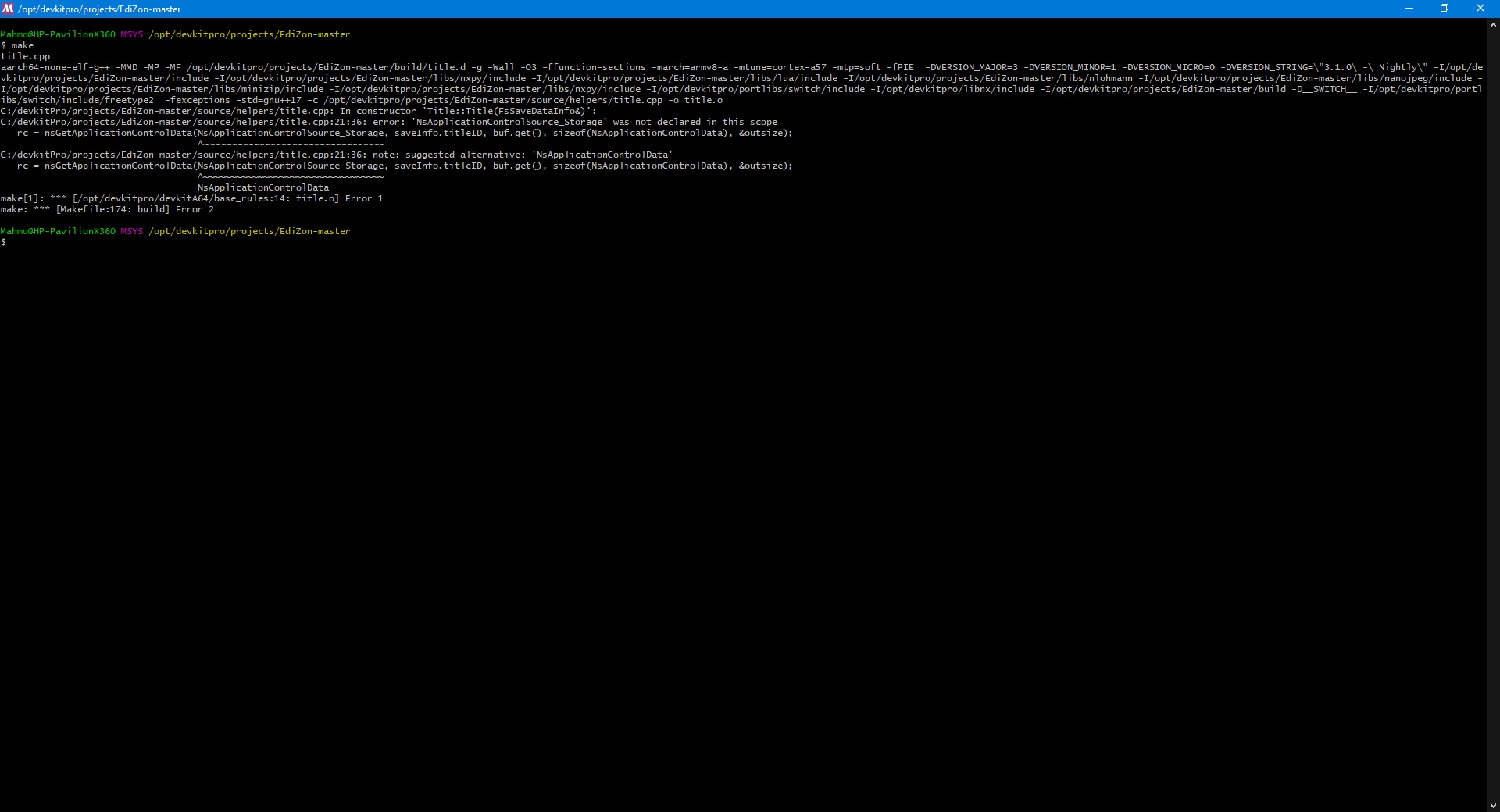
3.jpg


I've heard something about updated libnx having something to do with this, but I couldn't make any sense out of it.

Your help, is my salvation.

Thanks in advance.

 
Have you tried WSL? It works perfectly for me on Ubuntu.

Upon trying, I found that the syntax is a bit different so I couldn't translate "pacman -S switch-dev" to something it understands. The web says it's "sudo (dkp-)pacman -S switch-dev" but I get this error: "-bash: syntax error near unexpected token `dkp-' "

Can you help me with the syntax or whatever this issue is, please?
 
Are you running exactly what it says, being: 'sudo (dkp-)pacman -S switch-dev'?
If so, the wiki page means, you need to use either 'sudo pacman -S switch-dev' or 'sudo dkp-pacman -S switch-dev'
 
  • Like
Reactions: iwantsee
Are you running exactly what it says, being: 'sudo (dkp-)pacman -S switch-dev'?
If so, the wiki page means, you need to use either 'sudo pacman -S switch-dev' or 'sudo dkp-pacman -S switch-dev'

I tried all these cases, none worked.

There are suggestions for using other tools like Arch and WSL. The syntax is slightly different, so I'd appreciate a translation for the mentioned commands from anyone familiar.
 
So you was trying to run dkp-pacman without installing it...

Install Ubuntu from scratch, update it, then
Code:
wget https://github.com/devkitPro/pacman/releases/download/devkitpro-pacman-1.0.1/devkitpro-pacman.deb
sudo dpkg -i devkitpro-pacman.deb
sudo dkp-pacman -S Switch-dev
Accept everything as default and that's it.
 
Well, that's great! Everything works well up to this point! Many thanks

Now, I'm just trying to compile a project (EdiZon) into an nro file using the "make" command, but I get this error:

Makefile:10: c:/devkitpro/libnx/switch_rules: No such file or directory
make: *** No rule to make target 'c:/devkitpro/libnx/switch_rules'. Stop.

More details can be found in the attached screenshot.

I appreciate your help.
 

Attachments

  • Untitled.jpg
    Untitled.jpg
    488.6 KB · Views: 337
Why did you used export? Eh...
Now you need to scrap this to trash and start from scratch.
After installing Switch-dev everything is ready to go. And by using export you broke it.
 
That's not quite true... He could just re-export the new path

Why did you used export? Eh...
Now you need to scrap this to trash and start from scratch.
After installing Switch-dev everything is ready to go. And by using export you broke it.

Just started from scratch and tried again for the third time, it keeps asking me to export even after installing as appears in the screenshot, throwing this error every time:
"Makefile:6: *** "Please set DEVKITPRO in your environment. export DEVKITPRO=<path to>/devkitpro". Stop."

It's like the installation didn't add anything.

For the love of God, isn't there a guide for this kind of development for beginners? Jesus Christ!

Here's everything I've done in a nutshell:

1- Installed Windows 10 x64 v1909 and enabled WSL
2- Installed Ubuntu from the Store and ran the following commands:
cd mnt/c/devkitPro/projects/EdiZon-master
wget https://github.com/devkitPro/pacman/releases/download/devkitpro-pacman-1.0.1/devkitpro-pacman.deb
sudo dpkg -i devkitpro-pacman.deb
sudo dkp-pacman -S switch-dev
export DEVKITPRO=c/devkitpro
sudo apt install make
make

3- Got the following error:
Makefile:10: C/devkitpro/libnx/switch_rules: No such file or directory
make: *** No rule to make target 'C/devkitpro/libnx/switch_rules'. Stop.

My notes: The "switch_rules" folder is missing.

The question is: If it truly the solution, how to add it? Otherwise, what would the magic spell be?

I know that's a bulky reading, so my apologies and appreciation in advance.
 
Last edited by Barrytoo,
Just started from scratch and tried again for the third time, it keeps asking me to export even after installing as appears in the screenshot, throwing this error every time:
"Makefile:6: *** "Please set DEVKITPRO in your environment. export DEVKITPRO=<path to>/devkitpro". Stop."

It's like the installation didn't add anything.

For the love of God, isn't there a guide for this kind of development for beginners? Jesus Christ!

Here's everything I've done in a nutshell:

1- Installed Windows 10 x64 v1909 and enabled WSL
2- Installed Ubuntu from the Store and ran the following commands:
cd mnt/c/devkitPro/projects/EdiZon-master
wget https://github.com/devkitPro/pacman/releases/download/devkitpro-pacman-1.0.1/devkitpro-pacman.deb
sudo dpkg -i devkitpro-pacman.deb
sudo dkp-pacman -S switch-dev
export DEVKITPRO=c/devkitpro
sudo apt install make
make

3- Got the following error:
Makefile:10: C/devkitpro/libnx/switch_rules: No such file or directory
make: *** No rule to make target 'C/devkitpro/libnx/switch_rules'. Stop.

My notes: The "switch_rules" folder is missing.

The question is: If it truly the solution, how to add it? Otherwise, what would the magic spell be?

I know that's a bulky reading, so my apologies and appreciation in advance.

I don't think the normal path would be c/devkitpro, mine is set to
Code:
/opt/devkitpro
 
Just started from scratch and tried again for the third time, it keeps asking me to export even after installing as appears in the screenshot, throwing this error every time:
"Makefile:6: *** "Please set DEVKITPRO in your environment. export DEVKITPRO=<path to>/devkitpro". Stop."

It's like the installation didn't add anything.

For the love of God, isn't there a guide for this kind of development for beginners? Jesus Christ!

Here's everything I've done in a nutshell:

1- Installed Windows 10 x64 v1909 and enabled WSL
2- Installed Ubuntu from the Store and ran the following commands:
cd mnt/c/devkitPro/projects/EdiZon-master
wget https://github.com/devkitPro/pacman/releases/download/devkitpro-pacman-1.0.1/devkitpro-pacman.deb
sudo dpkg -i devkitpro-pacman.deb
sudo dkp-pacman -S switch-dev
export DEVKITPRO=c/devkitpro
sudo apt install make
make

3- Got the following error:
Makefile:10: C/devkitpro/libnx/switch_rules: No such file or directory
make: *** No rule to make target 'C/devkitpro/libnx/switch_rules'. Stop.

My notes: The "switch_rules" folder is missing.

The question is: If it truly the solution, how to add it? Otherwise, what would the magic spell be?

I know that's a bulky reading, so my apologies and appreciation in advance.

You're using Linux and you're trying to use windows paths. When you export DEVKITPRO=c/devkitpro - you need to change that to where you have DEVKITPRO installed on Linux - usually it's in your OPT folder.
 

Site & Scene News

Popular threads in this forum