



Okay i never make new posts because there is usually someone else already asked but this time I cant find the answer. Please forgive me.
I'm running a 11.2.035U o3dsxl with CFW Luma3DS. I've been trying to install themes since yesterday but it all fails. I'm using the CHMM2 v2.8 from the website. I have tried both the .cia and the app from homebrew, but everytime i load the themes and I go back to my menu, I have the default white theme.
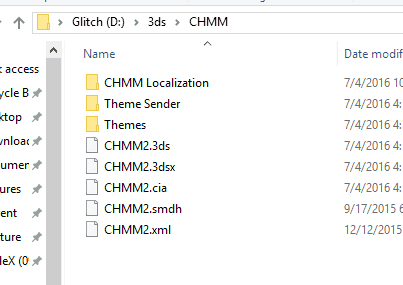
I have installed the folder in many different ways to make it work but it doesnt. Currently i have the folder like this.
When I try to run the app its called "BLEND3R" it will load my themes. I press "A" it will says "installing theme" then I press "Start">"Exit CHMM2." It will turn of my 3DS. I power on and No theme.
When I try to run the .cia named CHMM it will say "No theme recognized" I press "B" to scan for themes. I will show the, I press "A" it says "Installing theme", then "START">"Exit". It goes to the the power off screen, I press "HOME" and same default theme.
Any ideas? Sorry, again I tried to make this as clear as I could.
I'm running a 11.2.035U o3dsxl with CFW Luma3DS. I've been trying to install themes since yesterday but it all fails. I'm using the CHMM2 v2.8 from the website. I have tried both the .cia and the app from homebrew, but everytime i load the themes and I go back to my menu, I have the default white theme.
I have installed the folder in many different ways to make it work but it doesnt. Currently i have the folder like this.
When I try to run the app its called "BLEND3R" it will load my themes. I press "A" it will says "installing theme" then I press "Start">"Exit CHMM2." It will turn of my 3DS. I power on and No theme.
When I try to run the .cia named CHMM it will say "No theme recognized" I press "B" to scan for themes. I will show the, I press "A" it says "Installing theme", then "START">"Exit". It goes to the the power off screen, I press "HOME" and same default theme.
Any ideas? Sorry, again I tried to make this as clear as I could.


